Finding the right wireless mouse for a laptop depends on your needs: portability, ergonomics, or precision for work or gaming. This guide highlights five well-rounded options, each suited for different buyers—from students and remote workers to gamers and travel users. Below you’ll find concise comparisons, why each mouse was chosen, and practical buying tips to help you pick with confidence. A quick summary table of the featured products is provided to aid quick scanning.
| Product | Best For | Key Benefit |
|---|---|---|
| Logitech M185 (Swift Grey) | Ambidextrous daily use | Compact, long battery life |
| TECKNET Wireless Mouse (Purple) | Travelers needing adjustable DPI | 5 DPI levels, ergonomic grip |
| Logitech M240 Silent (Graphite) | Quiet work environments | Silent clicks, long battery life |
| Logitech M185 (Blue) Ambidextrous | Value-conscious multitaskers | Same core features as M185 with grip variant |
| Afaartcci Rechargeable Wireless Mouse | Two-device setup | Rechargeable, Bluetooth & 2.4G |
Logitech M185 Compact Ambidextrous Wireless Mouse — Swift Grey

The Logitech M185 is a compact, ambidextrous wireless mouse designed for everyday laptop use. It features a comfortable contoured shape suitable for both right- and left-handed users, a reliable 2.4 GHz connection, and a long battery life thanks to smart sleep mode. It ships with an AA battery and is broadly compatible with Windows PCs, Macs, and laptops.
Who it’s best for: Students and professionals who want a simple, reliable mouse that travels well and works across platforms. Why chosen: Its balanced size and ambidextrous design deliver comfort for long typing or reading sessions without a bulky footprint. Caution: Battery life depends on usage; heavy scrolling or high-usage scenarios may shorten life versus the stated period.
TECKNET Wireless Mouse — 2600 DPI, Purple

The TECKNET model offers an ergonomic design and a high degree of portability. It includes 5-level adjustable DPI up to 2600, letting you dial precision for design work, spreadsheets, or general navigation. It is compact and travel-friendly, though it works with USB-A devices, which may require adapters on newer MacBooks or slim laptops without traditional USB-A ports.
Who it’s best for: Creative professionals or students who need precise cursor control and portable form. Why chosen: The selectable DPI and contoured grip support longer work sessions. Caution: USB-A compatibility means potential adapter needs on newer machines at times.
Logitech M240 Compact Silent Bluetooth Wireless Mouse — Graphite

The M240 is a Bluetooth wireless mouse that emphasizes quiet operation. It connects directly without a dongle, reducing clutter. Battery life is extended thanks to energy-saving features, and the silence makes it ideal for open-plan offices or late-night work. It pairs with Windows, macOS, and other Bluetooth-enabled devices.
Who it’s best for: Quiet workers and roommates seeking minimal disruption. Why chosen: Bluetooth pairing and long battery life simplify setup on ultrabooks and tablets. Caution: Silent clicks are a feature; some users may miss tactile feedback in certain tasks.
Logitech M185 Compact Ambidextrous With Rubber Grips — Blue
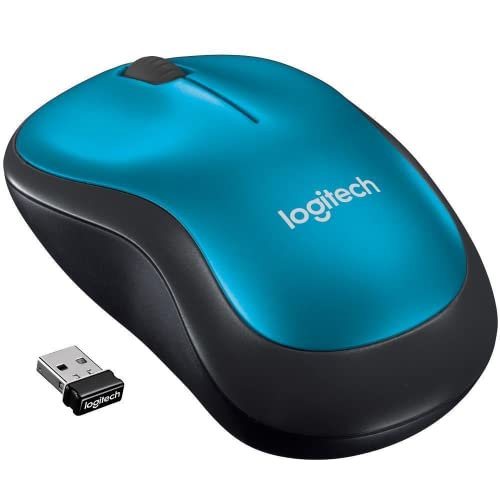
This variation of the M185 keeps the compact ambidextrous form and improves grip with rubber accents. It maintains USB wireless connectivity, long battery life, and broad compatibility, making it a reliable option for everyday laptop users who want a slightly different aesthetic without sacrificing performance.
Who it’s best for: Budget-conscious buyers who want a familiar, dependable mouse with a bit more grip texture. Why chosen: Consistency in performance across M185 variants. Caution: Small variance in grip feel may affect some users who prefer palm grip over finger grip.
Afaartcci Rechargeable Wireless Mouse — Silent Bluetooth

The Afaartcci model supports dual-mode connectivity: Bluetooth and 2.4 GHz, enabling easy switching between two devices. It includes a rechargeable 500mAh battery, quick charge time, and a 5-minute sleep feature to save energy. A colorful LED breathing light adds a playful touch to your workspace.
Who it’s best for: Users who frequently switch between devices or want a rechargeable option without replacing batteries. Why chosen: Dual-mode flexibility accelerates workflow across devices. Caution: The USB receiver is stored in the mouse, which can take a moment to locate when needed.
Buying Guide: What To Consider When Choosing A Wireless Laptop Mouse
- Connection Type: 2.4 GHz wireless offers stable performance with a USB receiver, while Bluetooth eliminates dongles but can be less universal on older laptops.
- Size And Ergonomics: Compact mice travel better; larger mice may be more comfortable for long sessions. Ambidextrous shapes suit both hands, but grip style (palm vs. fingertip) matters.
- dpi And Precision: Higher dpi is beneficial for detailed design work and high-resolution displays. Look for adjustable DPI if you switch tasks often.
- Battery Vs. Rechargeable: Battery-powered mice are simple but require replacements; rechargeable models save long-term cost and clutter but require charging time.
- Noise Level: Silent-click options reduce disruption in shared spaces. If you work in a quiet environment, this can be a priority.
- Compatibility: Ensure the mouse supports your operating system (Windows, macOS, or Chrome OS) and your laptop’s ports (USB-A, USB-C adapters).
- Portability: Consider weight and the presence of a carrying case or ergonomic features for on-the-go use.
Frequently Asked Questions
- What’s the difference between a Bluetooth mouse and a 2.4 GHz wireless mouse?
- Is a silent mouse better for work?
- Do I need a DPI switch?
- Are ambidextrous mice suitable for everyone?
- How long do wireless mice batteries last?
- What should I consider for travel?
Bluetooth mice connect without a dongle and pair directly with devices that have built-in Bluetooth. 2.4 GHz mice use a USB receiver and can offer a stable connection on devices lacking reliable Bluetooth.
Silent mice reduce click noise, which can minimize disruptions in shared spaces. They don’t affect accuracy, but some users may miss tactile feedback.
A DPI switch helps adapt cursor speed for different tasks, such as fine design work or fast scrolling. It’s especially useful for users who switch between precision work and regular browsing.
Ambidextrous mice are designed for both hands. They’re a good default for shared devices, but some users may prefer a dedicated right- or left-handed ergonomic shape for extended use.
Battery life varies by model and usage. Some offer up to 18 months with efficient sleep modes, while rechargeable models provide consistent power with charging cycles.
Look for compact, light forms with reliable wireless performance and, if possible, a USB receiver that fits in the mouse for portability.