A password management system you can trust in a physical format is ideal for those who prefer offline backups, quick access, or a distraction-free way to organize logins. This guide highlights five standout password books, explains who each is best for, and explains why they were selected. It covers seniors, students, and busy professionals who want a simple, secure way to manage dozens to hundreds of website and account credentials.
| Product | Best For | Password Capacity |
|---|---|---|
| WEMATE Password Book with Lock | Users needing physical security with a lock | 600+ entries |
| Juvale Password Book with Alphabetical Tabs (2-Pack) | People who want organized, compact, double-pack convenience | 80 pages (approx. standard entries per page) |
| ALKALO Password Book with Alphabetical Tabs (Small Pocket) | Travelers and minimalists who value portability | 414 passwords |
| BTSFTOGET Refillable Password Book Binder | Heavy users who want large capacity and renewability | 576 passwords + 48 license records |
| Clever Fox Password Book with Alphabetical Tabs | People who want clearly labeled, secure organization | Multiple entries across sections (A–Z) |
WEMATE Password Book with Lock Keeper Book for Seniors

Best for security-conscious users who want built-in protection. WEMATE combines a compact 4.33×6.18 inch footprint with a 0-9 lock, helping keep sensitive entries private. It accommodates 600+ website usernames and passwords, making it suitable for anyone managing numerous accounts. The lock adds peace of mind for deskside use or shared living spaces. Note: remove the black buckle before using the lock feature.
Who it’s best for: seniors or anyone needing a simple, lockable record of credentials. Why selected: high capacity and lockable design balance safety with accessibility. Caution: the lock requires a 3-digit combination and careful record-keeping to avoid losing access.
Juvale Password Book with Alphabetical Tabs (2-Pack)
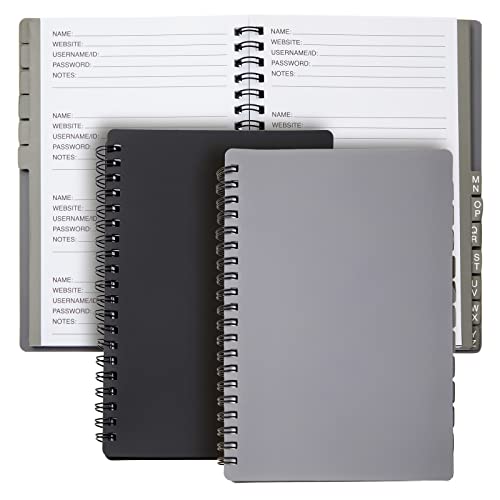
Best for dual-person households or students who want organized, portable password tracking. Juvale’s password book uses alphabetical tabs to streamline lookup and includes extra lined pages for notes. The spiral binding ensures the book lies flat for easy writing, while the durable plastic cover resists daily wear.
Who it’s best for: professionals, students, or households needing a straightforward, well-organized log. Why selected: clear alphabetic organization and portable 2-pack option. Caution: 80 pages may feel limited for users with very large credential inventories.
ALKALO Password Book with Alphabetical Tabs, Small Pocket

Best for travelers and users needing a highly portable option. The small 4.5×5.9 inch pocket size holds up to 414 passwords with three entries per page, plus dedicated pages for useful information like email settings and software licenses. An elastic closure and inner pocket add practicality for on-the-go use.
Who it’s best for: people who value compact design without sacrificing too much capacity. Why selected: strong balance of size, capacity, and extra utility pages. Caution: security relies on not losing the compact notebook or the included security pattern rather than encryption.
BTSFTOGET Refillable Password Book Binder with Alphabetical Tabs

Best for long-term users who want a durable, reusable system. This password binder supports up to 576 passwords plus 48 license records, with alphabetical tabs for quick location. The blue PU hardcover adds an upscale feel while protecting contents, and the binder format enables area to add or replace pages as needed.
Who it’s best for: professionals or heavy users seeking a scalable solution. Why selected: high capacity and refillable design make it a solid long-term option. Caution: binder maintenance is required to keep pages organized and to prevent loose sheets.
Clever Fox Password Book with Alphabetical Tabs

Best for users who value discreet, secure organization with clear labeling. Clever Fox uses alphabetical A-Z tabs and a layout designed to prevent accidental exposure of passwords by offering hints instead of the actual passwords. It combines practicality with a clean, professional appearance.
Who it’s best for: those who want an elegant, low-key appearance and structured access. Why selected: strong emphasis on security-conscious organization with user-friendly tabbing. Caution: not all users will prefer the hint-only approach for password storage, depending on their risk tolerance.
Buying Guide
What should you consider when choosing a password book?
- Capacity vs. portability: Do you need compact travel-ready options or higher capacity binders for many accounts?
- Security features: Is a lock or hidden hints preferred for your privacy needs?
- Organization method: Alphabetical tabs, color coding, or dedicated pages for notes and settings?
- Durability and binding: Hardcover, plastic cover, spiral binding, or refillable binders?
- Additional pages: Notes for hints, security questions, or software licenses can help keep details organized.
Which format is best for you?
- Lockable books (like WEMATE) are ideal for shared spaces or households needing extra privacy.
- Alphabetical-tab notebooks (Juvale, ALKALO, Clever Fox) work well for fast lookup and clarity.
- Refillable binders (BTSFTOGET) suit heavy users who want long-term scalability.
Practical tips for using a password book safely
- Keep the book in a secure location away from obvious, easy access.
- Write hints instead of the actual passwords where possible to reduce exposure risk.
- Periodically review and prune entries you no longer need.
- Consider pairing with a digital password manager for a layered approach to security.
Frequently Asked Questions
- Are physical password books safer than digital managers?
They offer offline storage and reduced risk of online data breaches, but require careful physical security and backup planning. - Can I store all types of credentials in these books?
Most entries cover usernames, passwords, and notes; some include licenses and settings pages as well. - Which book is best for a traveler?
ALKALO’s small pocket design balances portability with capacity for essential credentials. - Do password books support password hints?
Yes in several models; hints can reduce exposure risk compared to storing passwords directly. - How should I maintain a password book to ensure longevity?
Use a protective cover, avoid moisture, and replace worn pages or bindings as needed. - Is a lock necessary?
Lockable options add privacy for shared spaces, but require remembering codes and secure management.