Finding a wireless keyboard with an integrated touchpad makes navigation on TVs, HTPCs, and home PCs effortless. This guide highlights five highly compatible options, explains who each is best for, and flags practical limitations. Ideal buyers include cord-cutters seeking couch-friendly control, multi-device users needing quick switching, and those who prefer backlit keys for late-night use.
Summary of selected products
| Product | Best For | Key Benefit |
|---|---|---|
| Logitech K400 Plus | TV-connected PCs and smart TVs | Long battery life and plug-and-play setup |
| Arteck Universal Backlit 7-Colors | Dim rooms and multi-device users | Colorful backlight and broad compatibility |
| Bnnwa Multi-Device Keyboard | Office and mixed-device setups | Triple-device switching with stable 33 ft range |
| Arteck 2.4G Wireless Touch TV Keyboard | Living room control and HTPC | Solid range with media keys |
| Fosmon Mini Keyboard With Touchpad | Bluetooth and 2.4G versatility | Broad protocol support for many ecosystems |
Logitech K400 Plus Wireless Touch TV Keyboard

The Logitech K400 Plus is designed for PC-connected TVs and living-room setups. It combines a compact keyboard with a built-in touchpad, eliminating the need for a separate mouse. It uses a plug-and-play Unifying receiver, and its long-lasting battery can reach up to 18 months with on/off control. This model is best for casual TV navigation and media control. A potential limitation is that it relies on a dedicated USB receiver rather than USB-C, which may matter for newer devices without USB-A ports.
Arteck Universal Backlit 7-Colors Keyboard

This Arteck model offers a backlit touchpad keyboard with seven color backlight options. It’s highly versatile, working across Windows, Mac, Android, iOS, and various TV-connected devices. The 7-color backlight helps when using the keyboard in dark living rooms or bedrooms. Best for users who value ambient lighting and cross-platform compatibility. Caution: Bluetooth pairing stability can vary by device, which may affect seamless switching.
Bnnwa Multi-Device Wireless Bluetooth Keyboard with Touchpad

The Bnnwa keyboard is designed for multi-device households. It supports three devices via Bluetooth or 2.4 GHz, with a single-key switch for quick transitions. The keyboard includes a multi-touch trackpad for navigation and a compact, durable build. It’s ideal for small workspaces or couch setups where users frequently move between a laptop, tablet, and desktop. Limitation: the 2.4 GHz range can be affected by walls, so expect a potential drop in performance in large, congested spaces.
Arteck 2.4G Wireless Touch TV Keyboard

This Arteck 2.4G model uses a nano USB receiver for easy connection to TVs, PCs, or HTPC setups. It supports up to 10 meters of wireless range, which is helpful when lounging across a room. It’s a practical choice for living rooms and media centers where rapid typing and cursor control improve navigation. Caution: range can be affected by wireless interference, especially in busy homes with many devices.
Easytone Backlit Mini Keyboard With Touchpad
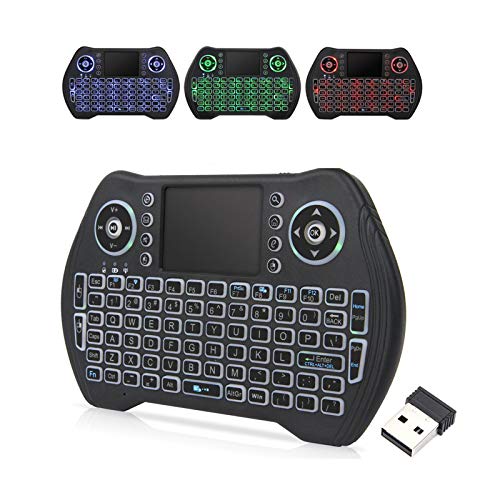
The Easytone mini keyboard offers backlit keys, a built-in touchpad, and a rechargeable Li-ion battery. It supports USB receivers and Bluetooth, providing flexible connection options for Android TV boxes, smart TVs, and PCs. Best for users who want a compact, travel-friendly option with night-time visibility. Limitation: mini layouts mean some users may miss full-size keys for extended typing sessions.
Buying Guide: Key Purchase Considerations
- Connection Type: Choose between Bluetooth, 2.4 GHz wireless, or both. Bluetooth offers device diversity but may require pairing stability; 2.4 GHz often provides lower latency and a dedicated receiver.
- Touchpad Size and Navigation: Look for a touchpad that supports multi-touch gestures and comfortable precision. Larger touchpads improve cursor control for long sessions.
- Backlighting: If you watch TV or game in dark rooms, backlit keys help. Check the number of brightness levels and color options.
- Battery Life and Power Management: Long battery life reduces maintenance. Some models include on/off switches to extend life further.
- Layout And Size: Full-size keyboards include more keys, but compact designs save space. Consider whether you need a full Num Pad or prefer a compact footprint.
- Compatibility: Ensure the keyboard supports your devices (Windows, MacOS, Android, iOS, or smart TV platforms) and the specific TV or HTPC setup you use.
- Durability and Build: Look for sturdy materials and reliable key switches, especially if you type frequently or travel with the device.
Frequently Asked Questions
- What is the main advantage of a wireless keyboard with a touchpad?
It combines typing and precise cursor control in one device, reducing desk clutter and simplifying living-room navigation. - Will these keyboards work with smart TVs?
Yes, many models are designed for TV-connected devices, HTPCs, and media centers via Bluetooth or USB receivers. - Is backlighting necessary for every room?
Backlighting is helpful in dark rooms but not essential; it mainly aids typing accuracy and comfort at night. - Do I need a Bluetooth keyboard if I already have a Bluetooth speaker?
Not necessarily. If you only need media control, a Bluetooth keyboard can still offer convenient input and navigation, but ensure device compatibility. - What about range and interference?
Most models offer 10–33 feet of wireless range, but walls, obstacles, and other wireless devices can reduce performance. - Are these keyboards suitable for travel?
Some models are compact and travel-friendly, while others are better suited to a home setup due to size and battery considerations.