If you’re building or upgrading a business or home network, the right wireless access point (AP) can dramatically improve coverage, speed, and reliability. This guide highlights five top options, explaining who each is best for and why. It’s ideal for small offices, coworking spaces, or homes upgrading to Wi‑Fi 6/7 and multi‑gig internet. The top picks balance cloud management, advanced features, and ease of deployment for varied needs.
Summary table of chosen products:
| Product | Brand | Best For | Key Benefit |
|---|---|---|---|
| Omada 7 (EAP720) | TP-Link | Medium to large offices seeking cloud management | Wi‑Fi 7 with 2.5G port and advanced Omada features |
| UniFi nanoHD | Ubiquiti Networks | High-traffic environments | MU‑MIMO with robust concurrent user handling |
| AX3000 (EAP650) | TP-Link | Cost‑effective Wi‑Fi 6 deployment | Free cloud management and strong dual‑band performance |
| TL‑WA1201 | TP‑Link | Flexible, multi‑mode deployments | MU‑MIMO and versatile operation modes |
| AX1800 (EAP610) | TP‑Link | Compact, scalable office setups | Wi‑Fi 6 with cloud management, good range |
Omada 7, EAP720: Wi‑Fi 7 with 2.5G Port

The Omada 7 (EAP720) combines high throughput with centralized cloud management. It supports Dual-Band 4-Stream Wi‑Fi 7, delivering up to 5.0 Gbps (5 GHz up to 4324 Mbps and 2.4 GHz up to 688 Mbps). It also features a future‑proof 2.5G Ethernet port to accommodate rising multi‑gig internet plans. This model is best for medium to large offices that want scalable, centralized control via the Omada Cloud Management Platform, including remote configuration, monitoring, and ZTP. Beware: firmware and cloud service requirements may influence feature availability depending on deployment.
- Best for: Offices needing robust cloud management and higher backbone speeds
- Why chosen: Combines Wi‑Fi 7 speeds with Omada’s centralized control
- Caution: Requires compatible cloud/management setup for full capabilities
UniFi nanoHD: Compact MU‑MIMO Powerhouse
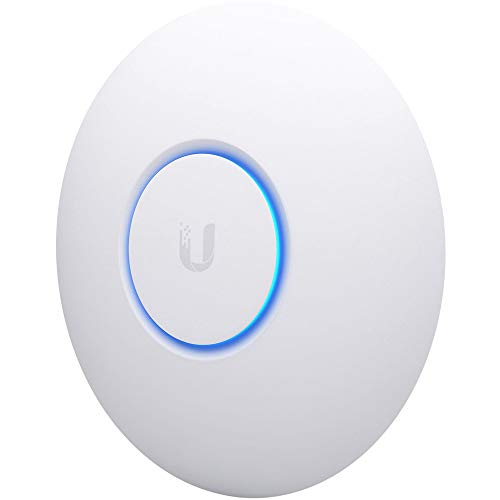
The UniFi nanoHD is a compact, enterprise‑grade AP built for high user counts and dense environments. It supports MU‑MIMO with four streams and 802.11ac Wave 2, handling 200+ concurrent users. It is POE‑enabled for flexible installation and integrates with UniFi Network Controller for centralized management. This model is best for spaces with many devices or smaller offices needing reliable performance without bulk equipment.
- Best for: Dense offices or spaces with many concurrent devices
- Why chosen: High concurrent user support in a compact form factor
- Caution: May require UniFi controller setup for full management capabilities
AX3000 (EAP650): Wi‑Fi 6 Cloud‑Managed

The AX3000 EAP650 offers ultra‑fast Wi‑Fi 6 speeds with True 1024‑QAM and Long OFDM Symbol. It includes Omada Essentials cloud management at no extra fee, enabling simple cloud‑based provisioning and monitoring. The ultra‑slim design makes it suitable for modern offices, hotels, and classrooms seeking a discreet yet capable AP. Best for: budget‑conscious deployments that still demand strong Wi‑Fi 6 performance.
- Best for: Cost‑effective, cloud‑managed Wi‑Fi 6 deployments
- Why chosen: Free cloud management and strong dual‑band performance
- Caution: Lacks Wi‑Fi 7 capabilities of premium models
TL‑WA1201: Flexible AC1200 AP

The TL‑WA1201 is a versatile AP with MU‑MIMO and dual‑mode operation (AP, Client, Range Extender, SSID management). It supports Passive PoE, simplifying installation where power options are limited. This model is best for flexible deployments in small offices or retail spaces needing multi‑mode functionality without complex infrastructure.
- Best for: Flexible setups with multiple operating modes
- Why chosen: Easy installation with PoE options and MU‑MIMO
- Caution: Moderate performance compared with Wi‑Fi 6/7 models
AX1800 (EAP610): Cloud‑Managed Wi‑Fi 6

The AX1800 EAP610 provides strong Wi‑Fi 6 performance with full Omada Essentials cloud management. It’s designed for scalable office use, boasting a slim profile for discreet installations. It’s best for growing networks that want a balance of price, cloud control, and robust Wi‑Fi 6 speed across two bands.
- Best for: Small to medium offices seeking scalable cloud management
- Why chosen: Good mix of cost, management, and Wi‑Fi 6 speed
- Caution: Fewer advanced features compared to premium Wi‑Fi 7 APs
Buying Guide: Key Considerations for Selecting the Right AP
- Coverage area and device density: Choose higher‑end APs with more streams and MU‑MIMO for crowded spaces.
- Wi‑Fi standard and speed: Wi‑Fi 6 (AX) is common; Wi‑Fi 7 (BE5000) offers top throughput but may require compatible clients and gear.
- Management approach: Cloud management simplifies configuration and monitoring across multiple APs; standalone options may fit small setups.
- Backhaul and ports: A 2.5G or multi‑gig Ethernet port future‑proofs the network for faster uplinks.
- Installation and form factor: Slim designs help in stylish offices; PoE support simplifies wiring.
- Security and updates: Check for ongoing firmware updates and secure cloud access features.
- Cost versus features: Weigh price against features like cloud control, AI features, and provisioning speed.
Frequently Asked Questions
- What is the difference between Wi‑Fi 6 and Wi‑Fi 7 APs?
Wi‑Fi 7 offers higher theoretical speeds and efficiency with features like Multi‑Link Operation, but requires compatible devices to realize benefits. - Do I need cloud management for my APs?
Cloud management simplifies configuration and monitoring for multiple APs, which is helpful in growing networks. - Is a 2.5G Ethernet port worth it?
Yes for future‑proofing and multi‑gig uploads/downloads, especially in business environments with fast internet connections. - Should I choose MU‑MIMO APs?
MU‑MIMO improves throughput when multiple devices transmit simultaneously; it’s beneficial in busy spaces. - What deployment best fits a small office?
A compact Wi‑Fi 6/7 AP with cloud management and PoE support is typically the most practical choice. - Can I mix brands in a single network?
Yes, but management features may be easier when using a single ecosystem to simplify provisioning and monitoring.