Looking for a reliable wifi mesh network to eliminate dead zones and buffering? This guide highlights five top options and explains who each is best for. The featured setups cover large homes, gaming, 4K/8K streaming, and busy households with many devices. Choose according to your home size, internet plan, and desired future-proof features.
Overview of selected products:
| Product | Best For | Approx. Coverage | Key Benefit |
|---|---|---|---|
| TP-Link Deco X55 AX3000 (3-Pack) | Medium to Large Homes | Up to 6500 sq ft | Wi-Fi 6 with strong device support |
| Deco 7 BE5000 (WiFi 7, 3-Pack) | Heavy concurrent usage | Up to 6600 sq ft | Wi-Fi 7 with high throughput |
| TP-Link Deco S4 (3-Pack) | Budget-friendly good coverage | Up to 5500 sq ft | Single network for roaming |
| Deco 7 Pro BE10000 (3-Pack) | Performance-focused homes | Up to 7600 sq ft | High-speed tri-band Wi-Fi 7 |
| TP-Link Deco XE75 (3-Pack, WiFi 6E) | Newest tech and 6 GHz | Up to 7200 sq ft | 6 GHz backhaul for stability |
TP-Link Deco X55 AX3000 WiFi 6 Mesh System, Deco X55(3-Pack)

This 3-pack Wi-Fi 6 mesh system is designed to eliminate weak WiFi across larger homes. It supports AX3000 speeds with dual-band performance and can connect many devices with reliable coverage. Best for households with multiple smart devices, streaming, and video calls in different rooms.
Best for: Medium to large homes with many devices and a need for stable, seamless roaming. It’s a solid all-around choice when you want robust coverage without complex setup.
Limitation to consider: Actual speeds vary by home layout and walls, so plan for potential backhaul adjustments in very dense construction.
Deco 7 Dual-Band BE5000 WiFi 7 Mesh Wi-Fi System 4-Stream 5 Gbps, 240 Mhz

This 3-pack uses WiFi 7 with a 4-stream BE5000 configuration for high throughput and heavy device activity. It’s suitable for 4K/8K streaming, AR/VR gaming, and large homes where many devices demand fast, stable connections.
Best for: Power users and home offices with many simultaneous activities. The system’s backhaul capabilities help balance traffic across units for better stability.
Limitation to consider: Real-world performance can vary with distance and obstacles; consider placement to optimize backhaul paths.
TP-Link Deco S4 Mesh AC1900 WiFi System, Deco S4(3-Pack)

This trio delivers an easy entry into mesh technology with a single network name for seamless roaming. It’s a practical option for homes up to 5,500 square feet and for users seeking reliable, straightforward coverage without advanced features.
Best for: Homes that want simple setup and dependable coverage without paying for the latest WiFi 6E or WiFi 7 tech. Suitable for most streaming and casual gaming needs.
Limitation to consider: Not the latest standard; may not optimize newly connected high-demand devices as efficiently as newer models.
Deco 7 Pro Tri-Band WiFi 7 BE10000 Whole Home Mesh System 6-Stream 10 Gbps

This Pro series offers expansive whole-home coverage and a future-ready 10G WAN/LAN port. With tri-band WiFi 7 speeds, it targets homes with high bandwidth needs, gaming, and advanced streaming across many devices.
Best for: Performance-focused households that want top-tier speed and broad coverage. Choose this if you regularly push high-bandwidth tasks and require room to scale.
Limitation to consider: Higher emphasis on performance may come with more complex setup or higher energy use than basic models.
TP-Link Deco XE75 AXE5400 Tri-Band WiFi 6E System

This 6E system introduces a dedicated 6 GHz band for backhaul and interference-free performance. It’s designed for homes with many devices and smart home setups, using true tri-band speeds up to 5,400 Mbps overall.
Best for: Early adopters and tech enthusiasts who want the newest band (6 GHz) for stable performance with numerous connected devices. Avoid this if your devices don’t support 6E or if you’re on a tighter budget.
NETGEAR Orbi 370 Series WiFi 7 Mesh System

Orbi 370 Series provides whole-home coverage up to 6,000 square feet with mesh technology and a next-gen WiFi 7 speed profile. It supports many devices on a single network with backhaul assistance to maintain performance across rooms and floors.
Best for: Users seeking strong WiFi 7 performance with broad coverage and the flexibility to add satellites as needed. Consider if you want a brand with established mesh performance history.
Limitation to consider: Real-world speeds depend on layout and internet plan; ensure compatible routers and extenders are placed for optimal backhaul.
eero 6 Mesh WiFi System (3-Pack)
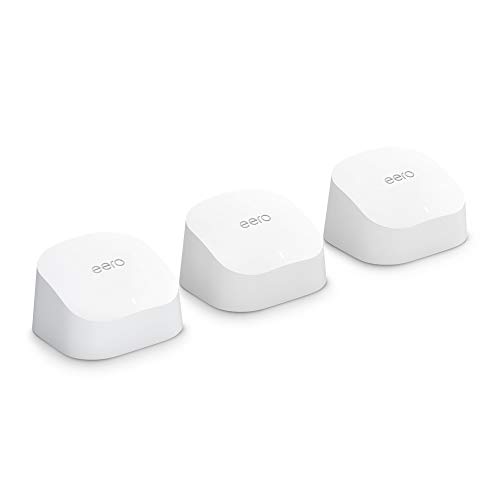
Eero’s mesh system offers whole-home Wi-Fi 6 coverage with a focus on easy setup and roaming. A 3-pack can cover up to 4,500 square feet and supports 75+ devices, making it suitable for moderately busy homes seeking simple expansion.
Best for: Homes prioritizing ease of use and reliable coverage over the latest high-end features. Choose this if you want a simple, interoperable mesh network with straightforward management.
Limitation to consider: May not deliver the highest raw throughput on very device-dense networks compared with WiFi 6E or 7 options.
Buying Guide: Key Considerations For A Wifi Mesh Network
- Coverage needs: Measure your home’s square footage and check whether a 2-pack or 3-pack system better suits your layout and future expansion.
- Wi-Fi standard: WiFi 6 and WiFi 6E offer improved performance for many devices; WiFi 7 provides the newest tech for heavy usage and many devices.
- Backhaul and bands: Systems with tri-band (including 6 GHz where available) can improve stability by dedicating backhaul traffic between nodes.
- Device density: If you have many smart devices, gaming systems, or 4K/8K streaming, prioritize models with higher capacity and robust backhaul.
- Ease of setup and management: Some brands emphasize user-friendly apps and quick setup; others offer more advanced controls for power users.
- Future-proofing: Consider whether you’ll add devices or expand coverage soon; models with easy expansion and multiple nodes offer flexibility.
Frequently Asked Questions
- What is a wifi mesh network and why use one? A mesh network uses multiple nodes to blanket a home in wireless coverage, reducing dead zones and improving reliability over a single router.
- Do I need Wi-Fi 6, 7, or 6E for a mesh system? It depends on your devices and goals. Wi-Fi 6E adds a 6 GHz band for less interference, while Wi-Fi 7 offers higher throughput for busy networks.
- How many nodes should I buy? Start with a 2-3 node kit for typical homes and add more nodes if coverage gaps remain or your home is very large.
- What is backhaul in mesh networks? Backhaul is the connection between mesh nodes. A dedicated backhaul (or a tri-band setup) improves performance by reducing traffic on the same network as client devices.
- Can I mix mesh brands? Mixing brands can cause compatibility issues; it’s generally best to keep nodes within a single ecosystem for seamless roaming and management.
- Will a mesh system replace my router? In most cases, yes. Mesh systems can replace your existing router, providing improved coverage and centralized management.