Answering your search for a gaming-friendly extender, this guide highlights top options that minimize latency and maximize bandwidth for online play. Designed for different setups, these picks suit casual gamers, competitive players, and households with multiple devices. Each product section explains who it’s best for and why. Use the quick summary table to compare key points at a glance.
| Product | Best For | Key Benefit | Note |
|---|---|---|---|
| TP-Link RE315 | Everyday gaming in small to medium homes | Strong dual-band coverage with easy setup | Great value and reliability |
| TP-Link RE550 (AC1900) | |||
| JoyLantern AX3000 | Large homes with many devices | WiFi 6 for higher capacity | High device support |
| TP-Link RE715X (AX3000) | Gamers needing strong WiFi 6 performance | Multi-antenna design for broader coverage | EasyMesh capable |
| TP-Link RE223BE (Wi‑Fi 7) | High-end setups with Wi‑Fi 7 router integration | Next-gen speed and MLO support | Best future-proof option |
TP-Link AC1200 WiFi Extender RE315

Best for: Casual gamers in smaller homes or apartments who want reliable boost without complexity. The RE315 provides dual-band speeds up to 1.2 Gbps total and features adaptive path selection for stable connections. One-Touch setup helps non-technical users get connected quickly, reducing dead zones around living rooms and home offices.
Why selected: It has a straightforward, dependable setup with external antennas for improved coverage, making it a solid, cost-effective choice for gaming consoles, PCs, and streaming devices.
Caution: While great for many setups, very large homes or electrical interference-heavy layouts may benefit from a higher-end model with more antennas and wider range.
TP-Link AC1900 WiFi Range Extender RE550

Best for: Medium to large homes needing extra capacity and robust performance across multiple devices. The RE550 offers up to 1300 Mbps on the 5 GHz band and 600 Mbps on the 2.4 GHz band, with three external antennas for wider coverage and better reliability during online gaming.
Why selected: Its stronger dual-band throughput helps reduce lag when gaming alongside other household activities like video calls and streaming.
Caution: Advanced features are helpful, but setup and optimization may require a few minutes of tweaking if you’re integrating with a busy router network.
JoyLantern AX3000 WiFi Extender

Best for: Large homes with many devices and thick walls where a WiFi 6 extender can maintain strong gaming latency. The AX3000 provides up to 2400 Mbps on the 5 GHz band and 600 Mbps on the 2.4 GHz band, with support for 150+ devices and broad coverage up to 18,999 sq. ft.
Why selected: The high-capacity design helps sustain stable gaming sessions even with several smart devices in use, reducing interference and buffering.
Caution: Real-world performance depends on router compatibility and home layout; extremely dense environments may still demand a wired backhaul for the best latency.
TP-Link AX3000 WiFi 6 Range Extender RE715X

Best for: Gamers who want high-speed WiFi 6 coverage and a reliable mesh-ready setup in larger homes. The RE715X uses dual-band 3 Gbps total bandwidth and Beamforming for stronger, more focused signals across rooms.
Why selected: It supports EasyMesh, giving simple expansion if you add more TP-Link devices later, and offers robust performance for latency-sensitive games and streaming.
Caution: Best results come when paired with a WiFi 6 router; with older routers, you may not see full advertised speeds.
TP-Link BE3200 Wi‑Fi 7 Range Extender RE223BE
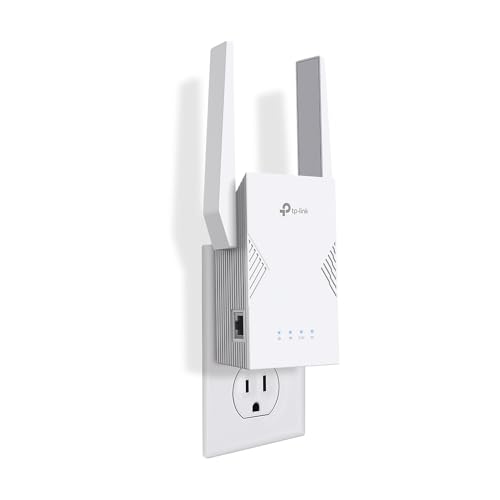
Best for: High-end gaming setups that benefit from the latest WiFi 7 technology. The BE3200 RE223BE offers up to 2594 Mbps on the 5 GHz band and 688 Mbps on the 2.4 GHz band with four antennas for distributed coverage, plus Multi-Link Operation (MLO) for optimized routing.
Why selected: The next-gen standard can improve latency and throughput in multi-device environments, making it a future-proof choice for serious gamers.
Caution: WiFi 7 features are most valuable when connected to a compatible WiFi 7 router; performance gains depend on the entire network ecosystem.
Buying Guide: Key Considerations For Gaming-Focused WiFi Extenders
- Router compatibility: For best results, match extender technology to your router (WiFi 5, 6, or 7). WiFi 6 and 7 extenders offer lower latency and higher device capacity.
- Backhaul options: Consider whether the extender supports a wired Ethernet backhaul or relies on wireless backhaul. Wired backhaul can reduce latency in gaming rooms far from the router.
- Coverage vs. capacity: Large homes require more coverage, but gaming latency also benefits from devices with Beamforming and multiple antennas to focus signals toward consoles and PCs.
- Number of devices: If several players and smart devices share the network, prioritize extenders offering higher device support and stable multi-device performance.
- Placement strategy: Place extenders midway between the router and the gaming area, avoiding interference from appliances and dense walls for optimal latency.
- Security and updates: Choose models from reputable brands with routine firmware updates and solid cybersecurity commitments to protect gaming sessions on home networks.
Frequently Asked Questions
- Do I need a gaming-specific extender or a regular one works?
Any high-quality extender can improve gaming latency if it provides strong dual-band or tri-band performance and stable backhaul. For busy homes, consider WiFi 6 or 7 extenders for better capacity. - Is Ethernet backhaul better for gaming than wireless backhaul?
Yes. A wired backhaul minimizes latency and packet loss, which is beneficial for competitive gaming and streaming. - Can I use multiple extenders in one home?
Yes, but ensure they are configured to work with your router—prefer EasyMesh or compatible mesh setups to avoid interference and create seamless roaming. - Will a WiFi 7 extender dramatically improve gaming?
It can improve throughput and latency in multi-device environments, especially when paired with a WiFi 7 router, but real-world gains depend on overall network conditions. - How should I choose extender placement for gaming rooms?
Place it halfway between your router and the gaming area, avoiding thick walls and electronics that cause interference. Use measurement tools in the router app if available. - Do extenders need firmware updates?
Yes. Regular updates fix security issues and can improve performance and stability for gaming.