If you’re chasing a lag-free gaming experience, a dedicated WiFi booster can dramatically reduce latency and buffering. This guide highlights five reliable options suited for gamers, power users, and multi-device households. Each product section explains who it’s best for, why it’s selected, and a practical caution. The accompanying buying guide helps you compare coverage, speed, and security features to match your setup and budget.
| Product | Best For | Main Benefit |
|---|---|---|
| TP-Link AC1200 RE315 | Standard gaming setups | Solid dual-band performance for mid-size homes |
| JoyLantern AX3000 Extender | Homes with many devices | High capacity and long-range WiFi 6 |
| TP-Link RE550 | Multi-room gaming | Gigabit Ethernet and strong dual-band reach |
| nonser 1200Mbps Extender | Budget-conscious homes | Balanced speed and wide coverage |
| Oaitree AX3000 Extender | WiFi 6 ready networks | Stable, fast connections with four antennas |
TP-Link AC1200 WiFi Extender RE315 Review

Best for: moderate-size homes with 1-2 gaming devices. The RE315 offers dual-band speeds up to 1.2 Gbps total, delivering 867 Mbps on 5 GHz and 300 Mbps on 2.4 GHz. This extender emphasizes easy setup and extended coverage without complex configurations, making it ideal for gamers who want a quick upgrade to improve in-game responsiveness.
Why selected: It uses Adaptive Path Selection for stable connections and one-touch setup for fast deployment. It supports up to 32 devices and includes external antennas for better signal distribution, helping eliminate dead zones in typical living spaces.
Limitations: While capable, it may not match WiFi 6 devices for extremely dense networks. If you have many smart devices or want the latest standard, consider a WiFi 6 option.
JoyLantern AX3000 Extender For Gaming

Best for: households with many devices and wide area coverage. The AX3000 Extender delivers up to 2400 Mbps on 5 GHz and 600 Mbps on 2.4 GHz, enabling smooth 4K streaming and lag-free gaming across large homes. It supports 150+ devices and claims coverage up to 18,999 sq ft, which makes it a strong choice for multi-room gaming setups or homes with thick walls.
Why selected: WiFi 6-style capacity in a single extender helps minimize congestion when several gamers or devices are active. The model emphasizes wide, reliable coverage and compatibility with various gear, including streaming devices and smart assistants.
Limitations: Real-world performance depends on router compatibility and wall materials. In very signal-challenged homes, separate mesh nodes may still be advantageous.
TP-Link AC1900 RE550 Dual-Band Extender

Best for: gamers in medium-to-large homes needing wired reliability. The RE550 provides up to 1300 Mbps on the 5 GHz band and 600 Mbps on the 2.4 GHz band, with a Gigabit Ethernet port for direct, low-latency connections to consoles or PCs.
Why selected: Its three external antennas optimize coverage, reducing dead zones across multiple rooms. It is EasyMesh compatible, which helps when expanding to a full mesh network later.
Limitations: Data provided emphasizes coverage and speed figures; actual throughput can be affected by nearby electronics and router capabilities. Consider pairing with a high-performance router for best results.
GEYILO WiFi Extender With Wide Coverage
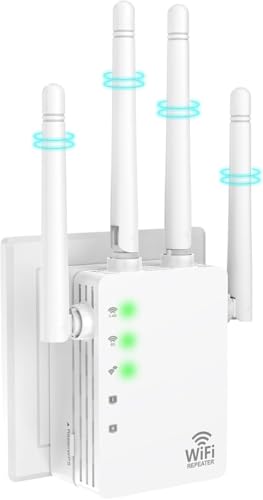
Best for: large homes with many devices and longer-range needs. This extender covers up to 12,880 sq ft and supports 105 devices, with dual bands for fast gaming and steady streaming. An Ethernet port adds wired reliability for gaming consoles or PCs.
Why selected: It balances wide coverage with a sizeable device capability, which helps households with smart TVs, game consoles, and IoT devices share bandwidth more effectively.
Limitations: Like others, performance depends on router compatibility and environmental factors such as walls and interference. Check your room layout to ensure crucial gaming spots receive strong signal.
Techtex WiFi Extender With Broad Range

Best for: users needing extensive coverage with flexible setup options. The Techtex extender claims a range up to 15,588 sq ft and supports up to 65 devices across multiple modes, including Repeater, Bridge, Access Point, Router, and Client.
Why selected: The broad feature set, including multiple operating modes and easy 1-tap setup, makes it adaptable to varied home layouts and gaming needs. It is designed to work with most routers and emphasize broad compatibility.
Caution: The marketing mentions many modes; verify the mode you need aligns with your current network plan to avoid misconfiguration.
TP-Link BE3200 Wi-Fi 7 RE223BE Extender
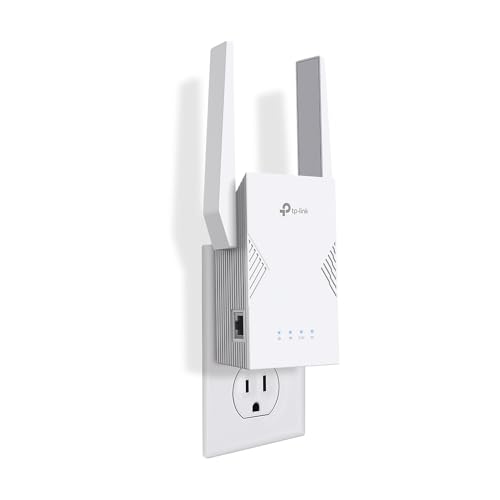
Best for: advanced setups that want Wi-Fi 7 readiness and future-proofing. The BE3200 supports next-generation Wireless 7 features with 3.2 Gbps total bandwidth and includes MLO and 160 MHz channels for improved performance with compatible routers.
Why selected: It offers higher bandwidth and broader device support up to 64 devices, aligning with modern gaming and streaming demands in larger homes or high-traffic networks.
Limitation: As with Wi-Fi 7 features, real gains require a Wi-Fi 7 router and compatible devices. If you’re not on a Wi-Fi 7 core network, gains may be limited.
Buying Guide: How To Choose The Right Gaming WiFi Extender
- Coverage vs. device load: If you have a large home or many connected devices, prioritize extenders advertising high square-foot coverage and 150+ device support.
- WiFi standard: For best future-proofing, weigh WiFi 6/6E or WiFi 7-capable extenders against cost. WiFi 6/7 typically offer better latency and multi-device performance for gaming.
- Speed and bandwidth: Look for total bandwidth (sum of 5 GHz and 2.4 GHz) that comfortably exceeds your router’s capabilities to avoid bottlenecks.
- Wired options: An Ethernet port is valuable for stationary gaming devices. Consider extenders that include a dedicated Gigabit port for reliable, low-latency connections.
- Mesh compatibility: If you plan to expand later, EasyMesh or Multi-Link Operation can simplify scaling and maintain seamless roaming.
- Security: Prefer extenders with robust encryption (WPA2/WPA3) and firmware update support to protect gaming sessions and network data.
- Placement strategy: Position extenders halfway between the router and gaming devices, not behind large metal appliances or inside cabinets, to maximize signal penetration and minimize interference.
Frequently Asked Questions
- What is the main benefit of a gaming-focused WiFi extender? It reduces latency and buffering by improving signal strength and reducing dead zones in areas where gaming devices are used.
- Do I need WiFi 6 or WiFi 7 extenders for gaming? Not always. WiFi 6/7 can provide better multi-device performance and lower latency in dense networks, especially in busy homes.
- Should I buy a separate mesh system instead? A mesh system can offer smoother roaming in very large homes, but a high-quality extender may be sufficient for mid-size homes with a stable router.
- Is a wired Ethernet port necessary? For consoles or PCs, yes. A wired connection minimizes latency and avoids wireless interference.
- Will an extender speed up a slow internet plan? An extender improves local coverage but cannot exceed the speed your internet plan provides. It helps distribute your existing bandwidth more evenly.
- How can I optimize placement for best gaming results? Place the extender about halfway between the router and gaming devices, avoid obstacles, and test speeds in typical gaming zones to find the best spot.