Finding a white gaming keyboard that blends aesthetics with performance is easier when you know what to look for. This guide highlights five top white mechanical and membrane options, each chosen for different gamer needs—compact setups, wireless versatility, or full-size layouts. The top picks are best for players seeking low-latency input, durable builds, and bright, legible keycaps. Summary table below helps you compare at a glance.
| Product | Type | Connectivity | Key Features |
|---|---|---|---|
| AULA F75 Pro Wireless Mechanical Keyboard | 75% Hot-Swap Mechanical | Bluetooth 5.0, 2.4GHz, USB | Hot-swap, pre-lubed stabilizers, gasket, long battery |
| SteelSeries Apex 3 TKL White | Membrane (Gaming-grade) | Wired USB | Water/dust resistant, 8-zone RGB, quiet switches |
| ASUS ROG Strix Scope II 96 Wireless | TKL 96% mechanical | Tri-mode (BT, 2.4G, USB) | Low-latency wireless, sound-dampening |
| TMKB 60% Mechanical Keyboard | 60% Mechanical | Wired | Ultra-compact, red linear switches, durable |
| MageGee Mini 60% Keyboard | 60% Mechanical | Wired (USB) | RGB backlight, IPX4-ish resistance, compact |
AULA F75 Pro Wireless Mechanical Keyboard
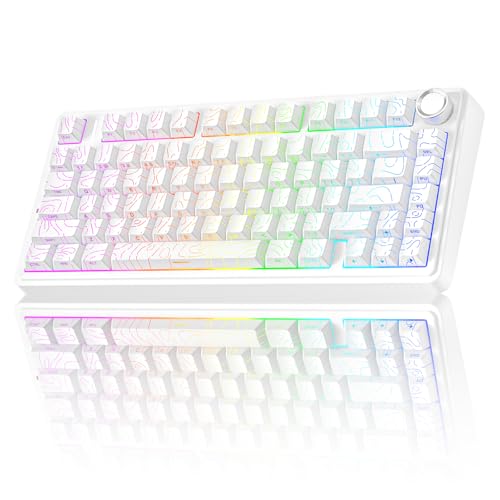
The AULA F75 Pro is a 75% hot-swappable wireless mechanical keyboard designed for versatility. It supports Bluetooth 5.0, 2.4GHz wireless, and USB wired connections, allowing up to five devices to be connected simultaneously. Best for gamers who switch between a PC, console, and mobile devices. The keyboard features a 4000mAh battery and hot-swap compatibility for 3-pin or 5-pin switches, enabling easy customization without soldering. Its gasket-style structure and multi-layer silencing provide a softer, quieter thock with stable key feel. A caveat is that hot-swap maintenance may require extra care when swapping switches frequently.
Who this is for: players who want a wireless keyboard with easy DIY switches and long battery life, plus a premium typing feel.
Why it was selected: combines tri-mode connectivity, a sizable battery, and hot-swap flexibility in a premium white chassis, ideal for immersive gaming and creative work.
Limitations: initial setup may be more involved for new users; ensure compatible switches for best results.
MageGee K1 RGB 104-Key Keyboard

The MageGee K1 is a full-size wired keyboard with 104 keys, featuring RGB backlighting, floating keycaps, and a practical ergonomic design. It is suitable for office work and gaming alike, with stable bottom pads to prevent slipping during intense play. The keyboard plugs in without software and offers a straightforward, plug-and-play experience. Best for gamers who want a classic layout in white with vivid lighting. A limitation is that it is not a wireless model, so mobility is limited to wired use.
Who this is for: users who want a reliable, full-size keyboard with easy setup and strong ergonomics.
Why it was selected: balanced build, visibility, and compatibility for diverse setups while keeping the white aesthetic.
Limitations: wired only; no Bluetooth or 2.4G wireless functionality.
SteelSeries Apex 3 TKL White

The SteelSeries Apex 3 TKL White uses a water- and dust-resistant design with a compact tenkeyless form factor. Its gaming-grade reliability and quiet, responsive keys support fast input in competitive play. This model is best for gamers who need a compact footprint while maintaining essential function keys and robust durability. A potential drawback is that it uses membrane switches, which some players may not prefer over mechanical options.
Who this is for: players seeking a durable, compact keyboard with reliable performance in various environments.
Why it was selected: a practical white TKL option with strong resistance and per-key functionality at a reasonable price.
Limitations: not mechanical; tactile feel differs from true mechanical keyboards.
TMKB 60% Mechanical Keyboard

The TMKB 60% keyboard emphasizes compact design with a 60% ANSI layout, ideal for small desks and portable setups. It uses ultra-responsive Red linear switches, delivering smooth keystrokes ideal for rapid gaming and typing. It also features 15 dynamic LED backlighting modes and durable double-shot keycaps for long-lasting backlight visibility. A limitation is the smaller layout, which omits dedicated function rows and a numeric keypad, potentially slowing some tasks.
Who this is for: gamers and typists who want maximum desk space with reliable mechanical feel.
Why it was selected: best 60% white model for portability and consistent backlighting.
Limitations: 60% layout may require adjustments to key mappings for some tasks.
MageGee Mini 60% Keyboard
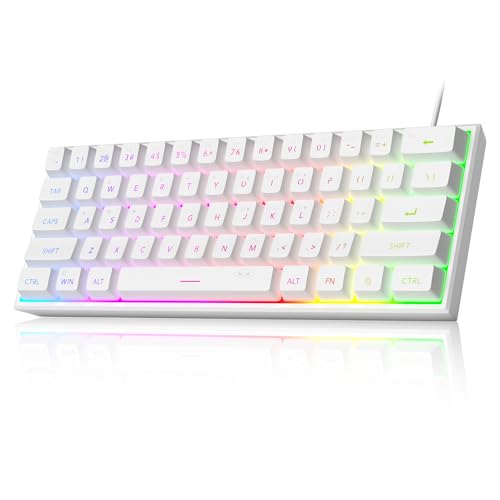
The MageGee Mini 60% Keyboard offers an ultra-compact 61-key layout with RGB backlighting. It is designed for minimal desk space and broad compatibility with PC, Mac, PS4, and Xbox One. Its waterproof-ish circuit board (IPX4) and robust double-shot keycaps enhance durability and legibility in low-light conditions. Best for travel and workspace setups where space is at a premium. A caution: the smaller layout can slow routine tasks that require a full numeric keypad.
Who this is for: users needing an ultra-compact, portable white keyboard for varied platforms.
Why it was selected: compact design with strong lighting and durability features in white.
Limitations: 61-key layout may not suit all productivity workflows.
Buying Guide
What matters most when choosing a white gaming keyboard:
- Layout: 60%, 60% with function row, TKL, and full-size variants affect desk space and key access.
- Switch type: Mechanical switches (linear, tactile, or clicky) influence feel and noise.
- Connectivity: Wired, wireless, or tri-mode offers different flexibility and latency profiles.
- Backlighting: RGB vs single-color; per-key lighting improves visibility in dark rooms and branding.
- Durability: Keycaps, stabilizers, and IP rating matter for long-term use and maintenance.
- Upgradeability: Hot-swappable options allow switch changes without soldering.
- Size and ergonomics: Keyboard height, tilt, and key spacing impact comfort for long sessions.
- Software vs. plug-and-play: Some require software for macros; others are ready to use out of the box.
Buying tips by scenario:
- Best for compact desk setups: choose 60% or 65% layouts with solid stability and reliable backlighting.
- Best for multi-device users: tri-mode connectivity or strong wireless battery life is key.
- Best for durability and immersion: look for water/dust resistance, dampening features, and per-key lighting.
Consider your preferred feel, desk space, and device ecosystem to select a keyboard that aligns with your gaming and productivity needs.
FAQ
- What is the difference between 60% and TKL keyboards?
- Are wireless gaming keyboards reliable for competitive play?
- Should I choose a mechanical or membrane keyboard for gaming?
- What does hot-swappable mean?
- Do white keyboards affect key visibility?
- Is IPX-rated protection important for a gaming keyboard?
60% keyboards remove the number pad and function row, saving space; TKL retains function keys with no number pad but is larger than 60%.
Tri-mode or robust wireless options can offer low latency, but wired connections are typically the most stable for competitive play.
Mechanical keyboards provide crisper feedback and faster actuation; membranes are quieter and often cheaper but slower in response.
Hot-swappable keyboards let you swap switches without soldering, enabling customization of feel and sound.
White keycaps typically offer high contrast on dark LED backlighting, improving legibility in low light.
IPX-rated boards resist splashes, making them more durable in everyday desk setups or near drinks.