Yes, small businesses can run smoothly with robust IP phones that deliver clear audio, support multiple lines, and integrate with popular SIP providers. This guide highlights five solid options for small offices, ranging from entry-level 2-line handsets to executive-grade systems. Each pick is suited for different user needs, from busy front-desk lines to power users with heavy call loads. Use the quick comparison table to decide which unit fits your team best.
| Product | Best For | Key Benefit |
|---|---|---|
| EAGATON T52P IP Phone | Small teams needing HD audio | Six-party conferencing and wideband codecs |
| Grandstream GRP2613 | Teams with multiple lines | 6 SIP accounts, PoE, customizable |
| Poly VVX 250 | Cost-conscious staff with feature needs | HD voice, dual Ethernet, scalable |
| Yealink T57W | Executives with high call volume | Large color touch screen, 16 SIP accounts |
| Yealink T46U | General office staff and managers | HD audio, robust feature set |
EAGATON T52P IP Phone for Small Offices

The EAGATON T52P is a dedicated VoIP phone designed for professional use with SIP-based services. This model is best for teams that rely on a single device for high-quality calls in a small office. It supports up to two SIP accounts and offers a 2.4-inch color display for at-a-glance status. It emphasizes HD audio and noise reduction, which helps when teams operate in busy environments. The built-in 6-party conferencing capability is a clear advantage for quick team huddles without external bridges.
Who it’s best for: small businesses with a dedicated VoIP service or PBX that need reliable HD audio and occasional multi-party calls. This phone is better for teams that do not require wireless connectivity beyond standard Ethernet.
Caution: It is not compatible with traditional landline/PSTN networks; a SIP service or PBX is required. Ensure your provider supports the codecs and provisioning you need, such as G.722 or Opus for higher fidelity calls.
Grandstream GRP2613 IP Phone
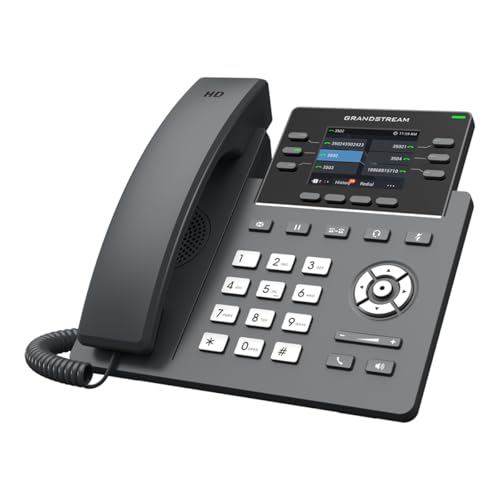
The Grandstream GRP2613 provides reliable performance for mid-sized teams, with support for up to four (or six in the GRP2613W variant) SIP accounts and six multipurpose line keys. Its PoE capability and integrated Ethernet simplify deployment in a crowded office. The model is designed with noise shielding to minimize background interference during busy calls. The phone is suitable for reception desks or shared lines where multiple extensions need quick access to key lines.
Who it’s best for: small businesses that need multiple SIP accounts and straightforward administration, with PoE powering to reduce cabling clutter. This is a solid choice for front-desk setups or small departments with several concurrent conversations.
Caution: It requires compatible SIP service or PBX provisioning. If you need wireless networking, consider a different model or add a Wi-Fi capable base alongside a supported device.
Poly VVX 250

The Poly VVX 250 combines Polycom HD Voice quality with a practical feature set suitable for everyday use. Its 2.8-inch display provides quick access to essential information, and two Gigabit Ethernet ports enable efficient network throughput for calls and data. This model is a sensible option for teams that need clear audio and reliability without getting into higher-end features that some executives require.
Who it’s best for: general office staff and employees who regularly place calls and benefit from improved audio quality at an affordable price point. Choose this if you want USB or network capacity with straightforward deployment.
Caution: For very high call volumes or advanced features, consider a higher-tier model that supports more accounts or more extensive telephony features.
Yealink T57W IP Phone

The Yealink T57W is a premium option designed for executives and heavy call-load managers. It offers a large 7-inch color touch screen, Wi‑Fi built-in, USB 2.0, and dual Gigabit Ethernet ports. It supports up to 16 SIP accounts, making it a robust choice for teams that rely on multiple identities or lines. The absence of a bundled power adapter means you’ll plan for PoE or provide your own power source during setup.
Who it’s best for: offices with high call volume and diverse deployment needs, including wireless setups and conference capabilities. Choose this if you want a scalable, feature-rich device with a modern interface.
Caution: The power adapter is not included, so ensure your power or PoE solution is ready for configuration and that your network infrastructure supports 802.3af PoE if you prefer wired power.
Yealink T46U IP Phone

The Yealink T46U is a versatile business phone offering solid audio and a familiar Yealink feature set. It supports up to 16 VoIP accounts, provides a 4.3-inch color display, and dual USB ports along with dual-port Gigabit Ethernet and PoE support. This model balances comfort and practicality for daily office use, with a focus on straightforward navigation and robust telephony features.
Who it’s best for: general office staff and managers who want a capable, modern phone with room to grow into more accounts and features. Choose this if you need a balanced, reliable device that fits a typical desk setup.
Caution: Power adapter is not included; plan for PoE or add a compatible adapter if you’re not using PoE.
Buying Guide: Key Purchase Considerations
- Voice quality and codecs: Look for HD Voice support and codecs like Opus or G.722 for clearer calls.
- Account capacity: Assess how many SIP accounts you need now and in the near future; more accounts enable more lines and faster reallocation.
- Power and networking: Decide between PoE and power adapters. PoE reduces cabling but requires compatible switches; adapters offer flexibility.
- Display and user interface: Larger color screens and touch-enabled interfaces speed up navigation and provisioning for busy users.
- Conference and collaboration: Built-in conference features save time; ensure the device supports the conference size you expect.
- Wireless vs. wired: If mesh Wi‑Fi or wireless provisioning is important, prefer models with robust Wi‑Fi support or simple USB dongle options.
- Compatibility and provisioning: Confirm that your SIP provider or on-prem PBX is compatible and that you can provision the device with your existing system.
FAQ: Quick Answers for Small-Business VoIP Buyers
- What is a SIP account?
A SIP account is a registered line on a VoIP system that allows you to make and receive calls over the internet. - Do I need a PoE switch?
PoE reduces cabling and power adapters; a PoE-capable switch powers the phone and provides data connectivity. - Is wired Ethernet required?
Most VoIP phones operate over Ethernet; some models offer Wi‑Fi as an alternative, but performance varies by environment. - What should I choose for a busy front desk?
A multi-line phone with 4–6 SIP accounts and strong conferencing features is ideal for handling many calls efficiently. - Can these phones work with any SIP provider?
They work with SIP-based services and compatible PBXs; verify codec and provisioning compatibility with your provider. - Do these phones support video or collaboration tools?
The listed models are mainly voice-centric; some high-end options provide broader collaboration features, but none include native video calls in these selections.