If you need a reliable VDSL modem (modem only or with built‑in routing) to pair with your internet service, these five options cover common setups for American homes. They’re suited for users who want simple, stable connections, clear compatibility notes, and easy configuration. This guide highlights who each model is best for and why it was chosen, plus practical buying considerations and a concise FAQ.
| Product | Best For | Why It Stands Out |
|---|---|---|
| TP-Link TD-W9950 300Mbps | Budget-conscious buyers needing a straightforward modem | Simple, reliable VDSL/ADSL modem with basic features |
| TP-Link Archer VR300 AC1200 | Small homes needing wireless and modem in one | Integrated router and VDSL/ADSL modem with dual-band Wi‑Fi |
| NETGEAR AC1600 DSL Modem Router (D6400) | Homes needing solid Wi‑Fi plus DSL support | Two-in-one device with strong wireless and DSL support |
| NETGEAR DSL DM200-100NAS | Modem-only option for simple DSL setups | Compact DSL modem with broad provider compatibility |
| CenturyLink Technicolor C2000T | CenturyLink users seeking VoIP and VDSL features | VoIP-ready, VDSL2 modem, suitable for CenturyLink services |
TP-Link TD-W9950 300Mbps Wireless N VDSL/ADSL Modem Router

The TD-W9950 combines a VDSL/ADSL modem with a basic wireless router. Best for users who want a simple, affordable device without extra frills. It’s well-suited for smaller homes or apartments where only essential features are needed. A potential limitation is the absence of advanced QoS or guest networking found in higher-end models.
TP-Link Archer VR300 AC1200 Wireless VDSL/ADSL Modem Router

The Archer VR300 blends a VDSL/ADSL modem with dual-band AC1200 wireless built in. This model is best for small to medium homes that want reliable Wi‑Fi alongside DSL connectivity. It’s a solid pick for users who want fewer devices and easier setup. A caution: the router’s performance is best within a typical home footprint; large homes may benefit from a mesh or larger router later on.
NETGEAR AC1600 WiFi VDSL/ADSL Modem Router (D6400-100NAS)
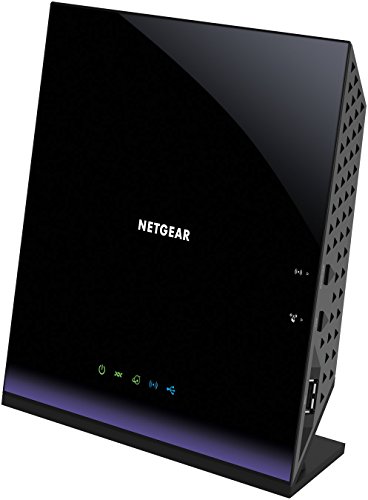
The D6400 provides a two-in-one solution with solid Wi‑Fi performance and VDSL/ADSL modem capabilities. It’s best for households that want a combined device to reduce clutter and streamline setup. Choose this if you need reliable wireless coverage in addition to DSL connectivity. A limitation is that certain fiber or non-DSL plans aren’t compatible; verify your provider’s compatibility before purchasing.
NETGEAR DSL (VDSL/ADSL) Modem (DM200-100NAS)

The DM200-100NAS is a compact, modem-only option designed for DSL service. It’s best for users who already have a separate router or want to minimize device complexity. It does not include built-in WiFi, so you’ll need an external router for wireless coverage. It’s a good pick for those with a dedicated router setup and want simple DSL compatibility.
CenturyLink Technicolor C2000T Wireless ADSL/VDSL Modem Router
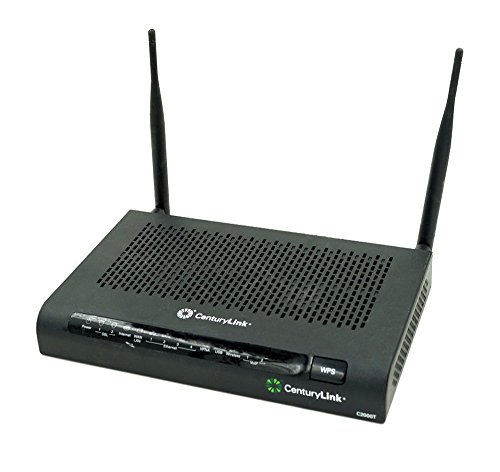
The C2000T combines a VDSL2 modem with a wireless router and telephony features, making it suitable for CenturyLink customers seeking a single device for internet and VoIP. It’s best for homes that rely on CenturyLink services and want VoIP compatibility. A potential limitation is that it’s optimized for CenturyLink; providers with different configurations may require alternative devices.
CenturyLink Technicolor C2000T (Renewed)

The renewed version offers similar features to the new C2000T, with emphasis on VoIP and VDSL2 compatibility. Best for budget-conscious CenturyLink users who want a cost-effective option while maintaining VoIP support. Consider the return policy and warranty terms typical of renewed devices when evaluating this choice.
Buying Guide
What is a VDSL/ADSL modem, and do you need one?
A VDSL/ADSL modem connects your home network to a telephone line-based internet service. If you have DSL or VDSL service, you typically need a modem (or a modem/router) to access the internet. Modem-only devices require a separate router for Wi‑Fi, while modem routers combine both functions in one box.
Modem-only vs. modem-router combos: which should you choose?
- Modem-only: Best when you already own a reliable router or want to upgrade later. Keeps a simple device profile and avoids extra features you don’t need.
- Modem-router combo: Ideal for easy setup and fewer devices. Useful for smaller homes where integrated Wi‑Fi coverage is sufficient.
Compatibility and provider considerations
- Verify your DSL provider compatibility (Some devices list specific providers or note limitations with bonded lines or certain services).
- Check whether your service requires VoIP support; if so, consider a model with built-in VoIP capabilities.
- For CenturyLink or similar providers, CenturyLink-specific models may provide smoother configuration and feature access.
Wi‑Fi coverage and future-proofing
- Consider dual-band AC or better if you have multiple wireless devices or a larger home.
- If you expect plan upgrades or higher speeds, ensure the device supports current DSL speeds and QoS features for stable performance.
Ease of setup and ongoing use
- Look for devices with straightforward web interfaces and mobile setup apps.
- Note whether the device supports WPS, guest networks, or simple parental controls if these features matter to you.
Which model to pick from this list?
- Best budget modem: TP-Link TD-W9950 for basic DSL setups without extra features.
- Best all-in-one for small homes: TP-Link Archer VR300 for combined DSL modem and reliable Wi‑Fi.
- Best for strong Wi‑Fi with DSL: NETGEAR AC1600 D6400 for balanced performance in a single box.
- Best modem-only option: NETGEAR DM200-100NAS for clean, router-ready setups.
- Best for CenturyLink: CenturyLink C2000T with VoIP support and easy CenturyLink integration.
FAQ
- Do these devices work with all DSL providers? Most list compatibility notes; always confirm with your provider before purchasing.
- Is a modem-router combo better than a modem alone? It depends on your home size, existing router, and desire for simplified setup.
- Can I upgrade my Wi‑Fi later? Yes, using a separate router with a modem can offer scalable Wi‑Fi improvements.
- What about VoIP support? If you rely on VoIP services, choose a model with built-in VoIP features or a compatible setup.
- Are renewed devices a good option? Renewed devices can save money but check warranty terms and return policies.
- How do I verify compatibility with bonded DSL? Contact your provider or check product documentation for bonded DSL support.