Answer: This guide flags the best value all-in-one PCs for everyday work, browsing, and light media use. Each pick balances price, display quality, and performance for typical home and small-office tasks. The top picks suit different buyers: budget-conscious students and home offices for the core options; multimedia enthusiasts for curved displays; and compact space-savers for small desks.
Summary table of chosen products:
| Product | Display | Key Specs | Best For |
|---|---|---|---|
| HP 27″ All-in-One Desktop | 27″ FHD Touch | Ryzen 5, 16 GB RAM, 1 TB SSD | Balanced performance and modern features |
| Lenovo NEW 24″ AIO | 24″ FHD IPS | Intel 4-core, flexible storage | Solid everyday multitasking |
| HP 21.45″ All-in-One | 21.45″ FHD | Intel N200, 8 GB RAM | Compact, budget-friendly |
| MECHAZER 23.8″ AIO | 23.8″ Curved | Core i7, 16 GB, 512 GB | Immersive curved screen on a budget |
| MECHAZER 27″ AIO | 27″ Curved FHD | Core i7, 16 GB, 512 GB | Premium-looking curve with strong performance |
HP 27 Inch All-in-One Desktop PC

Product highlights: 27″ FHD touchscreen, IPS panel, anti-glare, 250 nits, 99% sRGB. Onboard 16 GB RAM and a 1 TB PCIe NVMe SSD provide ample multitasking headroom and quick storage access. The Ryzen 5 7520U offers solid performance for daily tasks and light content creation.
- Best for: Home offices or students who want a large touch-friendly display and decent processing power without external peripherals.
- Why selected: Large integrated display with modern RAM and fast storage helps with productivity and media consumption in a single compact unit.
- Caution: Windows 11 Pro edition may require more configuration for enterprise settings; consider backup options for large files.
Core Innovations 24″ All-in-One Desktop PC

Product highlights: 24” FHD IPS display with Windows 11. Powered by an Intel Celeron N5095 processor, this model targets light multitasking, web browsing, and education tasks with a straightforward setup.
- Best for: Budget-minded buyers who want a basic all-in-one for daily tasks and learning from home.
- Why selected: Solid price-to-performance for basic productivity, with a clean Windows 11 experience.
- Caution: Performance may lag with heavy multitasking or demanding software; upgrade path is limited by integrated components.
Lenovo NEW 24″ IPS All-in-One

Product highlights: 24” 1080p IPS display with Intel processing options and Harman-enhanced speakers. The model emphasizes a quiet, immersive viewing experience and smoother multitasking.
- Best for: Small home offices and families needing a reliable all-in-one with good audio and a clear display.
- Why selected: Strong display and thoughtful audio features enhance everyday tasks and media consumption.
- Caution: Some configurations may emphasize display quality over raw CPU speed for heavy workloads.
HP 21.45 Inch All-in-One Desktop

Product highlights: 21.45″ FHD display, Intel N200 processor, 8 GB RAM, 512 GB SSD, Windows 11 Home in Jet Black finish. This compact configuration targets light to moderate productivity and streaming tasks.
- Best for: Users with limited desk space seeking a slim All-in-One for everyday tasks plus light media use.
- Why selected: A balanced mix of RAM and storage in a compact form factor provides a solid value entry point.
- Caution: Not ideal for heavy multitasking or CPU-intensive software; consider models with more RAM if needed.
MECHAZER All-in-One 23.8 Inch Curved Display
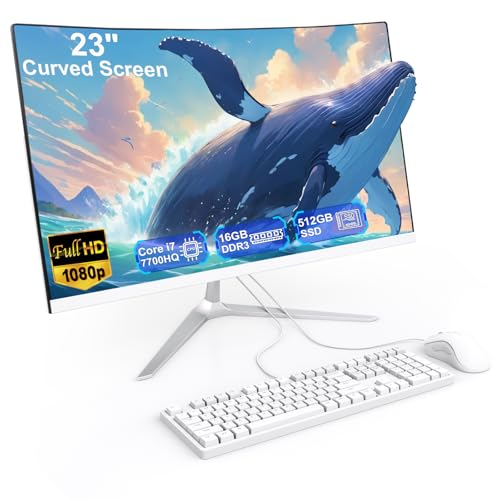
Product highlights: 23.8″ curved display, Core i7 7700HQ, 16 GB RAM, 512 GB SSD. The curved screen provides an immersive look for work and entertainment, with a complete package including wired keyboard and mouse.
- Best for: Users who value immersion and a strong processor in a space-saving all-in-one.
- Why selected: The curved display plus modern RAM and fast storage enable smooth multitasking and media playback.
- Caution: Older-generation Core i7 may lag behind newer CPUs on very demanding software; consider future upgrade needs.
MECHAZER 27 Inch All-in-One Curved Display

Product highlights: 27″ curved FHD display, Core i7 7700HQ, 16 GB RAM, 512 GB SSD, Bluetooth 5.0, dual-band WiFi. This model combines a larger curved panel with strong overall performance for multitasking and media.
- Best for: Users who want a premium-feel all-in-one with a bigger curved display for productivity and entertainment.
- Why selected: Large, curved screen delivers a more immersive visual experience while maintaining a compact footprint.
- Caution: Curved displays can take more desk space; ensure your workstation can accommodate the footprint.
Buying Guide
What to consider when choosing a value all-in-one PC:
- Display size and quality: Larger screens improve productivity and multimedia enjoyment. Look for IPS panels with wide color coverage for accurate visuals.
- Processor and RAM: For everyday tasks, a mid-range CPU with at least 8 GB RAM is a safe baseline; 16 GB is better for multitasking and photo/video editing.
- Storage: A fast SSD (512 GB or larger) greatly improves boot and app load times. Consider additional storage if you work with large media files.
- Upgrade paths: Some all-in-ones have limited upgrade options; verify RAM and storage upgrade possibilities if you anticipate growth.
- Connectivity: Ensure adequate USB, HDMI, and wireless options for peripherals and displays you own.
- Space and ergonomics: Curved displays offer immersion but require more desk depth. Balance screen size with available workspace.
Frequently Asked Questions
- What is an all-in-one PC?
It combines a display and a computer inside a single chassis, reducing cable clutter and saving desk space. - Is a curved display better for me?
Curved screens can improve immersion and reduce edge visibility, useful for media and prolonged viewing; consider desk depth and viewing angle. - Do all-in-one PCs support upgrading RAM or storage?
Upgrade options vary by model; some have soldered RAM or limited storage bays. Check the specifications before purchase. - Which size is best for a small home office?
24 to 27 inches tends to offer a good balance of readability and space; 21 to 23 inches saves room but is more compact. - What tasks are these PCs best suited for?
General productivity, web browsing, document editing, streaming, and light photo/video editing; heavy gaming or professional-grade workloads may require more powerful PCs. - How important is Windows edition for business use?
Windows 11 Pro offers advanced management features; Windows 11 Home covers most consumer needs with essential security features.