This article helps you choose the right USB-to-Ethernet adapter for reliable wired networking. It targets buyers seeking plug-and-play, driver-free options or easy compatibility across Windows, macOS, Linux, and Chromebooks. The top picks are best for students, remote workers, travelers, and casual gamers who want stable connections without a new router. A quick summary table highlights each product’s strengths to aid quick comparison.
| Product | Best For | ||
|---|---|---|---|
| Amazon Basics USB 3.0 to Gigabit Ethernet | Budget buyers | Gigabit speed, Wake-on-LAN | Does not support gaming consoles |
| TP-Link UE306 | Stable 1 Gbps on a budget | Foldable design, easy plug-and-play | Support for Switch is advertised; verify host compatibility |
| BENFEI USB 3.0 to Ethernet Adapter | Mac/Windows users needing driver-free setup | Aluminum shell, Wake-on-LAN | Some setups may require drivers on older OS |
| UGREEN USB to Ethernet Adapter | Nintendo Switch and laptops | 1000 Mbps, driver-free on most OS | Linux driver note may apply for older builds |
| Anker USB C to Ethernet Adapter | USB-C devices | Stable 1 Gbps, compact | USB-C only; needs USB-C port |
Amazon Basics USB 3.0 to 10/100/1000 Gigabit Ethernet Adapter

The Amazon Basics USB 3.0 to Gigabit Ethernet Adapter connects a USB 3.0 computer to a router, modem, or switch to deliver 1 Gbps Ethernet. It supports IPv4/IPv6 COE to reduce CPU load and includes Wake-on-LAN and Energy Efficient Ethernet features. Best for budget-conscious users who need straightforward, driver-free operation on supported Windows and macOS devices. Caution: It does not support some gaming consoles or smart TVs, so plan wired use on compatible devices.
TP-Link USB to Ethernet Adapter (UE306)

TP-Link’s UE306 provides a compact USB 3.0 to RJ45 Ethernet port, delivering 10/100/1000 Mbps wired connections. It’s noted for a foldable, portable design and plug-and-play setup. It’s suitable for laptops, tablets, and Nintendo Switch users who want a stable wired connection for file transfers, HD video, and online gaming. Better for those who value portability and a robust 1 Gbps wired option. Caution: Some users report full performance requires USB 3.0 ports and compatible drivers on older systems.
BENFEI USB 3.0 to Ethernet Adapter

The BENFEI adapter uses a compact aluminum shell and nylon cable for a sleek, portable solution that adds a standard RJ45 port to laptops, tablets, or ultrabooks. It supports Wake-on-LAN, full- and half-duplex Ethernet, and auto-crossover features, with plug-and-play operation on many operating systems. Choose this for a sturdy, stylish option with driver-free setup on most platforms. Limitation: Some older Windows versions may require drivers to achieve 1 Gbps on specific hardware.
UGREEN USB to Ethernet Adapter

UGREEN’s USB to Ethernet Adapter targets high-speed, stable connections at 1000 Mbps with Plug and Play support for Windows, macOS, Chrome OS, and Android. It’s fully compatible with Nintendo Switch in dock mode for wired gaming. This option is best for users seeking easy setup across multiple platforms and a reliable 1 Gbps wired connection. Caution: Windows XP/7 or Linux may require driver installations per the owner guidance for full functionality.
Amazon Basics Aluminum USB 3.0 Gigabit Ethernet Adapter
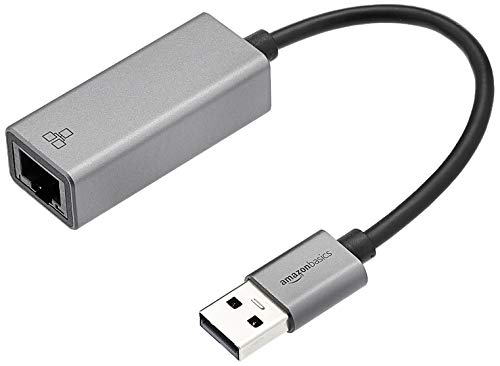
This aluminum-shelled USB 3.0 to Gigabit Ethernet adapter emphasizes plug-and-play use with no external power required. It delivers 10/100/1000 Mbps bandwidth and is ready out of the box for quick Internet access on compatible devices. Best for users who want a lightweight, heat-dissipating, driver-free option with a simple, reliable connection. Limitation: Some devices may require driver tweaks for advanced Ethernet features.
USB A/C to Ethernet Adapter with Three USB 3.0 Ports

The ALL-LUCKY adapter combines a USB hub with a Gigabit Ethernet port. It expands a device with three USB 3.0 ports and one RJ45 Ethernet port, aiming to provide more peripherals while maintaining a stable network. Best for users who need both additional USB ports and stable wired connectivity. Caution: The convertible USB-C/USB-A capability adds complexity; verify device port compatibility before purchase. Note: For 1 Gbps, use CAT6 or higher Ethernet cables.
uni USB to Ethernet Adapter

uni’s USB to Ethernet Adapter provides 10/100/1000 Mbps over USB 3.0 with backward compatibility for USB 2.0/1.1. It is driver-free on most OSes but may require a driver on Windows 11. It is suitable for students and professionals needing a straightforward, secure wired connection. Best for those who want driver-free operation with simple setup, but plan for potential driver needs on newer Windows builds. Caution: Not recommended for TV use.
Anker USB C to Ethernet Adapter

The Anker USB-C to Ethernet Adapter offers a compact, pocketable hub with a stable 1 Gbps connection. It’s designed for USB-C devices and emphasizes reliability and speed. Best for users with modern USB-C laptops or devices who require a portable, high-performance wired option. Limitation: Requires a USB-C port; not suitable for devices without USB-C or with limited power delivery.
Buying Guide
What matters most when choosing a USB-to-Ethernet adapter?
- Port Type: USB-A vs USB-C. Choose USB-C for newer devices and USB-A for broad compatibility.
- Speed: Look for 1 Gbps support for future-proof wired performance; 10/100 Mbps options are slower but may be cheaper.
- Power and Bus: USB-powered adapters draw from the host. USB 3.0/3.1 hosts generally supply adequate power for common adapters.
- Driver Requirements: Driver-free (plug-and-play) is preferable for simple setups; some models may require drivers on older or unusual OS versions.
- Compatibility: Ensure support for your OS (Windows, macOS, Linux, Chrome OS, or Android). Nintendo Switch compatibility is a factor for some gamers.
- Form Factor: Portable, foldable, or aluminum shells affect durability and heat dissipation.
- Cable Quality: For long runs, consider the Ethernet cable category (CAT6 or higher) to achieve 1 Gbps.
Practical buying questions
- Do I need a driver-free adapter? If you want immediate use on many devices, pick driver-free options.
- Will this support gaming or streaming? For gaming and HD streaming, choose a 1 Gbps wired adapter with a stable driver profile.
- Is compatibility with Nintendo Switch important? If yes, verify Switch dock compatibility for a wired connection.
- Should I prioritize USB-C? If your device has only USB-C ports, choose a USB-C adapter or a USB hub with Ethernet.
FAQ
- Q: Do USB-to-Ethernet adapters require drivers on modern Windows or macOS? A: Many are driver-free, but some may need a driver on older systems or certain Windows builds.
- Q: Can I use these adapters with a Nintendo Switch? A: Some models advertise Switch compatibility; verify dock/USB port compatibility for your setup.
- Q: Will a USB 3.0 adapter work on USB 2.0 ports? A: Yes, but speeds may drop to the USB 2.0 bandwidth (up to 480 Mbps), not ideal for Gigabit.
- Q: Is a USB-C to Ethernet adapter better than USB-A for all devices? A: Not necessarily; choose based on your device port type and future-proofing needs.
- Q: What cable category do I need for 1 Gbps? A: Use CAT6 or higher Ethernet cables for reliable 1 Gbps performance.
- Q: Can I use multiple adapters on one computer? A: Yes, most systems support multiple Ethernet adapters, but verify driver conflicts on older OS versions.