Answering the question “which USB stick works best with a smart TV,” this guide highlights five top options that optimize streaming, storage, and connectivity for American households. The picks include dedicated streaming sticks from a major brand and reliable USB flash drives for local media. The top buyers are: practical streamers who want 4K quality, users needing extra local storage for media libraries, and anyone seeking simple plug‑and‑play setups. The following table provides a quick snapshot of the chosen products and their primary strengths.
| Product | Best For | Key Benefit |
|---|---|---|
| Amazon Fire TV Stick HD | Basic HD streaming on a budget | Fast navigation and live TV with Alexa |
| Amazon Fire TV Stick 4K Select | 4K streaming with AI search | Brilliant picture quality and quick find features |
| Amazon Fire TV Stick 4K Plus | 4K with extra performance and cloud gaming | AI-powered search and game streaming via cloud |
| 128GB USB 3.0 Flash Drive (GARMESE) | Local media storage for Smart TVs | High capacity, fast transfers, rugged design |
| Android 13.0 TV Stick 4K (OLIZGBE) | Android 13 versatility on non‑Google TVs | Dual‑band WiFi and solid storage |
Amazon Fire TV Stick HD

The Fire TV Stick HD is designed for fast, straightforward HD streaming with an Alexa Voice Remote. It provides streamlined navigation that jumps directly to movies, shows, and live TV, helping users who want an inexpensive setup without sacrificing access to popular apps. Best for budget-conscious viewers who primarily watch in HD and value quick access to live channels.
Selected for its “fastest HD streaming stick” claim and compatibility with hundreds of apps like Prime Video, Netflix, YouTube, and more. The device supports Wi‑Fi 6, which can improve stability in busy networks. Caution: if you primarily watch 4K content, consider a 4K model for better picture quality.
Amazon Fire TV Stick 4K Select

Fire TV Stick 4K Select delivers 4K Ultra HD streaming with HDR10+ and AI-powered search to speed up finding titles. It’s ideal for households seeking sharper visuals and smarter content recommendations. Best for viewers who own 4K TVs and want a smoother, more intuitive browsing experience.
Why selected: 4K picture quality plus a refreshed Fire TV interface with personalized recommendations. Caution: advanced gaming features aren’t the focus here; consider the Plus model for extra capabilities if gaming matters.
Amazon Fire TV Stick 4K Plus

The Fire TV Stick 4K Plus builds on the 4K Select by offering enhanced streaming performance and AI-powered Fire TV Search. It also enables access to a broader catalog of content and supports cloud gaming through Xbox Game Pass via the cloud. Best for households that want a premium streaming experience with strong search and app support.
Caution: cloud gaming availability depends on service availability and network conditions; local storage is not a substitute for a hard drive when extensive offline media is required.
128GB USB 3.0 Flash Drive (GARMESE)
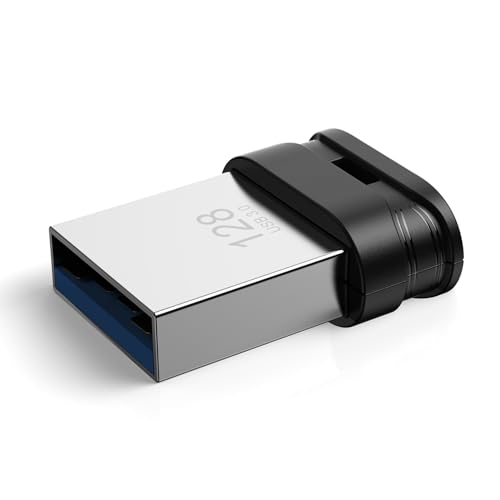
This USB 3.0 flash drive offers high-capacity storage suitable for saving local media, documents, and large files. Best for users who want to store TV recordings, downloaded movies, or music libraries accessible directly from a smart TV or media player. Caution: not all TVs support micro‑USB power or OTG storage; confirm TV compatibility before use.
- High-Capacity Storage: 128GB for photos, 4K videos, and large files
- Fast Transmission: USB 3.0 up to 90MB/s read, 30MB/s write
- Rugged & Waterproof: Durable design for long-lasting use
Android 13.0 TV Stick 4K (OLIZGBE)
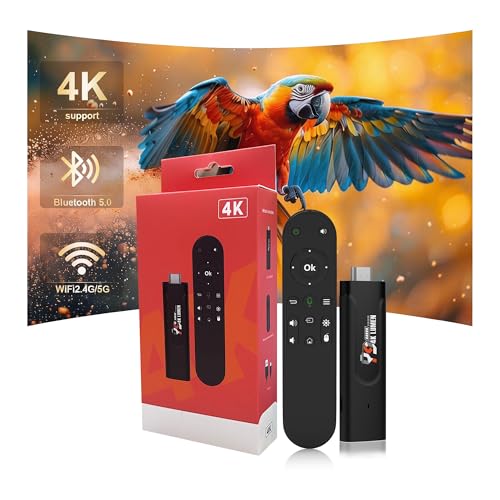
The Android 13.0 TV Stick 4K brings Android’s versatility to a smart TV setup. It features 2GB RAM, 16GB ROM, and dual-band WiFi for stable 4K streaming and app variety beyond typical streaming platforms. Best for users who want broader app compatibility and a familiar Android ecosystem.
Limitations: with 2GB RAM, performance may be less snappy during heavy multitasking compared to higher‑end sticks; consider models with more memory if you run many apps simultaneously.
Buying Guide
What should you consider when choosing a USB stick or streaming stick for a smart TV?
- Video resolution: Do you need 4K HDR or is HD sufficient for your TV and bandwidth?
- Storage needs: Do you want local media storage or rely on cloud streaming only?
- App ecosystem: Does your household prefer Fire TV, Android TV, or another platform?
- Networking: Is your WiFi strong enough, or would a device with WiFi 6 offer a noticeable boost?
- Power requirements: Some USB sticks need external power beyond the TV’s USB port; check your TV’s power delivery.
- Remote and search features: AI-powered search and voice remotes can save time finding content.
How to choose between 4K and HD sticks?
Choose 4K when you own a 4K TV and streaming services offer high-resolution content. For older TVs or limited bandwidth, an HD stick can be a cost-effective option with solid performance.
What about USB storage options?
USB flash drives are useful for local media storage. Ensure your TV supports external storage and that the drive is compatible with the file formats your TV supports (e.g., MP4, MKV).
Which platforms offer the best app availability?
Fire TV devices provide a broad app catalog including Prime Video, Netflix, YouTube, and many mainstream services. Android TV devices offer wide app compatibility and more customization.
Is cloud gaming a factor?
Some sticks support cloud gaming services via the platform’s app store. If gaming on a TV is important, prioritize devices that support cloud gaming through a supported service.
FAQ
- Which USB stick is best for a smart TV with 4K support? The 4K-capable Fire TV Sticks and the Android 13.0 TV Stick 4K are strong choices depending on preferred ecosystem.
- Do USB flash drives work with all smart TVs? Compatibility varies by TV model; check TV specifications for supported file systems and USB port power requirements.
- Can I use a USB drive to store recordings on a Fire TV Stick? Some TVs and streaming devices support local storage, but not all permit recording directly to USB sticks.
- Is WiFi 6 important for streaming sticks? WiFi 6 can improve stability and speed in busy networks, especially with 4K content or multiple devices.
- Do these devices require a power adapter? Some devices draw power from the TV’s USB port; others may require an external power adapter for reliable operation.
- Will these devices affect my existing streaming subscriptions? No, they provide access to your existing streaming services; subscription costs remain separate.