When choosing USB drives for DJing, prioritize speed, reliability, and compatibility with your equipment. This guide highlights five USB drives that perform well in live sets, studio prep, and set transfers. Best fits include high-capacity storage for large music libraries, dual-connector designs for cross-compatibility, and rugged builds for frequent travel. The following picks are suitable for club DJs, mobile DJs, and bedroom producers who need fast transfers and dependable performance on the fly.
| Product | Capacity | Connector Type | Best For | Why It’s Noteworthy |
|---|---|---|---|---|
| SanDisk 512GB DJ Flash Drive | 512GB | USB-C & USB-A | Professional sets | Up to 1,000 MB/s read, dual connectors, designed for DJ workflows |
| Lexar D40E 128GB Dual USB 3.2 Gen 1 | 128GB | USB-C & USB-A | Compact backups | Slim 2-in-1 design, up to 100 MB/s, 360° swivel |
| Samsung BAR Plus 128GB USB 3.1 | 128GB | USB-A & USB-C adapters needed | Rugged durability | Metal casing, high endurance, up to 300 MB/s read |
| JOIOT 128GB USB C Flash Drive Dual 3.0 | 128GB | USB-C & USB-A | 2-in-1 versatility | Read up to 130 MB/s, universal compatibility |
| SANDISK 256GB Ultra USB 3.0 | 256GB | USB-A | Budget-friendly backup | Up to 130 MB/s read, secure and reliable |
Lexar D40E 128GB Dual USB 3.2 Gen 1 Type-C Jump Drive

The Lexar JumpDrive D40E combines USB-C and USB-A in a slim, portable design, making it a practical choice for DJs who switch between laptops, tablets, and USB devices. It offers up to 100 MB/s transfer speeds, which can accelerate set prep and file transfers between devices. The 360° swivel connector minimizes cap loss and makes on-the-spot connector changes quick, ideal for quick-cue environments or backup drives in flight cases.
Best for: Mobile or laptop DJs who need a compact, cross-compatible drive that travels light. Choose this if you frequently switch devices during prep and need a two-in-one solution with easy connector access.
Caution: Actual speeds depend on host hardware and usage conditions; real-world transfer rates may be lower than the advertised maximum. Not ideal for ultra-high-bitrate audio libraries that require sustained write performance.
SANDISK Ultra Flair 128GB USB 3.0 Flash Drive

The SanDisk Ultra Flair 128GB drives USB 3.0 performance with read speeds up to 150 MB/s, which makes it a solid choice for DJs building quick transfers or backing up sets. The drive’s generous capacity helps DJs store multiple playlists, samples, and mixes without juggling multiple devices. It remains user-friendly for set preparation and on-the-road back-ups, especially when time is tight before a gig.
Best for: DJs who value straightforward, fast transfers and a balance of capacity and performance without extra features. Good for backup copies of tracks and pre-made sets before gigs.
Caution: Real-world speeds vary by host device and file type; USB 3.0 performance is contingent on a compatible port and system.
JOIOT 128GB USB C Flash Drive Dual USB 3.0

JOIOT’s 2-in-1 USB-C and USB-A flash drive is designed for wide compatibility across modern laptops, tablets, smartphones, and Macs. It delivers read speeds up to 130 MB/s and write speeds up to 35 MB/s, which is notably faster than USB 2.0 drives and practical for moving large audio files and samples before a live set. The emphasis on plug-and-play use makes it suitable for DJs who prefer not to install drivers or software.
Best for: DJs who use both USB-C and USB-A devices and want a fast, plug-and-play option for music libraries and practice files. Choose this if you routinely transfer large files between different devices.
Caution: Some devices may limit write speeds under sustained heavy use; consider a higher-capacity option for very large libraries or high-bitrate files.
Lexar D40E 128GB Dual USB 3.2 Gen 1 Type-C Jump Drive (Titanium Grey)

The Titanium Grey variant of the Lexar D40E reinforces the same dual-connector, 2-in-1 design with USB-C and USB-A compatibility. It remains a portable option with up to 100 MB/s transfer speeds and the same 360° swivel feature for easy connector access. This makes it a reliable backup or travel-friendly choice for DJs who edit and transfer on the road.
Best for: DJs who want a consistent, compact dual-connector drive with a familiar Lexar reliability profile. Choose this if you already own Lexar devices and prefer consistent performance in your gear bag.
Caution: As with any dual-connector drive, the full benefit comes from devices supporting both USB-C and USB-A; some adapters or older equipment may constrain performance.
SAMSUNG BAR Plus 3.1 USB Flash Drive 128GB
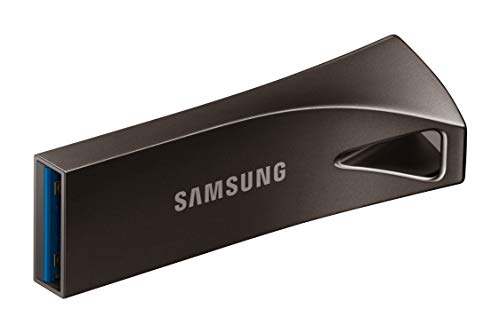
The Samsung BAR Plus USB drive is built for durability and performance. Its metal casing adds ruggedness, and it delivers read speeds up to 300 MB/s under USB 3.1, accelerating large file transfers and set preparation. The drive’s design is conducive to frequent use in travel-heavy DJ schedules and can handle daily wear and tear in road cases.
Best for: DJs who need a rugged, fast drive with strong build quality and quick file transfers. Choose this if you value durability alongside high-speed performance for live or studio use.
Caution: The BAR Plus relies on USB 3.1-compatible ports for peak speeds; using older USB ports may reduce transfer rates below the maximum.
SANDISK 256GB Ultra USB 3.0 Flash Drive
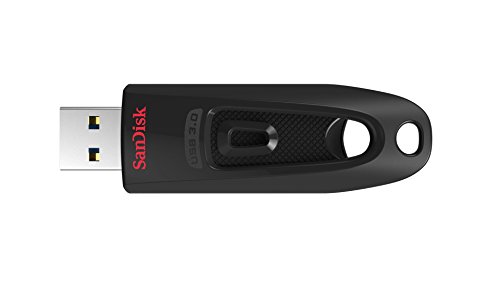
This 256GB Ultra USB 3.0 drive offers a balance of capacity and speed with up to 130 MB/s read performance. It’s a practical option for DJs who want a simple backup drive or a space to store a larger set or sample library without stepping up to more expensive high-speed models. It remains backward compatible with USB 2.0, aiding compatibility with older equipment.
Best for: DJs seeking a budget-friendly option with ample capacity and reliable USB 3.0 performance. Choose this if you need a straightforward, high-capacity backup for non-critical files or offload tasks.
Caution: USB 2.0 compatibility is slower; ensure your DJ gear supports USB 3.0 or higher to meet transfer expectations.
Buying Guide: Key Considerations For Djing With USB Drives
- Speed vs. Capacity: For live sets, prioritize higher read speeds to load tracks quickly. If you carry large libraries, consider 256GB–1TB options, balancing price and performance.
- Connector Compatibility: Dual USB-C and USB-A drives simplify use across laptops, controllers, and booth equipment. Check your gear’s ports before purchasing.
- Durability: Rigid metal housings and protective designs reduce damage from travel and on-stage handling. Look for rugged or “Bar Plus”-style builds for frequent gigs.
- Reliability & Warranty: DJ workflows call for dependable drives. While warranties vary, consider well-known brands with solid durability and replacement policies.
- Plug-and-Play: Opt for drives that require no software installation. This minimizes setup time and potential driver conflicts with performance gear.
- Security: If you store unreleased sets or client material, ensure encryption options or password protection are available where needed.
FAQ
- What USB drive is best for DJing live sets?
– A high-speed, dual-connector drive with at least 128GB of capacity is ideal, such as models offering USB-C and USB-A compatibility and solid read speeds. - Is USB-C essential for DJ gear?
– Not always, but many modern DJ laptops and controllers use USB-C. A dual USB-C/USB-A drive reduces adapter needs and streamlines workflow. - How much capacity do I need for a DJ set?
– For club or mobile gigs, 128GB–256GB can handle practice sets and smaller libraries; 512GB–1TB suits larger, multi-genre libraries and longer sets. - Can drive transfer speeds affect live performance?
– Yes. Faster read speeds reduce load times for tracks and samples, helping maintain smooth cueing and transitions. - Are there risks with carrying USB drives for DJs?
– Physical damage and data loss are risks. Use protective cases and maintain backups on separate drives. - Should I upgrade from USB 3.0 to USB 3.2 or USB-C?
– Upgrading offers faster transfers and better compatibility with newer devices, improving workflow efficiency.