Looking for simple, plug-and-play USB computer speakers that deliver clear sound without clutter? This guide identifies five top picks that work with Windows, macOS, Linux, and Chrome OS. They’re ideal for students, remote workers, gamers, and home office users who want easy setup and reliable sound from a compact package. The list includes a mix of compact desktop bars, traditional 2.0 stereo sets, and monitor-clip styles to suit different desk layouts. Below, compare compatibility, sound style, and best-use cases to help you choose.
| Product | Best For | Key Benefit |
|---|---|---|
| [Upgraded] LIELONGREN USB Computer Speaker | Windows and multi-OS users | Plug-and-play with broad OS compatibility |
| XKX USB Home PC Speakers | Small setups needing USB-C option | USB-C compatibility via built-in adapter |
| Amazon Basics Stereo 2.0 | Budget-conscious users | Two speakers with simple USB power |
| Amazon Basics USB-Powered with Volume | Compact, portable listening | Front-access volume control, plug-and-play |
| Logitech S150 USB Speakers | Balanced desktop use | Clear 2W peak/1.2W RMS with USB connection |
Best for Broad OS Compatibility: LIELONGREN USB Computer Speaker

The LIELONGREN Upgraded USB Computer Speaker is designed for Windows PCs and other operating systems, including macOS, Linux, and Chrome OS. It offers a straightforward plug-and-play setup: plug into a USB port, select the USB playback device, and you’re ready. This choice is best for buyers who want universal compatibility across devices from multiple brands, and a compact yet capable USB speaker for desktops, laptops, or mini PCs. A potential limitation is dependence on a proper USB audio driver on some systems, which is common for external USB audio devices.
Best USB-C Adapter Ready: XKX USB Desktop Speakers

The XKX speakers are versatile for setups that require USB-C compatibility thanks to a built-in USB-C to USB adapter. They support Windows, macOS, ChromeOS, and Linux, making them a strong pick for newer laptops or desktops with USB-C only ports. They’re best for users who want to connect via USB-C without a separate dongle, and who still need solid volume and bass. Note that some users may prefer separate 3.5mm audio options for legacy devices.
Best Budget 2.0 Stereo: Amazon Basics 2.0 Speakers

Amazon Basics Stereo 2.0 speakers provide a simple, affordable setup for desktops or laptops. This pair is USB-powered and includes inline volume control, making it a practical choice for basic listening, presentations, or general productivity tasks. Best for buyers who want a straightforward, plug-and-play solution without extra features or clutter. A potential limitation is the lack of Bluetooth or advanced controls, which may matter for some users seeking wireless flexibility.
Best Portable USB-Powered Option: Amazon Basics USB-Powered Speakers

Amazon Basics USB-Powered Speakers emphasize portability and front-panel volume control. They plug directly into a computer’s USB port, with simple plug-and-play setup and a front-facing control for quick adjustments. This option is best for users who need compact speakers for travel, dorm rooms, or small workstations, and who value ease of use over expansive audio features. A limitation is that the speakers rely on USB power, so battery-free operation is not possible when used away from a computer.
Best for Balanced Desktop Sound: Logitech S150

The Logitech S150 USB Speakers emphasize balanced audio with a compact design. Rated at 2 Watts peak/1.2 Watts RMS, they deliver clear spoken dialogue and general music for everyday computer use. The built-in USB connection makes setup quick, and an orange LED indicates power status. They’re best for users who want a clear, reliable desktop speaker pair without extra features. One limitation is that power and audio are both USB-driven, which might limit performance in noisier environments or with older USB ports.
Best 2-in-1 Monitor Bar: Tylubio USB & Bluetooth Speaker
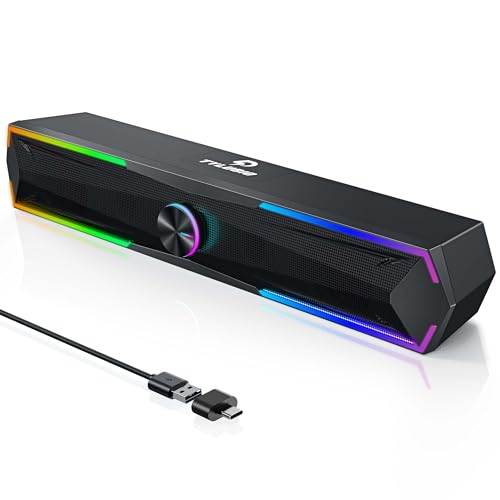
The Tylubio 2-in-1 speaker bar provides both USB and Bluetooth input, delivering a clear stereo experience with under-monitor convenience. It includes dynamic LED lighting and a single rotary control for easy USB/Bluetooth switching, play/pause, and power. This option is best for users who want a clutter-free desk with under-monitor placement and flexible input options. A caveat is that the LED features and multiple modes may be distracting for some, especially in focused work environments.
Best Clip-On Monitor Speaker: Cyber Acoustics CA-2890

The Cyber Acoustics CA-2890 is a USB-powered speaker bar designed to clip onto a monitor. It offers a clean, space-saving setup and quick volume/mute controls with a simple USB connection. This pick is best for users who want a minimal desktop footprint or a dedicated monitor speaker for compact setups. Limitation: clip-on design may be less versatile for non-monitor placements and may depend on monitor thickness and available space.
Buying Guide: Key Considerations for USB Computer Speakers
- Connectivity compatibility: Ensure the speakers work with your primary devices (Windows, macOS, Linux, Chrome OS) and any USB-C adapters if needed.
- Speaker configuration: Decide between 2.0 stereo, soundbars, or monitor-clip designs based on desk space and desired sound profile.
- Power source: USB-powered speakers simplify setup; some models offer 5V USB power while others may rely on USB-C power delivery.
- Controls and ease of use: Front-panel volume, mute, and simple plug-and-play setup reduce friction during use.
- Size and placement: Desktop footprint, under-monitor mounting, or portable options affect where you can place the speakers and how they sound.
- Sound quality needs: Look for speakers with sufficient bass, clear mids, and minimal distortion for your use case—gaming, music, or calls.
- Additional inputs: If you need headphone jack or 3.5mm input, verify those features before purchasing.
Buying Tips: Quick Comparison by Use Case
- Best all-around compatibility: LIELONGREN USB Computer Speaker for cross-OS setups.
- Best for USB-C only devices: XKX USB Desktop Speakers with built-in USB-C adapter.
- Best budget stereo option: Amazon Basics Stereo 2.0 Speakers for simple PC audio.
- Best portable, ultra-compact: Amazon Basics USB-Powered Speakers with front volume control.
- Best monitor- or desk-clutter solution: Cyber Acoustics CA-2890 monitor clip speaker bar.
FAQ
- Do USB computer speakers require audio drivers? Most plug-and-play USB speakers do not require driver installation, but some OSes may need basic audio drivers for full functionality.
- Can USB speakers work with laptops without external power? Yes, most are powered directly from the USB port and do not need a separate power source.
- Are USB-C speakers compatible with older devices? Some models include USB-C adapters or USB-C inputs, enabling use with USB-C-only devices and older USB ports with adapters.
- Is a separate 3.5mm input important? If you want to connect non-USB devices, check for a 3.5mm jack or alternative inputs.
- Which setup minimizes desk clutter? Monitor-clip or under-monitor speaker bars typically offer the cleanest desk appearance.
- What’s a good pick for gaming or movie watching? Look for speakers with strong bass and clear dialogue, such as compact 2.0 or soundbar-style options.