Looking for a reliable USB charging station to power multiple devices at once? This guide showcases five top options that appeal to different buyers, from heavy multi-device households to travel-minded users. Each product is evaluated for best use case, power Delivery capabilities, and safety features. Read on to find a solution that fits your mix of phones, tablets, laptops, and wearables.
Summary Table of Selected Products
| Product | Best For | Key Benefit | Caution |
|---|---|---|---|
| KingFuture USB Charger Station Block 10-Port USB-A | Large families, shared desks | High port count, 2.4 A per port | Bulkier footprint than compact hubs |
| Anker Desktop Charger, 60W 6 Port | Everyday multi-device charging | Trusted brand, balanced power | No Quick Charge support |
| BREEKET USB C GaN Fast 100W 6-Port | Fast charging for laptops + phones | GaN tech, 100W total | Not for laptops with very high power needs beyond 100W |
| MGRNPONY 320W 10-Port GaN Charging Station | High-output, many devices | 10 ports, GaN3 tech, high total wattage | Complex power distribution varies by device |
| Roruite USB C Charging Station 10 Port 245W | Very large device mix, laptops included | Wide total power, USB-C and USB-A mix | First port may have laptops-only note in some data |
KingFuture USB Charger Station Block 10-Port
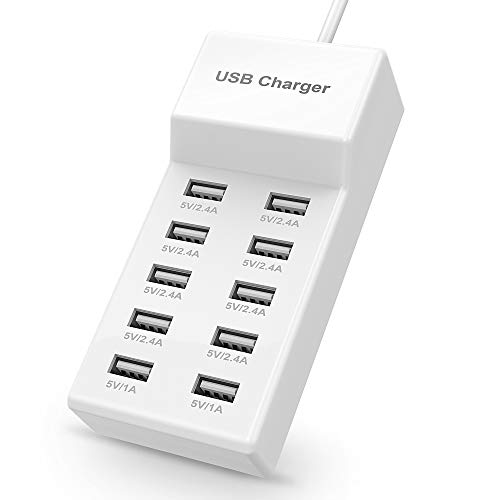
Best for high-capacity charging at a shared workspace or family desk. This 10-port USB-A hub provides up to 2.4 amps per port, with a total limit of 10 amps. It uses PowerIQ and VoltageBoost to optimize charging speed for a wide range of devices including phones, tablets, e-readers, headphones, and portable speakers. It supports worldwide input (100-240V) and includes a multi-protect safety system for device protection. Ideal for households with many devices that rely on USB-A charging, but the bulkier footprint means it’s suited to a dedicated charging area rather than a travel bag.
Best for: Families or shared workspaces that need reliable, multi-port USB-A charging without worrying about overloading individual outlets.
Selected since: It offers plenty of ports and robust safety features, making it a straightforward all-in-one solution for dense device environments.
Caution: Because it’s USB-A only, newer devices that rely on USB-C PD won’t benefit from fast USB-C charging speed here.
Anker Desktop Charger, 60W 6 Port

Best for balanced, reliable multi-device charging in homes or offices. This 6-port hub delivers up to 2.4 amps per port with a total of 12 amps, ensuring several devices can charge quickly simultaneously. Anker emphasizes a community of users and robust performance, though it does not support Qualcomm Quick Charge. Suitable for users who want a proven brand with predictable charging behavior in a compact footprint that reduces cable clutter.
Best for: Users who want dependable, multi-device charging with clear per-port performance and a trusted brand name.
Selected since: It provides strong per-port speed and energy distribution with a clean design for desks and nightstands.
Caution: Quick Charge is not supported, so some devices that rely on Quick Charge won’t see accelerated charging.
BREEKET GaN Fast USB C 100W 6-Port

Best for fast-charging power users who want a compact hub that can handle laptops and multiple devices at once. This GaN-based station offers 100W total with three USB-C PD 3.0 ports and three USB-A ports. It supports a broad range of devices from iPhones to high-end laptops, and its GaN technology helps keep heat lower and efficiency higher. Not ideal for users who need more than 100W total or those who primarily rely on USB-A-only charging.
Best for: Tech-savvy users who require quick charging across several devices, including laptops, in a compact form factor.
Selected since: It combines high power with GaN efficiency and broad compatibility for everyday and business use.
Caution: High-demand devices may reach the total 100W limit, which could limit simultaneous charging speed for some ports.
MGRNPONY 320W 10-Port GaN USB C Station

Best for users with many devices and higher power needs across USB-C and USB-A. This 10-port station includes five USB-C ports and five USB-A ports, with PD/PPS options up to 65W, 30W, and 20W. GaN technology improves efficiency and safety with continuous temperature monitoring. It supports charging a laptop, tablets, and multiple phones simultaneously. It’s a strong pick for busy households, but users should plan port allocation because some devices may share power depending on usage. Not designed for laptops with exceptionally high continuous power beyond its 65W USB-C PD1 port.
Best for: Families or teams who need to charge many devices at once with strong support for USB-C laptops and phones.
Selected since: The high port count and GaN efficiency offer versatile performance for diverse device ecosystems.
Caution: Power distribution across ports can vary; plan which devices go on the high-wattage USB-C port when needed.
Roruite USB C Charging Station 10 Port 245W

Best for large device mixes with a need for very high total power. This 10-port station provides a total of 245W with 65W on USB-C PD, 20W on several USB-C A ports, and 20W on USB-A ports. It supports a wide array of devices—from laptops to wearables and audio gear. Note that the first USB-C port can be laptop-focused in some configurations, so plan port allocation accordingly. Suitable for shared workspaces or power setups that require simultaneous laptop and mobile charging.
Best for: Users who need to charge laptops and many USB devices at once, with a high total power ceiling.
Selected since: It’s one of the strongest total-power options in this set, enabling diverse, simultaneous charging scenarios.
Buying Guide
What to consider when choosing a USB charging station:
- Power per port vs total power: If you have many phones, a high port count with moderate per-port power may be ideal. For laptops, prioritize higher USB-C PD ports and a generous total wattage.
- Port mix: USB-C PD ports are best for newer devices; USB-A ports work well for older devices. Some hubs combine both, offering flexibility.
- GaN technology: GaN chargers run cooler and more compact while delivering high wattage. They’re ideal for desks and travel where space matters.
- Safety features: Look for surge protection, overcurrent, over-voltage, and temperature monitoring. Certifications (UL or equivalent) add peace of mind.
- Build and footprint: Consider the size and cable management options. Larger hubs are common in home or office setups, while compact hubs suit travel.
- Device compatibility: Ensure the hub supports your primary devices (laptops, tablets, wearables) and whether it supports quick charging standards your devices rely on.
How to plan port allocation
- Assign high-wattage devices (laptops, tablets) to USB-C PD ports with higher wattage (45W-65W each if available).
- Place phones and wearables on USB-A or lower-watt USB-C ports to keep high-demand devices from throttling.
- Group cables using clips or organizers to maintain a tidy workspace and reduce cable wear.
FAQ
- What is GaN technology in charging hubs? GaN stands for gallium nitride, which enables smaller, more efficient chargers with less heat generation.
- Is it safe to charge multiple devices at once? Yes, if the station includes surge protection and over-current/over-voltage safeguards, and if you distribute power across ports as recommended by the manufacturer.
- Do these hubs support USB-C PD for laptops? Many of the listed hubs offer USB-C PD ports with varying wattages; check the total and per-port wattage to ensure compatibility with your laptop.
- Can I travel with these charging stations? Some models are compact and include travel-friendly features, but always verify voltage compatibility and keep in mind the size and cable management needs.
- Should I pick a 6-port or 10-port hub? Choose based on your device count and how much you value speed per device. A larger port count may be better for shared desks, while fewer but higher-wattage ports suit laptop-heavy setups.
- Do these hubs require a dedicated power outlet? Yes, most high-wattage multi-port hubs should be plugged into a dedicated outlet to avoid overloading a single outlet circuit.