The best two-in-one laptops in this guide offer strong versatility, a range of screen sizes, and solid everyday performance. They’re ideal for students, remote workers, and anyone who needs a single device that can switch between laptop and tablet modes. The top picks include models suited for light productivity, streaming, and note-taking, with careful attention to battery life, 2-in-1 flexibility, and value. Below, you’ll find quick summaries of each highlighted product, who they’re best for, and why they were selected. A buyer’s table follows to help you compare at a glance.
| Product | Screen | Best For | Why Selected |
|---|---|---|---|
| Lenovo Chromebook 2-in-1 | 14″ Full HD | Budget students and light productivity | Lightweight, durable, quick boot with Google apps integration |
| Exilapsire 15.6″ Yoga 2-in-1 | 15.6″ Full HD | Multi-taskers and media fans | Large display, capable multitasking for everyday tasks |
| Tylvx 15.6″ 2-in-1 | 15.6″ FHD | Creative users and heavy multitaskers | 16GB RAM, 512GB SSD, four-mode versatility |
| Lenovo IdeaPad Flex 3i Chromebook | 12.2″ WUXGA | Students and commuters | Compact, long battery life, flexible hinge |
| QAZIPO 2-in-1 Laptop/Tablet | 10.1″ FHD | Travelers and note-takers | Detachable keyboard with portable, lightweight design |
Lenovo Chromebook 2-in-1 — Lightweight 14″ 2-in-1
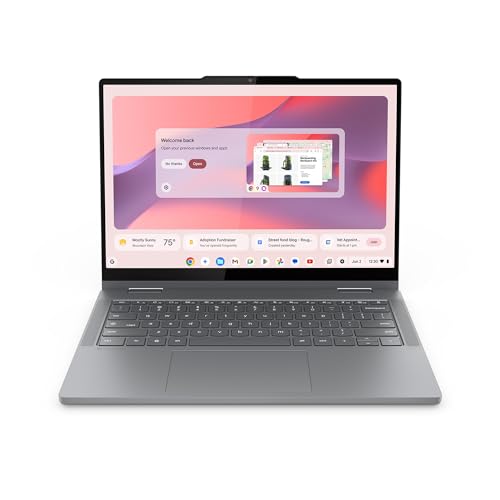
This Lenovo Chromebook 2-in-1 is designed for daily light work with a thin, durable build and integrated Google apps. It features a 14″ WUXGA IPS touchscreen for clear visuals, a compact 0.69″ profile, and a total weight around 3.3 pounds, making it easy to carry between classes or the office. The device is powered by an Intel-based core performance suitable for web browsing, document editing, and streaming, with 128GB of storage for files and apps. Best for students, travelers, and anyone who prioritizes a simple, secure Chrome OS experience. A potential limitation is that CPU performance may lag under heavier, professional-grade workloads.
- Best for: Students and on-the-go productivity
- What to know: Long battery life and military-grade durability support daily tasks
- Caution: Chrome OS limits some professional software options
Exilapsire 15.6″ Yoga 2-in-1

The Exilapsire 15.6″ Yoga 2-in-1 blends full-size screen real estate with a flexible 360-degree hinge. It runs a responsive AMD A9 CPU with Radeon graphics, offering adequate performance for web tasks, streaming, and light design work. The Full HD IPS display provides vivid colors and wide viewing angles, making it suitable for presentations from a laptop or tablet mode. Best for: users who want a bigger screen for multimedia and everyday productivity. A limitation is that it may not deliver high-end gaming or professional-grade performance for demanding software.
- Best for: Multimedia, presentations, everyday tasks
- Better for: Those who value a large display in a 2-in-1 form
- Caution: Not ideal for heavy content creation or gaming
Tylvx 15.6″ 2-in-1 Laptop/Tablet

The Tylvx 15.6″ model is aimed at power users who want robust multitasking capability. It features a 15.6″ Full HD touchscreen, 16GB RAM, and a 512GB SSD, paired with an Intel m3-8100Y processor. The 4-mode hinge supports laptop, tablet, tent, and stand configurations, ideal for students, designers, or professionals who switch between typing, drawing, and presenting. Best for: students and creators needing ample RAM and fast storage. Consider that the heavier device may be less portable than smaller systems.
- Best for: Multitaskers and creators
- Better for: Users who need storage and memory headroom
- Caution: Larger size may reduce portability
Lenovo IdeaPad Flex 3i Chromebook 12.2″
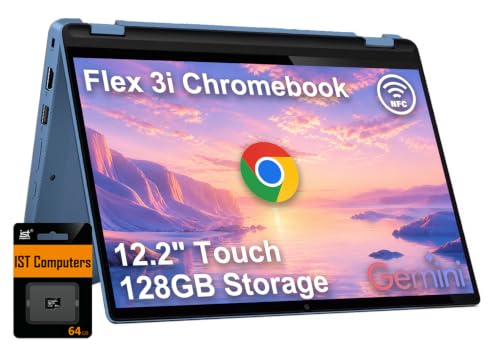
The IdeaPad Flex 3i Chromebook emphasizes a compact 12.2″ display with a 360-degree hinge, enabling laptop, tent, flip, and tablet modes in a single device. It uses an Intel N100 processor with 4GB RAM and 128GB storage, aiming at everyday tasks, schoolwork, and light multitasking. Best for: students and commuters who value portability and flexible use. Limitation: smaller screen may not be ideal for extended multimedia or heavy workloads.
- Best for: Everyday use and light multitasking
- Better for: Those prioritizing a compact, portable form factor
- Caution: Smaller screen size limits immersive media experiences
QAZIPO 2-in-1 Laptop/Tablet — 10.1″ FHD

The QAZIPO 2-in-1 combines portability and productivity in a compact 10.1″ form factor. It includes a detachable keyboard, full HD touchscreen, and a budget-friendly configuration suitable for note-taking, light document work, and media consumption on the go. Best for: travelers and students who want a very lightweight device for casual use. Caution: the small display and limited processing power may hinder workloads requiring more speed or screen real estate.
- Best for: Travel and note-taking on the go
- Better for: Ultra-portable, budget-conscious buyers
- Caution: Limited performance for heavy software
Buying Guide: Key Considerations for Choosing a 2-in-1 Laptop
What screen size should you choose? Smaller screens (10–12 inches) are ultra-portable and great for travel, while 13–14 inches balance portability with usability. Larger displays (15.6 inches) excel for multimedia and productivity but are heavier to carry.
Which processor and RAM matter? For light tasks, Intel N100 or similar integrated CPU options with 4GB RAM are often sufficient. If you multitask with many tabs or creative apps, aim for 8–12GB RAM and a faster processor where possible.
What about storage and endurance? Chromebooks often rely on cloud storage and smaller local storage (64–128GB), while Windows devices with SSDs offer faster boot times and local file access. Consider your needs for offline access and file size.
What mode options are essential? Look for devices offering laptop, tablet, tent, and stand modes if you anticipate frequent mode changes for reading, typing, or presenting.
Durability and battery life also influence value. Durable builds and decent battery life suit students and remote workers who travel or work remotely. Always check real-world battery expectations and the device’s weight when you prioritize portability.
Frequently Asked Questions
- What is a 2-in-1 laptop? A device that can function as both a laptop and a tablet, typically with a 360-degree hinge or detachable keyboard.
- Which 2-in-1 is best for students? Models with light to mid-range specs, good battery life, and a compact 12–14 inch screen often suit students well.
- Do I need a powerful CPU for 2-in-1 use? For basic tasks, a modest CPU with ample RAM is enough. Heavy workloads may require more RAM and a faster processor.
- Are Chromebooks good for all tasks? Chromebooks excel with web-based tasks, cloud storage, and Google apps; some professional software may be limited.
- What should I consider for portability? Weight, thickness, battery life, and the presence of a durable chassis are key factors for travelers.
- Is a 15.6″ 2-in-1 worth it for portability? It may offer better usability and screen space but can be heavier; weigh portability against screen needs.