Answer: If you need a compact, reliable travel mouse for your laptop, these five options balance portability, battery life, and ease of use across multiple devices. They’re ideal for commuters, students, and remote workers who value quiet operation and fast connectivity.
Summary table of selected products:
| Product | Best For | Connectivity | Notes |
|---|---|---|---|
| Logitech M240 Compact Silent Bluetooth Wireless Mouse | Quiet environments, long battery life | Bluetooth | Up to 18-month battery life |
| Logitech M350s Pebble 2 | Multiple-device users, portable style | Bluetooth | Easy Switch across 3 devices |
| VssoPlor Wireless Mouse | Budget-friendly, reliable 2.4 GHz | 2.4 GHz wireless | Stable connection up to 10 m |
| Logitech Mobi Fold Foldable Wireless Mouse | Maximum portability | Bluetooth | Foldable design |
| Verbatim Mini Travel Optical Mouse | Ultra-compact wired option | USB | Plug-and-play, no batteries |
Logitech M240 Compact Silent Bluetooth Wireless Mouse

The Logitech M240 combines quiet operation with Bluetooth connectivity, making it ideal for quiet offices or libraries. It pairs quickly and offers long battery life, reducing the need for frequent changes. This model is well suited for travelers who prioritize a silent click and simple pairing over additional programmable features.
Best for: Quiet environments and long battery life with easy Bluetooth setup. Limitations: No USB receiver; relies on Bluetooth, which may require device compatibility checks.
Logitech M350s Pebble 2 Bluetooth Wireless Mouse

The M350s Pebble 2 is a slim, colorful option designed for on-the-go use. It supports Easy-Switch across up to three devices, making it a good pick for users juggling work across multiple computers or tablets. The recycled-plastic build contributes to sustainability without sacrificing portability.
Best for: Multi-device users who want a lightweight, stylish travel companion. Limitation: Some users may prefer more ergonomic support for extended sessions.
VssoPlor Wireless Mouse

This VssoPlor model emphasizes stable 2.4 GHz connectivity and a wider working range, with a DPI setup designed to track smoothly on many surfaces. It’s a practical, budget-friendly choice for travelers who want dependable performance without added complexity.
Best for: Budget-conscious buyers needing a straightforward wireless experience. Caution: On some surfaces, you may still notice tracking variations; a mouse pad improves consistency.
Logitech Mobi Fold Foldable Wireless Mouse

The Mobi Fold shines in extreme portability. Its foldable design reduces bulk, and it supports multi-device connections. This option is great for travelers who want a compact gadget that easily fits into pockets or small bags while still delivering a solid navigation experience.
Best for: Ultra-compact travelers who need a foldable, multi-device solution. Limitation: Folded form may feel unusual to users accustomed to traditional mice.
Verbatim Mini Travel Optical Mouse
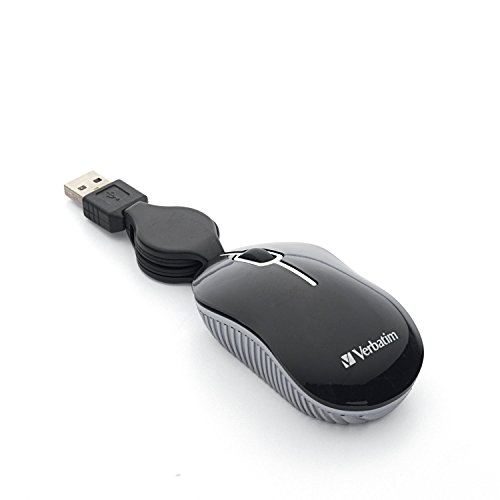
The Verbatim Mini Travel Optical Mouse is a wired option that eliminates batteries and wireless pairing concerns. Its ultra-compact size and reliable plug-and-play performance make it a practical pick for travelers who prefer a simple, wired setup during trips or business travel.
Best for: Travelers who want guaranteed power and simplicity without batteries. Caution: The wired connection reduces mobility without a USB extension or hub in some setups.
Buying Guide: Travel Mice For Laptops
What connectivity fits your routine?
Bluetooth mice are ideal if you want to minimize dongles and work with multiple devices. A 2.4 GHz receiver can offer a reliable option when Bluetooth is not available on a device. Consider how many devices you routinely connect and whether Easy-Switch is important to you.
How portable should your mouse be?
Foldable or ultra-compact designs save space for bags and pockets. If you prioritize full-day comfort, a slightly larger, ambidextrous model may reduce hand fatigue during long sessions. Evaluate your travel bag space and daily carry weight.
Battery life and power options
Silent and energy-efficient mice extend battery life, especially important for frequent travelers. Rechargeable options reduce ongoing costs, but you should ensure you have a suitable charging plan when you’re on the road.
Surface versatility and tracking
Some mice track well on most surfaces, while others benefit from a mouse pad for consistent precision. If you travel to varied work environments, a model advertised as reliable on diverse surfaces is advantageous.
Best practices for choosing
Match the mouse to your device ecosystem (Windows, macOS, Chrome OS, iPadOS). If you switch between devices often, prioritize Easy-Switch or multi-device pairing. Consider silent operation if you share spaces such as offices or dorms.
FAQ
- What is the quietest travel mouse? The Logitech M240 emphasizes silent clicks with a 90% reduction in click sound, making it a strong choice for quiet environments.
- Should I pick Bluetooth or wired for travel? Bluetooth reduces cable clutter and works with many modern laptops. A wired option guarantees power and plug-and-play simplicity where Bluetooth isn’t reliable.
- Can I use a travel mouse on multiple devices? Yes. Models like the M350s and Mobi Fold support multi-device connections and Easy-Switch for quick device changes.
- Are foldable mice durable for travel? Foldable designs maximize portability but may feel less traditional to use; they are best for travelers who prioritize compact size over a familiar grip.
- Is a mini travel mouse suitable for long work sessions? Some mini mice may be less ergonomic for extended use. If you type long hours, consider a model with a comfortable grip and stable support.
- Do travel mice require special software? Most travel mice use standard Bluetooth or USB drivers and do not require additional software for basic operation.