Looking for a tablet with a stylus that balances productivity, note-taking, and multimedia entertainment? This guide highlights five strong options, focusing on models that pair responsive stylus support with solid processing, good displays, and ample storage. Each pick suits different buyers: students needing all-day battery and AI tools, casual creators who want handwriting-to-digital conversion, and commuters who value portability and expandability. A quick summary table follows the intro to help you compare at a glance.
| Product | Display | Memory / Storage | Key Benefit | Best For |
|---|---|---|---|---|
| Lenovo Idea Tab (4GB/128GB) | 11″ 2.5K | 4 GB / 128 GB | Circle to Search with Google | Budget students |
| Lenovo Idea Tab (8GB/256GB) | 11″ 2.5K | 8 GB / 256 GB | AI-powered multitasking | Power users |
| NOVOJOY Android 10.1″ & Pen | 10.1″ HD | 8 GB / 32 GB (+ 1TB exp) | Android 15 with stylus | Everyday note-takers |
| Samsung Galaxy Tab S10 Lite | 10.9″ LCD | 6 GB / 128 GB | S Pen included | Media consumers and creators |
| EHFiDC Android 10.1″ 2-in-1 | 10.1″ HD | 30 GB RAM (30GB total) / 2TB expand | Gemini AI + 2-in-1 versatility | Student multitaskers |
Note: All models in this guide support a stylus or pen input in some form. Availability, specs, and features can vary by region and model iteration. This article uses publicly listed features to help you compare your options.
Lenovo Idea Tab — 11″ 2.5K Display, 90Hz, Pen Included

The Lenovo Idea Tab combines a sharp 11-inch 2.5K IPS touchscreen with a 90Hz refresh rate, designed for smooth handwriting, note-taking, and casual browsing. Powered by a MediaTek Dimensity 6300 processor, it emphasizes responsive performance for study apps and media playback. The included Lenovo Tab Pen and folio case support precise circle-to-search features, helping users quickly locate content or translate languages directly from a note. Best for students who value AI-powered apps and quick search within handwritten content.
Best for: Students and frequent note-takers who want solid on-device performance and direct handwriting-to-search capabilities. Caution: 4 GB RAM may feel constrained with heavy multitasking or large apps; consider 8 GB RAM variants for heavier workloads.
Lenovo Idea Tab — 11″ 2.5K Display, 90Hz, 8GB/256GB

This higher-memory Lenovo Idea Tab expands to 8 GB RAM and 256 GB storage, delivering stronger multitasking and more local file space for students, researchers, and artists who keep large projects on-device. The same 11-inch, 2.5K display and 90Hz refresh rate support smooth visuals and handwriting experiences, while Circle to Search remains a key advantage for fast access to information. Best for power users who want faster app switching and bigger local storage.
Best for: Students and light professional work that benefits from more memory and storage. Caution: Higher RAM/ROM configurations may come with a higher price tag; evaluate whether you need the extra capacity.
NOVOJOY Android 10.1″ Tablet With Stylus

The NOVOJOY 10.1-inch Android tablet emphasizes a broad feature set in a compact package. It runs Android 15 with a quad-core processor, 8 GB RAM and 32 GB storage, expandable via microSD. The included stylus and foldable case support easy note-taking and on-the-go editing, while Wi-Fi, Bluetooth, GPS, and 2K+ compatibility offer versatile daily use. Best for learners who want a capable, affordable Android tablet with expandable storage and a stylus for handwriting tasks.
Best for: Everyday students and casual creators seeking an affordable all-in-one device. Caution: Native app ecosystem and performance may vary with heavier professional software; storage expansion is recommended to maximize media quantities.
Samsung Galaxy Tab S10 Lite — S Pen Included

The Samsung Galaxy Tab S10 Lite combines a 10.9-inch LCD with an included S Pen, enabling precise handwriting, drawing, and note-taking. It offers long battery life and rapid charging, along with Vision Booster for comfortable viewing in varying lighting. This model is well-suited for media consumers who also want reliable stylus input for quick sketches or annotations. Best for multimedia enthusiasts who value a familiar ecosystem and a bundled stylus for on-the-go creativity.
Best for: Users who prioritize a bundled S Pen experience and strong battery performance. Caution: The included RAM is 6 GB, which may be limiting for very heavy multitasking compared to higher-end models.
EHFiDC Android 16 2-in-1 Tablet Set
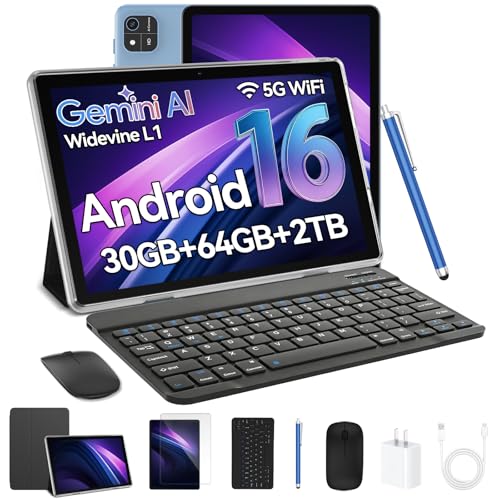
The EHFiDC 2-in-1 tablet set runs Android 16 with Gemini AI and includes a keyboard, mouse, and stylus, packed with a high-capacity memory configuration—effectively a portable hybrid laptop replacement for students who want to type and annotate with ease. The 10.1-inch HD IPS display and 90Hz touch responsiveness support smooth navigation. Best for students who want a versatile 2-in-1 device for both writing and light productivity, with expandability options via memory and accessories.
Best for: Students and professionals who benefit from laptop-like versatility in a compact tablet form. Caution: The 2-in-1 bundle adds accessories weight and may affect portability for very tight travel.
Buying Guide: Key Considerations When Choosing a Tablet With Stylus
What screen size and resolution best fits your routine? Larger displays help with note-taking and drawing, but smaller tablets are easier to carry. Look for high refresh rates (60Hz to 120Hz) for smoother stylus input and scrolling.
How much RAM and storage do you need? If you multitask with many apps or store large media offline, prioritize 8 GB RAM and 128–256 GB storage, with microSD expansion where available.
Is stylus latency important? A responsive stylus with low input lag enhances the handwriting-to-digital experience and makes drawing more natural. Some tablets include a bundled stylus, which can reduce total ownership cost.
What about operating system and app ecosystem? Android tablets offer broad app compatibility and expandable storage; Windows or 2-in-1 configurations provide keyboard and desktop-like experiences. Consider Gemini AI or other smart features if you value on-device intelligence.
Battery life and charging speed are practical meetups for daily use. Look for all-day stamina and fast charging to minimize downtime between classes or meetings.
Frequently Asked Questions
- Do all tablets with stylus support handwriting and note-taking? Most models listed support stylus input and handwriting notes, but accuracy and latency vary by hardware and software integration.
- Is 2-in-1 more versatile than a traditional tablet? A 2-in-1 with a keyboard and stylus can double as a lightweight laptop, offering better productivity for essays and research.
- Should I prioritize RAM or storage? For multitasking and large apps, prioritize RAM first (8 GB or more). Storage is important for offline media and documents; expandable storage helps long-term use.
- Is Android 15/16 necessary for good stylus support? Newer Android versions bring improved AI features and better compatibility with stylus apps, but most stylus experiences work well on Android 12 and newer as well.
- Are bundled accessories worth it? Yes, bundles with stylus, case, and keyboard can reduce total costs and improve portability and productivity.
- Which tablet is best for students on a budget? Models like the Lenovo Idea Tab and NOVOJOY options offer solid stylus functionality with balanced specs at accessible prices.