Answering the need for age-appropriate, parental-controlled tablets, these picks are best for parents seeking durable, kid-friendly devices. Ideal buyers include busy caregivers wanting offline-friendly educational games, parents prioritizing eye protection and parental controls, and teachers or caregivers seeking simple, shared devices for preschoolers. The list focuses on devices with parental controls, kid-friendly cases, and durable builds. Below, you’ll find five options that balance usability, safety, and value, plus a compact buying guide and quick FAQs to aid decision-making.
| Product | Best For | Why It Stands Out |
|---|---|---|
| HOTTABLET Kids Tablet 7″ (Pink) | Toddlers who need strong parental controls | Android 12, parental profiles, screen-time controls, kid-friendly case |
| Amazon Fire 7 Kids Tablet | Budget-friendly beginners | Ad-free content options, Amazon Kids+, durable build |
| HOTTABLET Kids Tablet 7″ (Blue) | Same family, different color for sharing | Same core features with a durable case |
| PEICHENG Kids Tablet 7″ Android 12 | Expandable storage users | Android 12, 4GB RAM, 32GB ROM, parental controls |
| COLORROOM 10.1″ Kids Tablet (Pink) | Growing toddlers and early readers | Large screen, Google Kids Space, parental controls |
HOTTABLET Kids Tablet 7″ Pink

The HOTTABLET 7-inch Android tablet is designed for young users, running Android 12 with a child-friendly mode and Widevine L1 support for streaming. It includes a quad-core processor, 4GB RAM (expandable by 2GB), 32GB storage, and a 1024×600 IPS display. Eye protection mode helps reduce eye strain during reading or viewing. The tablet offers 2+5MP cameras, Bluetooth, Wi-Fi, and a 3000mAh battery intended for about eight hours of mixed use. Best for parents who want robust parental controls, kid profiles, and a protective silicone case that stands for hands-free learning.
Best for: families needing strong screen-time controls and a durable, kid-friendly device. Choose this if you value expandable memory and a protective case that doubles as a stand.
Caution: Battery life may vary with heavy multimedia use; real-world eight-hour estimates depend on brightness and apps used.
Amazon Fire 7 Kids Tablet

The Fire 7 Kids Tablet is a budget-friendly option with a 7-inch display and ad-free content via Amazon Kids+. It includes a two-year worry-free guarantee, a kid-proof case, and a one-year subscription to Amazon Kids+. This bundle emphasizes a simple parental control experience and access to curated educational content from Disney, Nickelodeon, PBS Kids, and more. Best for: families seeking an affordable, easy-to-manage entry into digital learning and entertainment. Better for: parents who want a straightforward setup with enduring content offerings. Caution: long-term costs may accrue after the included subscription period.
HOTTABLET Kids Tablet 7″ Blue
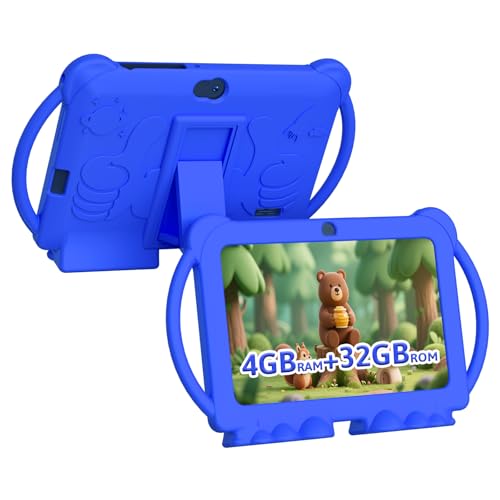
The blue variant mirrors the pink model’s core specs: Android 12, 4GB RAM (2GB base + 2GB expansion), 32GB ROM, and a 7-inch IPS display with 1024×600 resolution. It includes the same parental controls, kid profiles, and educational access via Google Play. The protective kid-proof case adds durability, and the device supports eight hours of mixed use. Best for: households with multiple children or color-coordinated devices. Better for: families prioritizing consistent parental controls and similar performance across color variants. Caution: expansion relies on SD card compatibility and may affect throughput if heavily used.
PEICHENG Kids Tablet 7″ Android 12

The PEICHENG tablet runs Android 12 with a quad-core processor and 4GB RAM plus 32GB ROM. It supports microSD expansion up to 512GB, has a 2.0MP front and 5.0MP rear camera, and includes a 3.5mm headphone jack and dual speakers. Pre-installed kids apps and parental controls let parents limit screen time, block unsafe sites, and create separate profiles. Best for: families needing extra storage options and a familiar Android environment. Better for: users who anticipate adding media locally via microSD. Caution: SD expansion requires attention to compatibility and card speed for smooth playback.
COLORROOM 10.1″ Kids Tablet (Pink)

The COLORROOM 10.1-inch tablet runs Android 15 with an octa-core CPU and a generous 10GB RAM (4GB + 6GB) and 64GB ROM plus 1TB expansion potential. It features a 10.1-inch anti-blue-light display at 1280×800, plus Google Kids Space for curated educational activities. Parental controls enable filtering and time limits, while early-learning apps support reading and basic math. Best for: toddlers who will grow into tablet use and benefit from a larger screen. Better for: families prioritizing a broader screen, improved eye comfort, and a Google-backed kids ecosystem. Caution: higher upfront cost and larger device may be less ideal for very small hands.
Buying Guide: Key Purchase Considerations
- Age-appropriate content: Look for devices with pre-installed kids space or parental controls to filter apps and websites.
- Durability: Protective cases and spill-resistant designs help withstand drops and rough handling.
- Screen size and eye comfort: For toddlers, 7–10 inch screens with anti-blue light features reduce eye strain.
- Storage and expandability: 32GB is common; microSD support adds capacity for photos and offline apps.
- Battery life: A minimum of 6–8 hours mixed use is preferable for classroom and play sessions.
- Platform and content: Google Play access enables a broad selection of kid-friendly apps; Amazon Kids+ offers curated content and ease of use on Fire tablets.
Frequently Asked Questions
- What age is best for a tablet for toddlers? Best suited for ages 2–6, with supervision and time limits tailored to development and attention span.
- Are parental controls sufficient for safety online? Yes, when enabled, but ongoing supervision and app vetting remain important.
- Should I choose Android or Amazon Fire? Android offers Google Play access and broader app choice; Fire devices provide strong parental controls and curated content via Kids+.
- Is a larger screen better for toddlers? A larger screen helps with readability and learning apps, but handling ease and grip matter for younger children.
- Can tablets replace a traditional toy? Tablets are best as learning aids and interactive storytelling tools, not substitutes for physical play.
- Do these tablets require a subscription for content? Some bundles include subscriptions; others rely on free or paid apps from the app store.