Finding the right tablet for a child means balancing content access, parental controls, battery life, and durability. This guide highlights five top options that fit different needs—from younger children needing simple interfaces to older kids want more capable tablets for learning and creativity. Each choice is best for a specific type of buyer, with clear pros, limitations, and who it suits best. The following table summarizes key points to compare at a glance.
| Product | Best For | Storage / Battery Highlights | Why It Stands Out |
|---|---|---|---|
| Amazon Fire HD 8 Kids Pro tablet | Older kids who want a full-feature tablet with kid-friendly content | 64GB; long battery life (up to 13 hours) | Ad-free content, strong parental controls, included Kids+ for learning and entertainment |
| Amazon Fire 7 Kids tablet | Budget-conscious families with younger kids | 16GB; 10-hour battery | One-year Kids+ subscription, durable case, easy controls |
| SVITOO Kids Tablet 10 Inch | Parents seeking Android-based flexibility with robust parental controls | 32GB; expandable storage | Android environment with parental controls and kid-friendly case |
| COLORROOM Android 15 10.1 Inch Tablet | Kids who benefit from a larger display and Google Kids Space | 64GB; 10GB RAM, expandable storage | Android 15 with Google Kids Space and strong parental controls |
| HOTTABLET 7 Inch Kids Tablet | Travel-friendly or starter tablet for very young users | 32GB; 3000mAh (estimated) battery | Kid-friendly case, parental controls, Google GMS access |
Amazon Fire HD 8 Kids Pro tablet

The Fire HD 8 Kids Pro is designed for big kids ages 6–12 with a bright 8″ HD display and a focus on learning and creativity. It includes a 6-month Amazon Kids+ subscription and a slim, kid-friendly case. This model is best for families seeking a robust, ad-free experience with strong parental controls and a long battery life that supports schoolwork, reading, and media consumption.
Who it’s best for: parents wanting a durable, feature-rich tablet for older children who can navigate apps and learning content with minimal supervision. Why selected: it pairs a full-feature tablet experience with curated, kid-safe content through Amazon Kids+ and solid 2-year guarantee coverage against breakage.
Limitations to consider: after the initial Kids+ period, ongoing access requires a subscription; some may prefer a wider app ecosystem beyond the Amazon app store. The included storage is good for most kids’ needs but can fill quickly with media and apps.
Amazon Fire 7 Kids tablet

The Fire 7 Kids tablet is a compact, affordable option for younger children ages 3–7. It ships with a 1-year Amazon Kids+ subscription and a rugged case, plus a 1-year protection plan from the manufacturer. Battery life runs around 10 hours, which supports short trips and daily supervised use without frequent recharging.
Who it’s best for: families seeking a budget-friendly entry point for preschool and early elementary age kids who mainly need simple apps, books, and videos. Why selected: the bundle emphasizes parental controls, content curation, and durability in a smaller form factor.
Limitations to consider: smaller 7″ display and limited storage may feel restrictive for heavier media use or multiple large apps. After the first year of Kids+, ongoing access requires monthly fees.
SVITOO Kids Tablet 10 Inch

The SVITOO 10-inch Android tablet emphasizes parental controls, a protective case, and a large display. The device targets kids who need more screen real estate for learning apps, videos, and interactive content while parents manage screen time and app access. It includes a kid-friendly case and preloaded safety features for a safer experience.
Who it’s best for: families wanting an Android environment with straightforward, built-in parental controls and a larger screen for studying and video calls. Why selected: it provides robust controls, a strong balance of performance and safety, and a case to protect the tablet during learning sessions. Limitations: Android tablets can offer a wider app ecosystem but may require more parental setup to ensure safe usage.
COLORROOM 2026 Android 15 10.1 Inch Tablet

The COLORROOM 10.1-inch tablet runs Android 15 with an Octa-core CPU, 10GB RAM, and 64GB storage plus expandable memory. It supports Google Kids Space and robust parental controls for children aged 3 and up. The larger screen helps with reading, drawing, and multitasking learning apps, making it a versatile option for growing learners.
Who it’s best for: households needing a larger, more capable Android-based option with strong family safety features. Why selected: the mix of high memory, a modern Android OS, and Kids Space makes it suitable for both learning and media consumption. Limitation: more advanced features may require more user setup and monitoring by guardians.
HOTTABLET 7 Inch Kids Tablet
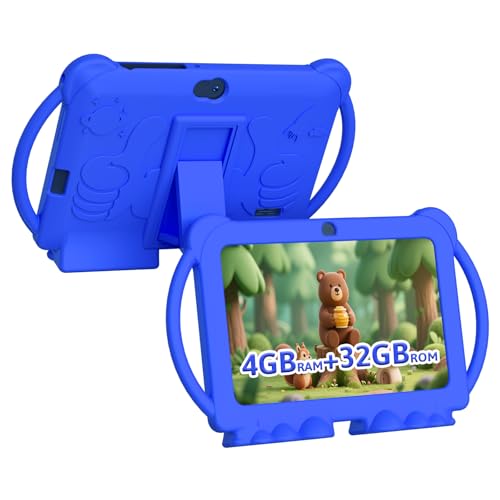
The HOTTABLET 7-inch tablet is a compact option with Android 12.0, a 4-core CPU, 4GB RAM, and 32GB storage. It offers parental controls and a kid-friendly Google GMS experience for access to educational apps. The compact size makes it easy to travel with and suitable for younger children learning basic literacy and numeracy.
Who it’s best for: families needing a small, affordable starter tablet for younger kids who primarily use educational apps and light media. Why selected: it combines a child-focused interface with essential controls and a sturdy, market-friendly price. Limitation: smaller screen and limited overall performance compared to larger models if the child grows quickly into more demanding apps.
Buying Guide: Key Purchase Considerations
What should you evaluate before buying a kids tablet? Start with the age range and learning goals. Consider display size, storage, and expandability, as well as the durability of a rugged case. Parental controls help limit screen time, filter content, and manage app access. If your child will engage with a variety of apps and media, an Android-based tablet or a device with access to a broad app store can be beneficial. For younger children, a curated content ecosystem with a strong Kids+ or Kids Space offering ensures safer browsing and easier content discovery. Battery life matters for longer trips and school days, while a warranty or replacement policy reduces ongoing costs from accidental damage.
Durability and accessories: look for kid-proof cases, screen protectors, and easy-to-clean surfaces. Storage is important if a child uses many apps or downloads content; consider expandable storage if the device supports it. Parental control depth varies; some platforms allow time limits, content filtering, and usage reports. If you want a seamless learning ecosystem, a tablet tied to a familiar content store (Amazon Kids+ or Google Kids Space) can simplify onboarding for both kids and parents.
Usage patterns: if the child reads and studies extensively, prioritize readability, a larger display, and a robust set of educational apps. If travel is common, battery life and a compact form factor matter more. For very young kids, simplicity and supervision-first features are crucial. Always balance price against long-term usability and the value of bundled subscriptions and guarantees included with some models.
Frequently Asked Questions
- What age is best for a tablet with parental controls? Parental controls are most helpful for ages 3–12, with selection criteria adjusting to the child’s growing independence and app needs.
- Is Android or Amazon Fire better for kids? It depends on content needs. Android offers broader app access, while Amazon Fire provides curated content and integrated Kids Space or Kids+. Choose based on desired ecosystem and ease of use.
- Should I buy an extended warranty for a kid tablet? An extended warranty or replacement policy is useful for accidental damage and helps reduce replacement costs, especially for younger children.
- Do kids tablets need memory expansion? If your child stores a lot of apps, videos, and ebooks, expandable storage helps avoid running low on space.
- What should be considered for travel use? Prioritize models with long battery life, durable cases, and offline access to learning content to minimize interruptions on the go.
- Is screen time managed automatically by these tablets? Most include parental controls, but ongoing supervision and limit-setting by guardians remain essential for healthy usage habits.