Answering the search needs of aspiring authors, screenwriters, and classroom writers, this guide highlights five practical tools that help plan, draft, and organize stories. These picks range from full-featured writing software for scripts to creative prompts and guided journals that spark ideas. Each option targets a different writer type, from professional screenwriters to students and teachers. Whether you want automatic formatting, ready-to-use prompts, or structured story templates, these choices help sustain momentum and improve storytelling craft.
| Product | Best For | Why It Stands Out |
|---|---|---|
| Script Studio | Screenwriters and novelists | Integrated script formatting, scene numbering, and outline tools for long-form storytelling. |
| Storymatic Classic | Writers facing blocks and classrooms | 540 prompts and storytelling games to spark ideas and warm up sessions. |
| How to Write a Story (Grades 4-6+) | Students and teachers | Structured guidance focused on basic story elements for younger writers. |
| Piccadilly Write the Story Journal | Creative journaling and rapid drafting | Guided prompts and word constraints to stretch imagination. |
| Make-a-Story Writing Journal | Early writers and classroom use | Draw-and-write prompts that develop language and narrative planning. |
Script Studio — Creative Writing Software for Screenwriters & Novelists

Best for professional writers who need a single workspace for drafting scripts and long-form fiction. The software includes an intuitive word processor with automatic script formatting, scene numbering, and pagination, making it ideal for screenwriters and novelists who require consistent formatting as they type. It also emphasizes step and sequence outlining with strong story-structuring tools and notes management, helpful for complex narratives. A potential limitation is that it focuses on structure and formatting tools, which may be less helpful for writers seeking heavy research databases or long-form collaboration features.
Storymatic Classic – Creative Writing Prompts and Story Games
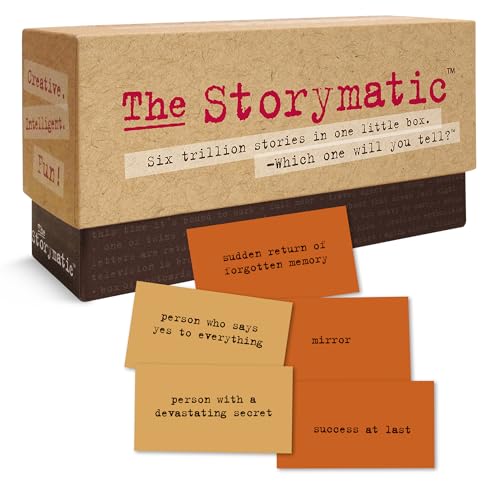
Best for writers seeking rapid idea generation and classroom-friendly activities. This card-based prompt system provides 540 cards that pair characters with complications to kickstart stories. It’s especially useful for writers experiencing writer’s block, teachers guiding creative writing, or groups exploring storytelling together. One limitation is that prompts are paper-based and require manual integration into digital drafts for most workflows.
How to Write a Story, Grades 4-6+

Best for classrooms and younger writers who need structured guidance. This resource emphasizes characters and basic story elements suitable for grades 4-6 and up. It’s a solid pick when a teacher or parent wants clear steps and prompts to help students plan settings, scenes, and motivations. A drawback is that it is not a digital writing environment, so it lacks in-app editing and formatting features found in software tools.
Piccadilly Write the Story Journal

Best for creative journaling and rapid drafting. This guided journal includes prompts that challenge a writer to craft stories using a twist, time travel, or mystery themes. It supports both individual practice and classroom activities, offering a structured space to record ideas and drafts. The constraint-based prompts can be a limitation for writers who prefer open-ended writing without predefined rules.
Learning Resources Make-a-Story Writing Journal

Best for early writers and classroom use. The Make-a-Story Writing Journal combines draw-and-write prompts with story questions to help kids plan characters, settings, and plots. It’s a practical starting point for developing handwriting, sequencing, and creative expression. A limitation is that it is a printed journal rather than a digital platform, requiring transcription when moving to digital drafts.
Buying Guide
What type of story writing support do you need?
Digital writing software is ideal for professional formatting, outline control, and collaborative drafting. Paper prompts and guided journals help spark ideas, teach structure, and support classroom activities. Choose based on whether you prioritize automation and formatting, or creativity prompts and hands-on practice.
Are you focused on fiction, screenplays, or classroom use?
Screenwriting and long-form fiction benefit from products that auto-format scenes, characters, and pagination. For classrooms and younger writers, guided journals and prompt cards provide structure and engaging exercises. Consider a mix if you teach or mentor multiple ages or genres.
How important is portability and offline access?
Software solutions excel in portability across devices and cloud syncing, while paper prompts and journals work offline and without devices. If you travel often or work remotely, a digital tool with offline modes can be advantageous.
What about learning style and pace?
Prompts and storytelling games suit experiential learners who benefit from quick idea generation. Structured worksheets or software with templates help sequential learners who need clear steps and examples. A combination often yields the broadest coverage.
What are reasonable cautions to consider?
Digital tools may require a learning curve and ongoing updates. Paper-based prompts do not integrate automatically with drafts, so extra steps are needed to transfer ideas. Ensure the chosen approach aligns with your editing workflow and publishing goals.
Frequently Asked Questions
- What is the best option for serious screenwriting? A dedicated writing software with professional script formatting, scene numbering, and pagination, such as Script Studio, is best for screenwriters who need production-ready documents.
- Can prompts help overcome writer’s block? Yes. Prompt-based tools like Storymatic Classic provide varied starters that jumpstart ideas and can be used solo or in groups.
- Are paper journals useful for digital writers? Absolutely. Journals and guided prompts can supplement digital work by fueling creativity and planning before drafting.
- Which option is best for kids? Books and journals designed for classrooms, such as How to Write a Story (Grades 4-6+) and Make-a-Story Writing Journal, emphasize structure and practice appropriate to early learners.
- Should I buy multiple tools? If you teach or write across formats (screenplays, fiction, journaling), combining a digital writer with prompts or guided journals provides a balanced workflow.
- How do I transfer ideas from prompts to a manuscript? Start with an outline or character sketches, then import or copy content into your primary drafting tool. Use the prompts to fill in scenes and develop arcs.