Direct answer: if you want reliable protection for your Steam Deck, choose cases that balance hard outer shells with snug inner fit and practical features like kickstands, strap options, and easy port access. This guide highlights five top cases that fit both Steam Deck OLED and LCD models, emphasizing portability, protection, and convenience. Ideal buyers include frequent travelers seeking rugged protection, casual gamers who want organization on the go, and tech users who value modular accessories. Below, a quick comparison table helps you compare essentials at a glance.
| Product | Best For | Key Feature |
|---|---|---|
| JSAUX PC0104 ModCase | Modular protection with front shield | Detachable front cover and metal kickstand |
| JSAUX Carrying Case (OLED/ROG Ally) | Travel with accessories organized | Expanded internal storage, thickened EVA shell |
| tomtoc Slim Carrying Case | Ultra-portable protection | Thin hard-shell design with precise fit |
| JSAUX Hard Shell Case (OLED) | Rugged daily protection | Dual-layer storage, cable port for on-the-go charging |
| UYIYE Kickstand Case | Hands-free tabletop gaming | Hidden foldable kickstand, sweat-resistant grip |
JSAUX ModCase For Steam Deck (PC0104)

The ModCase provides complete protection using eco-friendly PC-ABS and silicone. It includes a detachable front shell and a modular metal kickstand for stable tabletop use. Precise cutouts preserve full port access, including the updated OLED power button. Best for gamers who want maximum modular protection without sacrificing handheld comfort. A potential limitation is that modular components add some weight, which may reduce handheld ergonomics for ultra-light travel.
JSAUX Carrying Case For Steam Deck / ROG Ally

This hard shell travel case is designed for Steam Deck OLED, ROG Ally, and ROG Ally X, offering a thickened EVA shell and fleece-lined interior to protect the screen. It features upgraded storage capacity to carry a charger, dock, power bank, and accessories without removing the case. Best for travelers who need organized space for multiple devices. Limitation: accessories are not included, so you must add cables and chargers separately.
Tomtoc Slim Carrying Case For Steam Deck

The Tomtoc Slim Case emphasizes ultra-portability with a hard shell that shields the Steam Deck from scratches during travel. It offers precise curvature fit to prevent joystick and button mis-touches and includes a padded inner layer to absorb shocks. Best for daily commuters and travelers who want minimal bulk. Limitation: it is slim, so it may not accommodate many accessories beyond the console and small add-ons.
JSAUX Hard Shell Case For Steam Deck / OLED
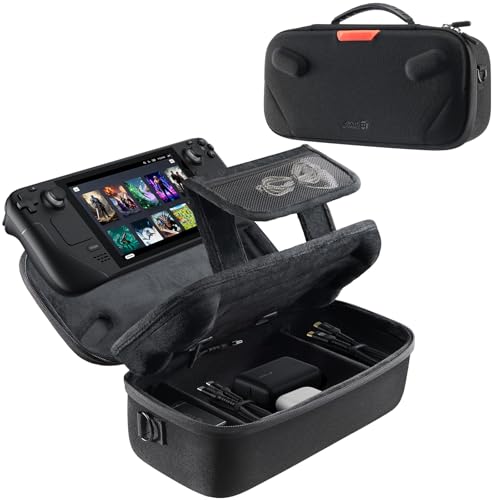
This upgraded JSAUX case fits both Steam Deck and OLED models with dual-layer storage and a built-in cable port for on-the-go charging. It supports commuting, travel, and gaming on the go while keeping essentials organized. Best for users who want a robust, multi-compartment case that also supports charging on the move. Caution: accessories are not included, so initial setup requires adding your own cables and adapters.
UYIYE Kickstand Case For Steam Deck OLED & LCD

UYIYE’s blue-purple gradient case offers a built-in kickstand for hands-free tabletop play and a sweat-resistant grip with a genuine cowhide cover and a 2mm EVA lining. It fits both OLED and LCD models and preserves button and port access. Best for players who want a stylish, ergonomic grip and a stable kickstand. Limitation: it adds a modest bulk to the device to accommodate the kickstand’s mechanism.
JSAUX ModCase For Steam Deck / OLED (PC0105)

This ModCase variant combines a protective shell with an adjustable kickstand and an interior stand base. It’s designed specifically for the Valve Steam Deck (2022) and offers four adjustable viewing angles (35°, 45°, 55°, 65°). Best for gamers who want customizable angles for comfortable play. Caution: installation notes warn that applying skins may affect fit, and it’s not compatible with certain docks.
Buying Guide
What should you look for in a Steam Deck case?
- Protection level: Do you prefer a rigid shell, soft silicone, or modular protection with front covers?
- Fit and model compatibility: Ensure the case supports both Steam Deck OLED and LCD versions you own.
- Port access: Check that the case preserves easy access to all buttons, triggers, and ports.
- Portability vs. added bulk: Slim cases are easy to carry; modular kits add protection but can add weight.
- Storage and organization: Consider cases with built-in compartments for chargers, cables, and accessories.
- Extra features: Kickstands, detachable fronts, and cable ports can improve usability on the go.
How to compare products quickly?
- Best for protection: Look for hard-shell or dual-layer designs with reinforced corners.
- Best for travel: Prioritize compact, lightweight cases with organized storage.
- Best for ergonomic play: Choose cases with kickstands or comfortable grips.
- Best for compatibility: Confirm OLED vs. LCD model support and Dock compatibility notes.
FAQ
- Will these cases fit both Steam Deck OLED and LCD models? Yes, most listed options specify compatibility with both OLED and LCD variants.
- Do they include accessories or cables? Some describe inner storage and ports, but many items do not include accessories; verify before buying.
- Are front or back covers necessary for protection? Front covers add scratch protection for the screen and thumbsticks, especially when backpacked.
- Which case is best for travel with multiple accessories? Options with expanded internal storage or modular compartments are ideal.
- Can I charge the Steam Deck while in the case? Some models offer built-in cable ports for on-the-go charging; others require removing the console.
- Do these cases affect button or trigger accessibility? Most designs preserve full access, but always check the cutouts for precise layout.