Answer: For NAS users seeking reliable, cache-friendly SSDs, the Western Digital WD Red SA500 series and high-endurance Gigastone drives offer balanced endurance, steady SATA performance, and NAS-optimized features. This guide selects five SSDs best suited for NAS environments, from home media servers to small offices, with clear buyer considerations and non-hyped claims. The included table helps compare key attributes at a glance.
| Product | Capacity | Best For | Endurance/Notes | Why Selected |
|---|---|---|---|---|
| Western Digital WD Red SA500 4TB | 4 TB | Heavy NAS caching, 24/7 access | High endurance for NAS workloads | Purpose-built for NAS caches; proven 3D NAND |
| Gigastone High Endurance 1TB (2-Pack) | 1 TB each | Multi-user NAS with frequent writes | Excellent endurance; SLC caching | High endurance NAS-grade SSDs |
| Western Digital WD Red SA500 2TB | 2 TB | Smaller NAS or cache tier | Strong NAS endurance | Balanced performance for home/business NAS |
| Samsung 870 EVO 2TB | 2 TB | Everyday NAS for mixed workloads | Reliable, high SATA performance | Well-known compatibility and longevity |
| Gigastone High Endurance 512GB (2-Pack) | 512 GB each | Compact NAS with caching needs | Solid endurance in smaller capacity | NAS-oriented endurance in a small form factor |
Western Digital WD Red SA500 4TB NAS SSD
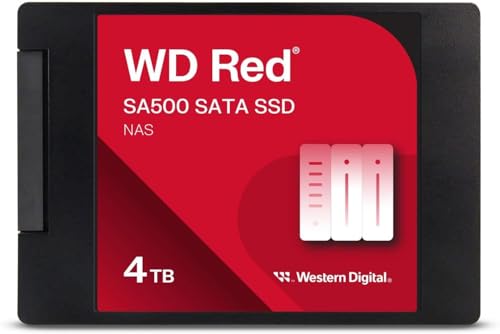
Key features show storage optimized for NAS caching to rapidly access frequently used files. Endurance supports heavy read/write cycles in 24/7 environments. Purpose-built for NAS with WD 3D NAND, delivering maximum SATA performance for home or business use.
Best for: Home or small office NAS users needing a large cache-friendly SSD with steady NAS-ready performance. Caution: Limited to SATA interface; not a primary NVMe option for faster PCIe-based NAS setups.
Gigastone 1TB High Endurance NAS SSD (2-Pack)

Features highlight high endurance with 24/7 NAS cache reliability, data protection, ECC, and power loss protection. Sequential transfer speeds reach up to 550 MB/s. Compatible with NAS systems and popular brands, though not recommended for server models or SAN environments.
Best for: Creative teams or multi-user NAS setups that require strong endurance and reliable caching. Caution: Not intended for server-class NAS or SAN applications.
Western Digital WD Red SA500 2TB NAS SSD

Storage optimized for caching in NAS to rapidly access frequently used files. High endurance designed for 24/7 operation. Purpose-built for NAS with WD 3D NAND to deliver reliable SATA performance for home and business NAS environments.
Best for: Smaller NAS caches or budget-conscious setups needing dependable caching with NAS-grade endurance. Caution: Lower capacity than 4TB option; may require additional drives for larger NAS arrays.
Samsung 870 EVO 2TB SATA SSD

Performance leadership on the SATA interface, delivering up to 560 MB/s read and 530 MB/s write speeds. Proven reliability and broad compatibility, with strong longevity and high endurance for mixed NAS workloads.
Best for: NAS setups needing robust, proven SATA SSD performance with high compatibility. Caution: Not the highest endurance option—for very heavy NAS write workloads, consider higher-capacity or higher-endurance models.
Gigastone High Endurance 512GB NAS SSD (2-Pack)

Two-pack setup offers decent caching capacity with 512 GB per drive and strong endurance tailored for NAS workloads. Includes power loss protection, ECC, and silent operation, suitable for small NAS deployments.
Best for: Compact NAS environments or tiered caching configurations. Caution: Lower total capacity per drive means more drives may be needed for large caches or data repositories.
Buying Guide: Key Considerations for NAS SSDs
What capacity do you need? NAS caches typically benefit from higher capacity SSDs that can hold frequently accessed data. For large media libraries or multi-user access, aim for 2 TB or more per drive if budget allows.
Endurance matters in NAS. Look for TBW (terabytes written) ratings and firmware optimizations designed for 24/7 operation. High endurance is especially important for cache drives that experience frequent writes.
Cache vs. main storage. Some NAS setups pair HDDs for bulk storage with SSDs as cache. In such cases, choose SSDs with excellent cache performance and steady sustained writes to accelerate common workloads.
Interface compatibility. SATA SSDs are widely compatible with most consumer and small-business NAS devices. NVMe SSDs require PCIe support and often a different NAS configuration; ensure your NAS supports NVMe if considering those options.
Firmware and NAS reliability. Choose SSDs marketed for NAS or with NAS-compatible firmware features such as power loss protection, ECC, and stable write performance under multi-user access.
Budget and total cost of ownership. Consider the balance between initial cost, drive endurance, and how much caching you need. A higher upfront investment can reduce latency and improve multi-user responsiveness over time.
FAQ
- What’s the best SSD size for NAS caching? Generally 1–2 TB per drive works well for caching in many home and small-business NAS setups, with higher capacities for larger caches or data pools.
- Are NAS SSDs different from standard SSDs? NAS-focused SSDs typically emphasize endurance, cache efficiency, and firmware features suited for 24/7 multi-user access. Standard consumer SSDs may perform well but might lack NAS-specific optimizations.
- Should I use multiple smaller SSDs or one large SSD for NAS caching? Multiple drives can improve cache hit rates and reduce write saturation; however, a single large SSD can simplify setup and improve reliability if redundancy is managed.
- Is SATA fast enough for NAS caching? For many NAS setups, SATA SSDs provide ample performance, especially when paired with HDD storage. If your NAS supports NVMe and you need very high throughput, consider NVMe SSDs with compatible NAS hardware.
- What about endurance ratings? Endurance indicates how much data can be written over the drive’s life. NAS workloads can wear drives quickly; choose models with higher TBW or MTBF ratings and NAS-optimized firmware.
- Can I mix brands for NAS caching? Yes, but verify compatibility and firmware features across drives, and design a caching strategy that minimizes cross-drive write amplification.