Answering the common buyer question: which transcription software best fits professional and personal use? This guide highlights five top options focused on ease of use, reliable playback control, and strong compatibility with foot pedals. Ideal buyers include freelancers, medical or legal transcriptionists, students, and small teams needing efficient audio-to-text workflow. The table below compares key aspects at a glance.
| Product | Best For | Playback & Formats | Foot Pedal Included | |
|---|---|---|---|---|
| Express Scribe Transcription Software (B00W64AI50) | General transcriptionists needing flexible formats | Various speed, constant pitch; audio/video; encrypted files | Optional with pedal compatibility | Windows |
| Express Scribe Pro Transcription Software (B01AQ3A6LI) | Professional setups requiring durable pedals | Pro features with heavy-duty USB pedal support | Yes | Windows |
| Express Scribe Transcription Foot Pedal ECS-FPAE | Users of Express Scribe software needing reliable hardware | Exclusive compatibility with Express Scribe | Yes | Windows/Mac |
| NCH Express Scribe Pro Transcription Foot Pedal Kit (B016IO81PW) | All-in-one kit with headset and pedal | Includes download software and hardware | Yes | Windows |
| Nobelbird Dictation Kit (B009V62AMU) | Professional kits for faster transcribing | Three-button USB pedal; ergonomic devices | Yes | Windows |
Express Scribe Transcription Software With Foot Pedal
Features include various speed playback with constant pitch, support for audio and video playback, and the ability to play most formats including encrypted dictation files. This makes it suitable for general transcriptionists handling diverse file types. Best for: freelancers or professionals who need flexible playback and broad format support. Caution: some formats may require additional codecs or updates to access encrypted dictations.
Express Scribe Pro Transcription Software With USB Pedal

Pro software paired with a heavy-duty Infinity USB pedal and a transcription headset. This setup targets professional environments requiring robust hardware and software integration. Best for: professionals needing durable hardware and reliable performance for long transcription sessions. Caution: hardware compatibility can vary with operating systems or USB ports on older machines.
Express Scribe Transcription Foot Pedal ECS-FPAE

Exclusive compatibility with Express Scribe software on Windows and Mac. It features a large ergonomic pedal layout designed for easy navigation between play, fast-forward, and rewind, reducing fatigue during long dictation sessions. Best for: users who want a purpose-built pedal designed for Express Scribe workflows. Caution: not compatible with non-Express Scribe transcription programs.
NCH Express Scribe Pro Transcription Foot Pedal Kit
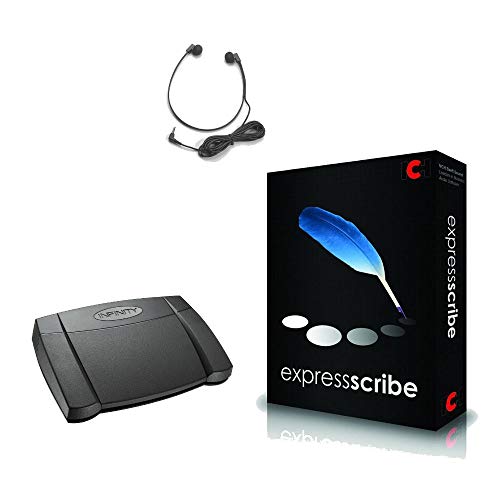
This kit combines Express Scribe Pro software with the Infinity USB foot pedal and Spectra PC headset. It offers a ready-to-use transcription setup with included hardware. Best for: newcomers or teams needing a complete starter kit. Caution: software download and licensing are required outside the box.
Nobelbird Express Scribe Transcription Kit

Includes a three-button USB foot pedal, high-quality ergonomic devices, and 10-foot cord length. Best for: professionals seeking ergonomic hardware and a compact kit for efficient workflow. Caution: requires compatible software; verify that Express Scribe is installed or accessible on your system.
Buying Guide: Key Considerations For Transcription Software
What should I look for in transcription software?
Compatibility with common audio formats, reliable playback controls, and clear keyboard shortcuts are essential. Consider whether you prefer a standalone application or a bundled kit with a foot pedal and headset.
Do I need a foot pedal?
A foot pedal can improve speed and accuracy by freeing hands for typing. Choose a pedal that is compatible with your transcription software and your computer’s USB ports. Ergonomic design helps reduce fatigue over long sessions.
What about formats and encryption?
Ensure the software supports your typical file formats, including encrypted dictation if you work with secure clients. Check whether you can adjust playback speed without changing pitch to maintain audio clarity.
Is a kit worth it for beginners?
For beginners, a kit with software, a foot pedal, and a headset can simplify setup and ensure all components work together. This reduces initial friction and speeds up the learning curve.
Platform and updates
Most options target Windows, with some Mac compatibility. Consider future-proofing for OS updates and whether the vendor offers ongoing updates or technical support as part of the package.
Accuracy vs. speed trade-offs
Balanced settings help maintain transcription accuracy while maximizing speed. Look for features like variable speed playback and pitch stabilization to tailor performance to your workflow.
Which product stands out?
For broad format support and ease of use, Express Scribe options are strong all-around choices. For a bundled hardware-and-software experience, kits from NCH or Nobelbird offer convenient, ready-to-use setups. Dragon Professional focuses on speech-to-text capabilities, suitable for those who also require dictation features beyond manual transcription.
Practical tips for setup
- Install the software and any necessary drivers before connecting hardware.
- Configure keyboard shortcuts for play, pause, rewind, and fast-forward.
- Test a variety of audio formats with a short sample to confirm compatibility.
- Set playback speed gradually to avoid fatigue during long sessions.
FAQ
- Is a subscription required for these transcription tools? Most listed options are available as downloadable software with license keys; check individual product pages for licensing terms.
- Can I use these with Mac computers? Some models offer Mac compatibility, notably certain Express Scribe pedals and software configurations; confirm the specific product listing.
- Do all kits include a headset? Several kits bundle a headset, but not all; verify the contents in the product description before purchase.
- Are encrypted dictation files supported? Yes, some Express Scribe versions advertise support for encrypted dictation; review file-format notes for encryption details.
- Which option is best for beginners? A starter kit that combines software, a pedal, and a headset can reduce setup friction and provide a cohesive workflow.
- Can I upgrade later if I outgrow the software? Most providers offer license upgrades or tiered plans; check licensing terms and upgrade options for each product.