When shopping for software and kits to create stop motion videos, look for user-friendly interfaces, reliable frame capture, and robust editing capabilities. This guide highlights five top options that balance ease of use with professional features, making them suitable for beginners, educators, and hobbyists. The top picks are best for different creators: complete kits pair with cameras for classroom projects; Windows/macOS packages suit independent animators; and flexible rigs support intricate setups. A quick summary helps you compare at a glance.
| Product | Best For | Key Strength | Notes |
|---|---|---|---|
| Stopmotion Explosion: Complete HD Kit | Educators and families | All-in-one with camera and learning resources | Great for classroom projects and LEGO animations |
| HUE Animation Studio Pro | Serious hobbyists and students | Full HD Capture with integrated lighting and book | Best for controlled lighting and flexible lens focus |
| Zu3D Complete Kit | Kids and parents | Two software licenses and hands-on materials | Strong educational value and approachable interface |
| Stop Motion Studio (Cateater) | Independent creators | Overlay mode and built-in editor | Simple workflow with frame-by-frame precision |
| Stop Motion Studio Pro (Cateater) | Advanced hobbyists | Enhanced capture and editing tools | Upgrade option for more features |
Stopmotion Explosion: Complete HD Kit

The Stopmotion Explosion kit provides a complete package designed to streamline production from setup to final edit. It includes a 1920 x 1080 HD camera with an upgraded focus ring and a full book of instructions plus access to online tutorials. This package is ideal for STEM-focused classrooms, homeschool projects, and hobbyists who want an all-in-one solution for LEGO brickfilms, action figures, and clay animation. Best for educators and families seeking turnkey learning materials and a single purchase that covers hardware, software, and guidance.
Who it’s best for: teachers and parents who want a ready-to-use system with guided activities and a built-in camera. Why selected: it combines a high-definition camera with step-by-step learning resources, reducing setup time and helping learners grasp stop motion fundamentals. Caution: bulkier kits may require more storage space and setup time than compact software-only options.
HUE Animation Studio Pro: Stop Motion Kit
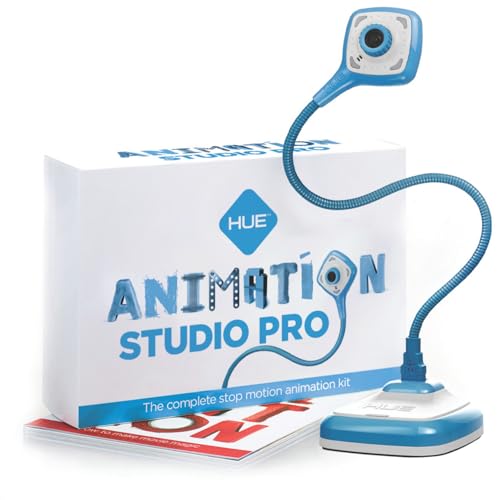
The HUE Animation Studio Pro kit emphasizes precise control with full HD capture and built-in lighting and microphone, reducing noise and improving shot quality. Its manual focus lens helps animators maintain consistent focus without fiddling with autofocus during shoots. This kit is best for aspiring filmmakers who want a mid- to high-end camera setup, a robust software suite, and printed learning materials. It’s especially suitable for projects that require tighter focal control and cleaner audio.
Who it’s best for: independent animators and students who want professional-level capture with guided learning. Why selected: the combination of manual focus, LED lighting, and a comprehensive book of techniques supports advanced stop motion workflows. Caution: the larger field of view may demand more planning for tight shot compositions.
Zu3D Complete Kit For Kids
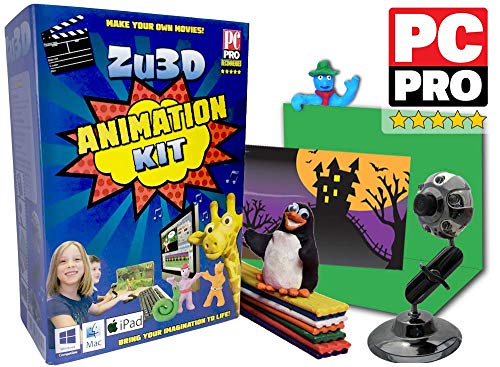
Zu3D’s complete kit blends kid-friendly hardware with easy-to-use software, making it a strong choice for families and classrooms where children drive the storytelling. The package includes an animation webcam, green screen, modeling clay, a mini-set, and a handbook, plus two software licenses for Windows, Mac OS X, and iPad. Best for hands-on projects, story creation, and collaborative learning. This kit’s strength is its friendly interface that enables young creators to jump straight into producing animated films.
Who it’s best for: families and schools seeking an engaging, age-appropriate stop motion experience. Why selected: the bundled licenses and materials support a range of activities from simple experiments to longer projects. Caution: software licensing requires activation on compatible devices; ensure your devices meet the supported platforms.
Stop Motion Studio
Stop Motion Studio focuses on a streamlined workflow with an overlay mode that highlights frame differences for precise control. It includes an integrated movie editor with a frame-by-frame preview and an adjustable capture interval, making it suitable for creators who want a compact, efficient production process. Best for solo creators who value quick iteration and clear visual feedback as they animate.
Who it’s best for: solo animators and beginners who want a straightforward toolset that covers capture, preview, and basic editing without added complexity. Why selected: the overlay and interval features accelerate learning and improve shot consistency. Caution: advanced users may require additional plugins or external editors for complex post-production.
Stop Motion Studio Pro

Stop Motion Studio Pro extends the basic app with advanced tools and features designed for more serious hobbyists. It retains overlay mode for precise frame comparison and includes an enhanced editing workflow with faster previews and more flexible capture options. Best for creators who want a higher level of control without leaving a familiar interface. This version is ideal when you outgrow entry-level features but don’t yet need full desktop production suites.
Who it’s best for: intermediate to advanced hobbyists who want better performance and more editing options. Why selected: it builds on the standard Stop Motion Studio with features that support more complex projects. Caution: pricing and feature availability can vary by platform; verify compatibility before purchase.
Buying Guide
What to consider when choosing stop motion software and kits
- Platform compatibility: Decide whether you need Windows, macOS, iPad, or multi-platform support. Some kits come with licenses valid across devices, others are device-specific.
- Hardware vs. software balance: All-in-one kits include a camera and lighting, which is convenient for learners and classrooms. Standalone software suits creators who already own a camera or want to upgrade gradually.
- Learning resources: Educational content, step-by-step guides, and tutorials shorten the learning curve. Consider whether printed books, online courses, or user communities are valuable for you.
- Editing features: Look for overlay modes, frame previews, adjustable capture intervals, and integrated editors. These features help you refine timing, motion, and storytelling.
- Camera control: Manual focus, exposure controls, and lighting integration can significantly improve consistency, especially in stop motion that relies on precise frame-to-frame changes.
- Future expansion: If you anticipate growing your projects, check for licensing that supports multiple users or additional software modules.
- Physical setup: Consider size, weight, and mounting options for rigs and stands. A sturdy, adjustable rig reduces vibrations and helps you maintain alignment across frames.
Frequently Asked Questions
- What is the best starter stop motion kit?
Answer: A kit that combines a camera, software, and learning materials is ideal for beginners and classrooms, such as complete HD kits that provide an all-in-one learning path. - Do these tools work with LEGO stop motion projects?
Answer: Yes. Several kits are designed with LEGO animation in mind, offering compatible rigs and templates for brickfilms. - Is manual focus better than autofocus for stop motion?
Answer: In many cases, yes. Manual focus helps maintain consistent focus as you move objects between frames, reducing focus drift during shoots. - Can I use Stop Motion Studio with an external camera?
Answer: Some versions support external cameras; check the product details and licenses for device compatibility. - Are the licenses transferable between devices?
Answer: Licensing terms vary; verify whether licenses allow installation on multiple platforms or require separate purchases for each device.