Looking for reliable software to convert and edit scanned PDFs with OCR? This guide highlights five OCR-enabled PDF editors that suit different buyers—from students and freelancers to small offices. Best for: converting to Word or Excel; better for batch processing; choose this if you need strong editing features; avoid if you require hardware scanners bundled with software.
Summary Table of Selected Products
| Product | Best For | Key Feature |
|---|---|---|
| PDF Converter Ultimate | General PDF conversion with OCR | Adjustable conversion settings |
| PDF Director 3 PRO | Edit, convert, protect PDFs | OCR for scanned documents |
| PDF Director 2 PRO with OCR | All-in-one PDF editing | New OCR module for recognition |
| Scrivar PDF Pro | Unlimited tools in one app | OCR plus 30+ tools, lifetime license |
| Systweak PDF Editor Pro | Editing and converting with OCR | Searchable scanned PDFs |
PDF Converter Ultimate – OCR and PDF Conversion

Product overview: This tool converts PDF files into Word, Excel, PowerPoint, and other formats. It uses OCR to recognize text in scanned documents and offers adjustable conversion settings for better results. Best for users who need straightforward format conversion with OCR support and flexible output options.
Best for: general users who frequently convert PDFs to editable formats. Why selected: it centers on easy word- and table-based conversions with OCR but without heavy, complex workflows. Caution: OCR performance depends on document quality and language support.
PDF Director 3 PRO – Edit, Convert, OCR

Product overview: A comprehensive PDF editor with text and image editing, PDF to Word/Excel conversion, and OCR technology for scanned documents. Best for: users who need end-to-end PDF handling in one program and reliable OCR for archives.
Why selected: strong editing workflow alongside OCR makes it suitable for creating and updating documents in one tool. Caution: advanced features may have a learning curve for first-time users.
PDF Director 2 PRO with OCR – All-in-One

Product overview: Fully featured PDF editor to edit, merge, create, and reduce PDFs. Includes a new OCR module for recognition in scanned documents and can merge multiple PDFs into one file. Best for: teams needing robust document assembly with OCR.
Why selected: combines editing, creation, and OCR recognition in one package. Caution: may require understanding of page structure controls to maximize efficiency.
Scrivar PDF Pro – 30+ Tools With OCR
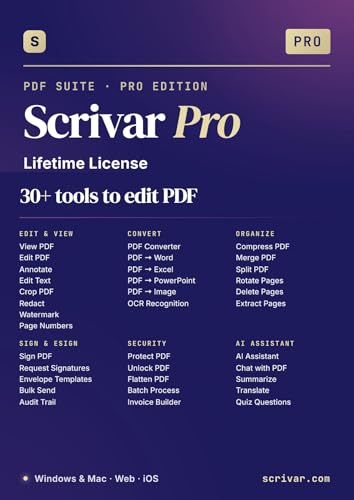
Product overview: An all-in-one PDF toolkit with more than 30 features, including edit, convert, merge, compress, sign, OCR, redact, and batch processing. Best for: buyers who want a single purchase with lifelong access and no ongoing subscriptions.
Why selected: the lifetime license and built-in e-sign capabilities make it a standout for frequent, large-scale document work. Caution: feature breadth may feel overwhelming for light users.
Systweak PDF Editor Pro – OCR and More
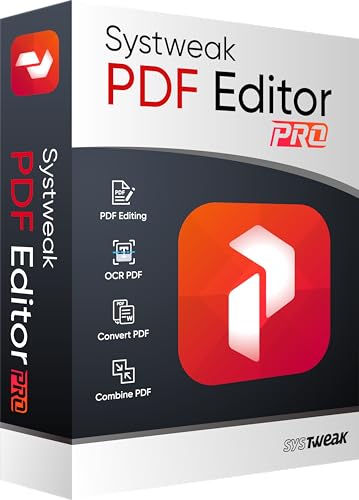
Product overview: Edit, convert, sign, protect, and compress PDFs with OCR and searchability for scanned documents. Best for: users needing reliable OCR, document protection, and conversion to Excel, Word, or PowerPoint.
Why selected: emphasizes searchability of scanned PDFs and versatility across formats. Caution: licensing and feature depth can be more than necessary for very light users.
Buying Guide: How to Choose the Right OCR PDF Editor
- OCR accuracy and language support: Look for software that explicitly mentions OCR modules and multi-language support for mixed-document libraries.
- Editing vs. conversion balance: If you edit frequently, prefer editors with direct text/image editing and page structure controls; if you mainly convert, prioritize robust output formats.
- Batch processing capability: For large document sets, verify that the tool supports batch OCR, batch conversion, and automation.
- Licensing model: Consider lifetime licenses for long-term value (as with Scrivar) vs. annual subscriptions (common in other suites).
- Security and signing features: For contracts and sensitive documents, check built-in e-sign and document protection options.
- Platform compatibility: Ensure Windows version compatibility and that the interface fits your workflow (standalone vs. Adobe-compatible).
FAQ
Q: Do these tools convert scanned PDFs back into editable Word or Excel?
A: Yes. Most listed products include OCR and export options to Word, Excel, and other editable formats.
Q: Is OCR accuracy dependent on document quality?
A: Yes. Clarity, font, and layout affect OCR results; higher-quality scans yield better text recognition.
Q: Can I sign PDFs with these tools?
A: Several options include e-signing capabilities or integration for signing documents directly within the app.
Q: Are lifetime licenses available?
A: Some tools offer lifetime licenses (e.g., Scrivar) while others use subscription models; check each product’s terms.
Q: Can I merge multiple PDFs into one?
A: Yes, several editors support merging as part of their core features.