Looking for a compact, affordable notebook that covers the basics—web browsing, document editing, and streaming? This guide highlights five small, portable notebooks that balance size with practicality for students, teachers, and commuters. Each pick targets a specific buyer: students needing light Chrome OS devices, teachers seeking durable educational laptops, professionals needing on-the-go reliability, and budget buyers prioritizing essential features. Use the quick-reference table to compare core strengths at a glance.
Summary table of chosen products:
| Product | Best For | Key Benefit |
|---|---|---|
| Lenovo 100E Chromebook 2nd Gen | Students, budget-conscious buyers | Renewed Chrome OS with durable design |
| Dell Chromebook 3100 2-in-1 | Classroom use, flexible form factor | Touchscreen Chromebook with 11.6″ display |
| Dell Latitude 3190 11.6″ HD 2-in-1 | Education, rugged everyday use | 2-in-1 with modern CPU and slim profile |
| Dell Chromebook 11 3100 | Light tasks, basic web work | Compact, Chrome OS with 11.6″ screen |
| Samsung Chromebook 4+ (Renewed) | Daily productivity and media | Large 15.6″ display for multitasking |
Lenovo 100E Chromebook 2nd Gen — Durable Budget Chrome OS

The Lenovo 100E Chromebook 2nd Gen is best for students and teachers seeking a compact, affordable Chrome OS device. It runs on a MediaTek MT8173C processor with 4GB RAM and 16GB eMMC storage, offering snappy web tasks and classroom apps. The device’s size fits easily in backpacks and desks, while Chrome OS provides quick access to Google Workspace and educational apps. Caution: Renewed electronics may show minor signs of wear, and storage is limited for large app libraries.
Best for: Students and education use where a lightweight, budget-friendly Chromebook is needed.
Dell Chromebook 3100 2-in-1 — Flexible Classroom Chromebook

The Dell Chromebook 3100 2-in-1 is highlighted for classrooms and mobile work. It features an 11.6-inch display with 1366 x 768 resolution and a touch-enabled chassis, making it easy to annotate, browse, and present. Powered by an Intel Celeron N4000 and Chrome OS, it’s designed for basic productivity and streaming. Better for activities that benefit from touch input; a potential limitation is the lower-end processor for heavy multitasking.
Best for: Students and educators who want a convertible Chromebook with touch control and solid basic performance.
Dell Latitude 3190 — Education-Ready 11.6″ 2-in-1

The Dell Latitude 3190 11.6″ 2-in-1 targets students and professionals who need a reliable, compact Windows-based option. It combines an 11.6″ HD Multi-Touch display with an Intel Celeron N5030 and 4GB RAM, plus 128GB SSD. This allows Windows 11 Professional compatibility and broader software access beyond Chrome OS. Best for those who prefer Windows ecosystems or require local software compatibility. Limitation: Renewed units may vary in battery health and overall wear.
Best for: Students and professionals who want Windows 11 Pro compatibility in a small form factor.
Dell Chromebook 11 3100 — Steady Small Chrome OS Laptop

The Dell Chromebook 11 3100 focuses on essential tasks with an 11.6″ display and Chrome OS. It provides 16GB Flash Memory and a straightforward user experience suitable for web browsing, streaming, and document editing. Best for budget-conscious users who want a simple, durable Chrome OS device. Caution: Storage is limited, so consider cloud storage or external options for large files.
Best for: Budget buyers and students who require a dependable, no-frills Chrome OS notebook.
Samsung Chromebook 4+ — Large-Screen Lightweight Chrome OS
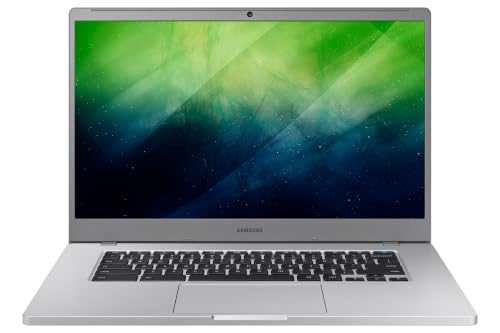
The Samsung Chromebook 4+ is included for users who want a larger display while staying within a small footprint in a portable package. It runs Chrome OS on an Intel Celeron N4000 and offers 4GB RAM with 32GB eMMC storage, plus a 15.6-inch FHD display. This makes it better for multitasking across multiple tabs and light media tasks. Limitation: Heavier than smaller Chromebooks due to the larger screen.
Best for: Users who need more screen real estate for productivity and media while keeping a light, travel-friendly chassis.
Buying Guide: What To Consider When Buying A Small Notebook
- Operating System: Chrome OS vs Windows. Chrome OS is simple, fast for browsing and cloud apps, and often more affordable. Windows offers broader software compatibility and local apps.
- Display Size And Type: 11.6″ is ultra-portable; 15.6″ provides more screen space for multitasking but weighs more. Consider resolution and panel quality for readability and multitasking.
- Performance: Look for at least 4GB RAM in light-use devices; 8GB is preferable for more tabs and apps. Storage (eMMC vs SSD) affects boot times and file access; larger storage helps with offline files.
- Durability: For students and teachers, a rugged chassis and spill-resistance can matter. Renewed devices may show wear but can be budget-friendly.
- Battery Life: Check claimed runtime and real-world usage patterns. Longer battery life improves all-day use in classrooms or commuting.
- Portability vs. Screen Real Estate: If you travel often or carry a bag, a lighter, smaller notebook is ideal; for home office use, a larger screen can boost productivity.
- Upgradeability and Ports: Ensure adequate USB ports and SD card slots if you rely on external storage. Some models have upgraded RAM or storage options; many are non-upgradable.
Frequently Asked Questions
- What is a small notebook computer best for? — Ideal for basic tasks like web browsing, document editing, streaming, and light multitasking on the go.
- Is a Chromebook suitable for school work? — Yes, Chrome OS supports Google Workspace and classroom apps, making it great for students and teachers with limited software needs.
- Should I choose Windows or Chrome OS on a small device? — Chrome OS is simpler and often more affordable; Windows offers broader software compatibility if you need desktop apps.
- Are renewed devices a good deal? — Renewed units can provide cost savings but may have wear or reduced battery life; verify return options and warranty terms.
- What’s the trade-off of a larger screen in a small notebook? — A larger display improves multitasking but increases weight and reduces portability.
- Can these devices handle multitasking with many tabs open? — With 4GB RAM, expect smooth performance for light multitasking; 8GB RAM handles more tabs and apps more comfortably.