Answering the needs of busy American small business owners, this guide highlights practical software solutions for administration, invoicing, accounting, and contact management. Each pick serves a specific use case—from simple invoicing and databases to full accounting suites and digital card management. This overview helps buyers choose software best suited for solo entrepreneurs, freelancers expanding to small teams, or established micro businesses seeking efficiency gains. A quick summary table follows to compare core strengths at a glance.
| Product | Best For | Main Benefit |
|---|---|---|
| Smart Business Pack | Small teams needing basic, all-in-one tools | Comprehensive bundle of essential business titles |
| Express Invoice Billing | Invoicing and quoting with customization | Fast invoice creation and mobile access |
| MySoftware My Database | Simple data management and templates | Pre-designed templates with rich media options |
| Sage 50 Pro Accounting 2026 | Accounting and bill management | Trusted accounting capabilities for small businesses |
| PenPower WorldCard Pro | Digitizing business cards and contact export | Quickly converts cards to digital contacts |
Smart Business Pack by Avanquest
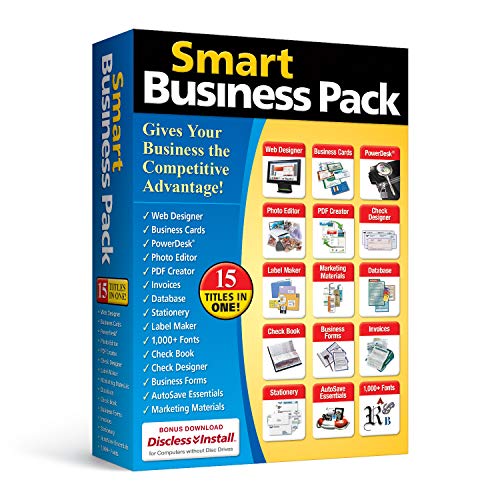
The Smart Business Pack bundles 15 essential software titles to help manage business information, legal transactions, and finances. Best for small teams or solo entrepreneurs who want a single source of tools for daily operations. The package’s scope makes it a convenient starting kit for basic workflow automation and records organization. A potential limitation is the lack of depth in any single application, so users with advanced needs may later require standalone solutions.
Express Invoice Billing and Invoicing Software Free

Express Invoice focuses on quick creation of invoices, orders, and quotes with customizable branding. It supports securing web access on mobile devices and offers direct emailing, printing, and faxing from within the app. This makes it a strong fit for freelancers or small teams that require professional invoicing with flexible delivery options. A consideration is that users may need to supplement with more robust accounting for long-term finance tracking.
MySoftware My Database

MySoftware Company’s My Database emphasizes templates for business and personal use, plus a large media library with clipart and fonts. It includes a notes table for history and to-do items, making it useful for lightweight CRM-like record-keeping or project planning. It’s best for buyers who want a customizable, visually rich database experience. The limitation is that it may not scale as a stand-alone accounting or invoicing solution for growing businesses.
Sage 50 Pro Accounting 2026 U.S. Retail Edition

Sage 50 Pro Accounting 2026 is a trusted accounting solution designed for small businesses. It supports real-time reporting, responsible for managing bills and invoicing, and tracking costs. Best for buyers seeking a familiar, long-standing accounting program with guided setup for common business models. A limitation is that it targets one-user setups primarily; multi-user require different editions or configurations.
Sage 50 Premium Accounting 2026

Sage 50 Premium Accounting extends the Pro edition with enhanced chart-of-accounts options and more robust job-related cost tracking. It’s best for small businesses requiring stronger financial oversight and more detailed reporting. It remains highly suitable for accountants and bookkeepers who manage multiple clients or projects. A caveat is the potential greater complexity compared with entry-level accounting software.
PenPower WorldCard Pro
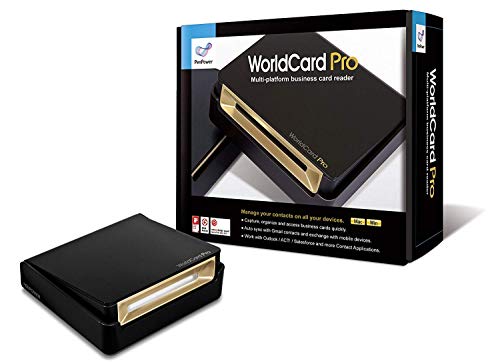
PenPower WorldCard Pro is a business card scanner that converts physical cards into digital contacts quickly. It supports multiple languages and offers export options to address books and contact formats like vCard and CSV. Best for small businesses networking offline who want to digitize contact information without manual entry. A limitation is that it mainly addresses contact management rather than full business workflow automation.
Buying Guide: Key Purchase Considerations
- Core needs: Determine whether you need invoicing, accounting, contact management, or a database/dossier system. Choose a package that covers your primary workflows.
- Scale and users: Consider how many user licenses you require. Some products are best for single users, others support multiple users with varying access levels.
- Ease of setup: Look for guided setup, templates, and intuitive interfaces suitable for quick adoption in small teams.
- Brand reliability: For accounting and invoicing, opt for software with a long track record and predictable updates to support tax compliance and reporting.
- Data export: Ensure you can export data to common formats (CSV, vCard, etc.) for interoperability with other tools.
- Cost of ownership: Evaluate bundled features versus standalone modules. A bundled solution can simplify maintenance but may offer less depth in specialized areas.
Frequently Asked Questions
- What should I look for in small business management software?
Prioritize core workflows (invoicing, accounting, contact management) and ensure the tool scales with your business needs.
- Is an all-in-one package better than separate apps?
All-in-one can simplify administration, but separate apps may offer deeper functionality in each area.
- Can I start with a free invoicing tool and upgrade later?
Yes, many tools offer basic free plans or trials. Upgrading lets you access more features as your business grows.
- Do I need multi-user access from day one?
For solo operations, single-user can be enough; for small teams, ensure the plan supports multiple users without excessive costs.
- How important are data export options?
Critical for business continuity and future migrations, especially when upgrading software or integrating with other tools.