Answering the need for a quiet, reliable keyboard, these models emphasize near-silent switches, durable builds, and dependable input in gaming and office spaces. They’re ideal for gamers who share rooms, streamers who need minimal keystroke noise, and professionals seeking distraction-free typing. The top picks below highlight 5 keyboards with quiet switches, strong build quality, and practical features for silent gaming.
| Product | Type | Key Quietness | Best For |
|---|---|---|---|
| SteelSeries Apex 3 RGB (TKL option) | Membrane/Whisper Silent Switch | Whisper quiet | Compact setups, office-friendly gaming |
| TECKNET Wired RGB Keyboard | Mechanical-like with whisper switches | Near-silent | Ergonomic comfort, RGB customization |
| HyperX Alloy Core RGB | Membrane with Quiet Switches | Quiet, soft keystrokes | Budget quiet gaming with reliability |
| SteelSeries Apex 3 TKL | Whisper quiet switches, IP32 | Very quiet | Tenkeyless, durable in tight spaces |
| SOLAKAKA KI99 Pro | Mechanical with quiet/silent style | Silent/low-noise | Wireless flexibility, gasket structure |
SteelSeries Apex 3 RGB Gaming Keyboard

The Apex 3 uses whisper quiet gaming switches and offers 10-zone RGB illumination for immersive visuals. It also features IP32 water resistance to protect against accidental spills, increasing durability in mixed-use spaces. This keyboard is best for gamers who want a compact, quiet, and visually appealing option without sacrificing responsiveness. A premium magnetic wrist rest adds comfort during long sessions. A caution: though water resistant, it is not water-proof, so avoid liquid exposure that exceeds IP32 guidelines.
TECKNET Wired Gaming Keyboard

TECKNET emphasizes ergonomic design with a 7-degree input angle, integrated wrist rests, and a sturdy metal base for durability. It includes 15 RGB color modes across 7 illumination modes with 4 brightness levels, delivering clear key visibility in low light. The keyboard uses whisper quiet switches designed for office-friendly operation, aiming for near-silent keystrokes. Best for users who want extensive backlighting customization in a comfortable, office-adjacent package. Limitation: based on data, the switches’ long-term feel may vary with heavy gaming tempo.
HyperX Alloy Core RGB

The HyperX Alloy Core RGB combines a durable, spill-resistant frame with quiet, responsive keys and a dynamic 6-mode RGB system. It emphasizes anti-ghosting with reliable key rollover, so simultaneous presses register accurately. This model is best for gamers who need a budget-friendly quiet option with strong reliability and simple, effective RGB lighting. Caution: it uses membrane-type switches, which may feel less tactile than mechanical options for some users.
SteelSeries Apex 3 TKL RGB

The tenkeyless form factor of the Apex 3 TKL prioritizes space efficiency while keeping 8-zone RGB illumination and IP32 water and dust resistance. The keyboard uses whisper quiet switches and anti-ghosting for accurate keystrokes even under rapid action. It’s best for players who want a compact, travel-friendly setup with strong durability and silent operation. A potential limitation is the lack of a full-size numeric keypad for users who frequently rely on it.
SOLAKAKA KI99 Pro Wireless Mechanical Keyboard

The KI99 Pro blends a gasket structure with quiet, pre-lubed switches and multiple connection modes (BT5.0, 2.4G, Type-C). It features a 96% layout to save desk space, plus a control knob for quick volume, media, and lighting adjustments. Best for gamers and professionals who want flexible wireless options and a compact footprint without sacrificing silent typing. Limitation: higher complexity may require more setup to optimize all features.
be quiet! Dark Mount Tactile
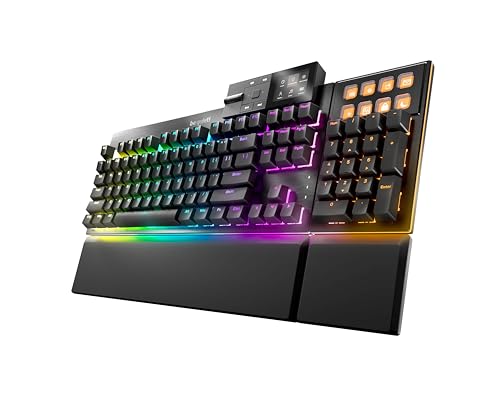
The Dark Mount offers modular options like attachable Numpads and a Media Dock with dedicated keys for quick audio and video control. It supports customizable 8 Display Keys and optional macro binding, framed by silent tactile switches with a focused emphasis on whisper-quiet operation. Best for streamers or power users who value macro customization and quiet performance. Caution: some features require additional accessories or setup steps for full effect.
Corsair K55 CORE TKL RGB

The Corsair K55 CORE TKL focuses on compact layout with eight-zone RGB backlighting and a spill-resistant design. It includes dedicated media controls and a 1000 Hz polling rate for responsive gaming. This option is best for players who want a feature-rich, space-saving keyboard with reliable quiet keys. Limitation: being membrane-based, it may not match the tactile feedback of high-end mechanical switches for some users.
Corsair K55 CORE RGB Membrane

This Corsair model provides ten-zone RGB lighting and quiet, responsive membrane switches suitable for quieter gaming and everyday use. It emphasizes iCUE compatibility for future lighting customization and a practical spill-resistant design. Best for users who want a broad RGB palette and easy, quiet operation without paying a premium for mechanical switches. Caution: some users may prefer a more tactile or mechanical feel for competitive play.
Buying Guide
What should you consider when choosing a silent gaming keyboard?
- Switch type and noise level: Membrane and dedicated silent switches yield quieter keystrokes than traditional mechanical switches. Consider a model labeled as whisper or silent to minimize sound during play or streaming.
- Durability and protection: IP ratings and spill resistance help protect against accidental liquid damage in mixed environments or shared rooms.
- Layout and size: Tenkeyless or compact designs save desk space, useful for smaller setups or LAN parties. Full-size keyboards offer number pads if you rely on them for productivity.
- Backlighting and visibility: RGB options improve key visibility in low light. Ensure the lighting modes align with your preferences for gaming or work sessions.
- Wired vs. wireless: Wireless keyboards offer flexibility but may introduce latency or battery considerations. If you game fast-paced titles, a reliable wired connection is often preferred.
- Additional features: Media controls, macro support, and ergonomic wrist rests can improve long-term comfort and workflow.
Frequently Asked Questions
- What makes a keyboard “silent”?
Answer: A keyboard is considered silent when its switches and key travel produce minimal audible noise, often achieved with low-friction or membrane-style switches and dampening design. - Are membrane keyboards quieter than mechanical ones?
Answer: Generally yes, membrane keyboards produce less clatter than many mechanical switches, though some mechanical options are engineered for quiet operation with silent switches. - Is water resistance important for a gaming keyboard?
Answer: IP-rated water resistance helps protect against spills, especially in shared or busy environments, though it does not make the keyboard waterproof. - Should I choose a tenkeyless keyboard for gaming?
Answer: Tenkeyless designs save desk space and can improve mouse movement; they’re popular among gamers who want a compact setup without sacrificing essential functions. - Do wireless keyboards work well for gaming?
Answer: Wireless keyboards can work well, but wired keyboards typically offer lower latency, which may be important for competitive titles. - What is key rollover and why does it matter?
Answer: Key rollover indicates how many keys can be pressed simultaneously without missed inputs. Anti-ghosting features help ensure accurate multi-key presses in fast action scenarios.