Answering the buyer’s intent: pick a server rack cabinet that fits your space, load, and security needs. This guide compares five versatile options ideal for small to mid-size IT rooms, offices, and classrooms. Best for wall-mounted spaces, floor-standing versatility, and security-conscious environments. The table below highlights each option’s core strengths to help you decide quickly.
| Product | Depth | Best For | Key Benefit |
|---|---|---|---|
| StarTech 22U 4-Post Server Cabinet | 33 in | Mid-to-large IT racks | Heavy weight capacity and adjustable depth |
| VEVOR 22U Network Cabinet Wall Mount | 23.6 in | Space-constrained rooms | Locking tempered glass door, good airflow |
| Sysracks 27U Wall Mount Cabinet | 24 in | Home lab and AV setups | Full kit with shelves and fan |
| Tecmojo 18U Wall Mount Cabinet | 17.7 in | Compact IT gear | Lockable glass door and side panels |
| Tecmojo 12U Wall Mount Cabinet | 17.7 in | Smaller network gear | Adjustable mounting rails and cable access |
StarTech 22U 4-Post Server Cabinet
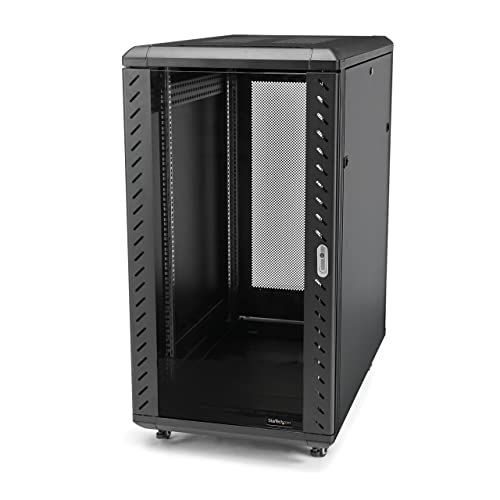
The StarTech RK2236BKF is a four-post, 22U server cabinet designed for higher-capacity IT setups. It features adjustable mounting depth from 5.7 inches to 33.0 inches, accommodating a range of servers, switches, and AV gear. It ships flat-packed for safer shipping and includes wheels and leveling feet for stability. The deep design supports heavier equipment and multiple devices in a single enclosure. Best for: mid-to-large racks needing flexible depth and a sturdy foundation. Limitations: assembly can be more involved due to the four-post design, which may require careful alignment during setup.
VEVOR 22U Network Cabinet Wall Mount

This VEVOR wall-mount network cabinet maximizes space with a 23.6-inch depth and a robust 300-pound maximum load, making it suitable for small offices, classrooms, or retail backrooms. It emphasizes heat dissipation with ventilation vents and cooling holes to sustain safe operating temperatures. The welded frame ensures durability for ongoing use. Best for: compact spaces needing a sturdy wall-mounted solution with reliable airflow. Caution: wall-mounted configurations may limit vertical expansion compared with full-height options.
Sysracks 27U Wall Mount Server Rack Cabinet

The Sysracks 27U wall-mount enclosure is ideal for home labs and compact AV setups. It arrives as a full kit with two shelves, a fan, PDU, and cable management accessories, all within a 24-inch depth. This cabinet supports standard 19-inch rack gear and balances space efficiency with expansion capability. Best for: hobbyist labs and small studios needing a ready-to-use kit. Limitation: deeper equipment or larger servers may require a taller or deeper unit.
Tecmojo 18U Wall Mount Cabinet

This Tecmojo 18U wall-mount cabinet focuses on compact IT gear with a locking glass door and side panels for security. It includes a cooling fan and offers adjustable mounting rails with numbered U positions for straightforward equipment installation. Best for: small offices or classrooms needing a secure, compact rack with decent airflow. Caution: the maximum mounting depth is 14.2 inches, which may limit larger 19-inch equipment.
Tecmojo 12U Wall Mount Server Cabinet

The Tecmojo 12U wall-mount cabinet provides a space-efficient option for smaller IT setups. It features a lockable door and side panels for security, with easy cable management thanks to top and bottom punch-out panels. Best for: compact IT racks with moderate equipment needing a secure, accessible enclosure. Limitation: shallower depth may limit some bulkier equipment or future expansion.
Buying Guide: Key Purchase Considerations
- Space and mounting type: Wall-mount vs. floor-standing. Choose wall-mount to save floor space in small rooms, or a 4-post cabinet for heavy equipment and easier cable management.
- Depth and height: Ensure the cabinet depth accommodates your longest devices. Verify height in U units to match your gear’s rack units.
- Weight capacity: Check total load capacity and per-shelf limits. Overloading can compromise stability and safety.
- Security features: Locking doors and side panels protect against tampering in shared environments.
- Ventilation and cooling: Look for vented doors, top/bottom panels, and fans to maintain safe operating temperatures.
- Accessories: Availability of shelves, PDUs, cable management, wheels, and feet affects total cost and ease of deployment.
- Installability: Flat-pack vs. pre-assembled; consider how much time you will need for setup and alignment.
- Future expansion: Consider extra U space and deeper enclosures if you expect growth in equipment and cables.
FAQ
- What is the typical depth I should consider for 19″ IT equipment? Answer: Most standard 19″ equipment fits within 14–33 inches of depth, depending on model and cabling needs.
- Do wall-mount cabinets support heavy equipment? Answer: Yes, but check the stated weight capacity and ensure wall anchors and mounting hardware are suitable for the wall type.
- Is glass door a security risk? Answer: Lockable tempered glass doors provide security while enabling visibility; verify lock quality and door panels.
- Should I choose a 4-post cabinet or a single-frame wall mount? Answer: 4-post cabinets handle heavier gear and easier rack mounting; wall mounts save floor space but may have limited weight capacity.
- Can I add shelves and PDUs later? Answer: Many models support add-ons; confirm compatibility with the rack’s rails and mounting patterns.