Yes—refillable ink printers offer ongoing savings and less waste for everyday home or small office use. This guide highlights five top options, explaining who each model is best for and why it fits a refillable ink strategy. Whether you print mainly text, photos, or mixed documents, you’ll find a model that minimizes cartridge waste and reduces running costs over time. The buyer-friendly table below summarizes key strengths and ideal use cases for quick comparison.
| Product | Best For | Why It Stands Out |
|---|---|---|
| Canon MegaTank G3270 | Small office and families with high-volume printing | Very high ink yields and wireless all-in-one. |
| HP Smart Tank 5003 | Low-maintenance, high-volume home printing | Up to 3 years of ink included; easy setup. |
| Epson EcoTank ET-4800 | Home office needing fax and Ethernet | Cartridge-free, versatile with ADF and Ethernet. |
| Epson EcoTank ET-2400 | Budget-friendly cartridge-free all-in-one | Low ongoing cost with large ink bottles. |
| Brother INKvestment Tank MFC-T580DW | Structured workflow with warranty | Three-year ink promise and simple refill design. |
Canon MegaTank G3270 All-in-One Wireless Color Printer

The Canon MegaTank G3270 is designed for high-volume households or small offices that prioritize minimal downtime and simple maintenance. It offers wireless print, copy, and scan, with a bundle of ink that can last up to two years under typical usage. This makes it a strong choice for those who print many pages each month and want predictable ink costs. Best for users who want an all-in-one experience with strong wireless capabilities and large ink reserves.
Key strengths include very high page yields—up to 6,000 black-and-white and 7,700 color pages per set. The refill process is straightforward, and the device supports wireless operation for easy mobile printing. A potential limitation is the upfront weight of the unit, which may be less portable than smaller models.
HP Smart Tank 5003 Wireless All-in-One

The HP Smart Tank 5003 emphasizes ease of use and long-term ink savings. It is best for households seeking a “set it and forget it” solution with relatively low maintenance. The printer arrives fully loaded with ink, promising up to about three years of color and black pages right out of the box. It also supports basic printing, copying, and scanning with borderless options and wireless connectivity.
Best for low-cost, high-volume printing with a straightforward setup. A limitation to watch for is that advanced features or premium photo modes might be more limited compared to premium photo-centric inkjet options.
Epson EcoTank ET-4800 Wireless All-in-One

The Epson EcoTank ET-4800 delivers a strong home-office feature set with fax, ADF, and Ethernet, all in a cartridge-free design. Its high-capacity tanks and EcoFit bottle system reduce refill friction, making it a good fit for users who print in mixed modes and want reliable network connectivity. It emphasizes zero cartridge waste and is designed for long-term cost efficiency.
Best for users who require a robust network-enabled printer with a built-in document feeder. A caveat is that initial setup can be more involved due to additional features like fax and Ethernet configuration.
Epson EcoTank ET-2400 Wireless Color All-in-One

The ET-2400 is a budget-friendly cartridge-free option with the promise of substantial long-term savings via bottle ink systems. It ranks well for light-to-moderate households that want to avoid frequent cartridge changes while maintaining color printing capabilities. Ink refilling is designed to be less messy, and the printer supports wireless printing for convenient home use.
Best for budget-conscious buyers who still need reliable color all-in-one functionality. A limitation includes fewer advanced features compared to higher-end models, which may matter for power users or professionals needing extensive automation.
Epson EcoTank ET-2988 Wireless All-in-One
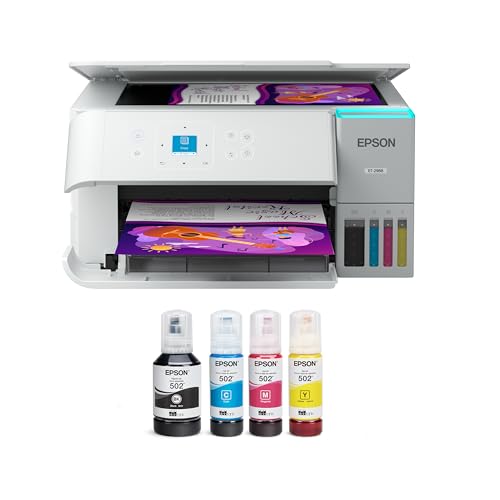
This refreshed EcoTank model emphasizes a larger ink supply with a 3-year ink-in-box promise and a 1.44″ color display. It also highlights a reliable refill process and a long print life with high page yields. It is best for users who want a comprehensive home-office printer with strong color performance and a straightforward user interface.
Choose this if you want strong stock printing for reports and visuals. A potential limitation is its renewed status, which may imply availability considerations in some markets.
Epson EcoTank ET-2803 Wireless Color All-in-One

The ET-2803 emphasizes cartridge-free printing with individual color bottle sets equivalent to about 80 cartridges. It offers up to 4,500 black pages and 7,500 color pages, with up to two years of ink in the box. The model is well-suited for families or small offices that print a mix of documents and visuals while seeking long intervals between refills.
Better for users who want substantial color output while keeping ink costs predictable. Limitations include that color accuracy and photo-specific performance can vary by media type, which may matter to photographers or design professionals.
Brother INKvestment Tank MFC-T580DW

The Brother INKvestment Tank MFC-T580DW emphasizes a blend of reliability and cost efficiency, with up to three years of ink in the box and a 3-year limited warranty. The 1-line LCD provides straightforward operation, making it suitable for home offices that need a dependable all-in-one device with easy maintenance and clear status updates.
Best for busy households that want a predictable refilling workflow and solid customer support. A caution is that some users may find the initial setup less intuitive if they are accustomed to more feature-rich, high-end models.
Buying Guide: Refillable Ink Printer Considerations
What matters most for your print needs?
Assess monthly print volume, color vs. black-and-white needs, and whether you require scanning, faxing, or network sharing. Cartridges-free design reduces ongoing costs but confirm the total ink yield and refill bottle capacity to estimate true per-page costs.
How important is ease of refilling?
Look for a simple, spill-free bottle system with clear color-coding and foolproof nozzle mechanisms. EcoFit and similar refill systems minimize mess and prevent cross-color mistakes.
Is wireless connectivity essential?
For most homes and small offices, wireless printing from phones and laptops saves time. If you need Ethernet or a bitmap-friendly network, ensure the model includes Ethernet and a stable wireless setup.
How long should the ink last?
Refillable printers advertise long runs of ink. Compare official page yields and consider your typical print mix. High-yield black-and-color ratios can dramatically reduce refill frequency.
What about warranty and support?
Three-year warranties and solid customer service add value when using refill systems. Brand-backed support can help with bottle compatibility and maintenance questions.
Special considerations for photos and graphics
If you frequently print photos or color graphics, check color accuracy, media support, and print speed in color mode to ensure your results meet expectations.
FAQ
- What is a refillable ink printer? A printer that uses large ink reservoirs and separate refill bottles instead of traditional replaceable cartridges, reducing running costs.
- Are refillable ink printers good for photos? Yes, many models deliver solid color prints, though color accuracy can vary by model and media type.
- Do refillable printers require special ink? Yes, they use compatible, high-capacity refill bottles designed for the tank system.
- Is the upfront cost higher with EcoTank or MegaTank? Upfront costs can be higher, but long-term savings come from lower per-page costs and fewer cartridge changes.
- How often should I refill the tanks? Refilling frequency depends on usage, ink bottle yields, and printed page volume.
- Can I use third-party ink bottles? Many printers support third-party bottles, but always verify compatibility to avoid leaks or warranty issues.