Looking for a reliable rechargeable wireless keyboard and mouse combo? This guide highlights five solid choices that pair convenient charging with stable 2.4GHz connectivity. Best for: home offices, students, and professionals who want a clutter-free workspace with easy plug-and-play setup. Each option emphasizes long battery life, comfortable typing, and a compact, full-size layout where applicable. A quick comparison table follows to help you decide at a glance.
| Product | Best For | Key Benefit | Notes |
|---|---|---|---|
| Amazon Basics Ultra Premium Wireless Keyboard and Mouse Combo | Budget-conscious buyers | Full-size layout with number pad, rechargeable | 2.4G receiver range up to 33 ft |
| Arteck 2.4G Wireless Keyboard and Mouse Combo | Desk space savers | Stainless steel ultra-slim design, shared receiver | Long battery life on a single charge |
| seenda Rechargeable Wireless Keyboard and Mouse Combo | Quiet, shared workspace | Low-profile keys, long battery life | One USB receiver for both devices |
| Logitech MK270 Full Size Wireless Keyboard and Mouse | Reliability seekers | Reputable brand, spill-resistant design | Easy plug-and-play, consistent range |
| Vssoplor Wireless Keyboard and Mouse (Ultra Slim) | Ultra-slim setups | Very thin profile with 2.4 GHz connection | Receiver stored in mouse |
Amazon Basics Ultra Premium Wireless Keyboard And Mouse Combo

The Amazon Basics bundle offers a full-size keyboard with a number pad plus an integrated wireless mouse. It uses a single 2.4GHz USB receiver for both devices, stored in the keyboard base for easy transport. Its extended wireless range supports up to 33 feet, making it suitable for larger desks or rooms. Best for budget-minded buyers who want a straightforward, plug-and-play setup with rechargeable operation.
- Best for: Users needing a complete, no-fruss setup with a full layout.
- Why selected: Combines convenience, range, and cost efficiency in one package.
- Caution: Battery life varies with usage; heavy typing or gaming may drain the battery faster.
Arteck 2.4G Wireless Keyboard And Mouse Combo
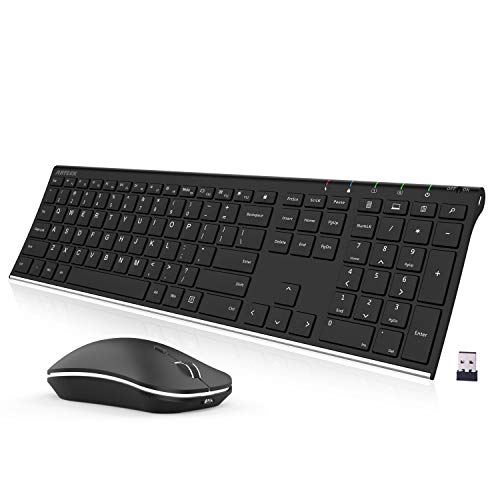
The Arteck bundle emphasizes a stainless steel, ultra-slim profile with one USB receiver for both devices. It’s designed for space-saving setups and long battery life on a single charge. The keyboard and mouse are built for quiet operation, making it a strong choice for shared workspaces or dorm rooms. Best for: Users who want a sleek, durable look without clutter.
- Best for: Slim, stylish desks that still require a full keyboard layout.
- Why selected: Strong balance of aesthetics, reliability, and minimal USB usage.
- Caution: The compact design may feel different for users who prefer a heavier keyboard.
seenda Rechargeable Wireless Keyboard And Mouse Combo

Seenda’s kit offers built-in rechargeable batteries for both keyboard and mouse with a shared USB receiver. It highlights quiet, low-profile keycaps ideal for offices, libraries, or shared spaces. A practical feature is the ability to use devices while charging, minimizing downtime. Best for: Those who need a quiet, long-lasting setup with simple charging and desk-friendly design.
- Best for: Quiet typing in shared or late-working environments.
- Why selected: Combines comfortable, low-profile keys with reliable wireless performance.
- Caution: Battery life is usage dependent, so heavy typing can shorten run time.
Wireless Keyboard And Mouse With RGB Backlighting

This XISOGUU bundle features RGB backlighting across a full-size keyboard with a 104-key layout and a 2.4G/ Bluetooth/ wired mode option. The included USB-C charging and long battery life extend usability across work and play. It’s best for: Users who want visual personalization and flexible connectivity in one package.
- Best for: Colorful desk setups and mixed device ecosystems.
- Why selected: RGB lighting adds ambiance while maintaining reliable 2.4G performance.
- Caution: The feature-rich setup may require more initial configuration for non-standard devices.
Logitech MK270 Full Size Wireless Keyboard And Mouse

Logitech’s MK270 combo is a trusted option offering reliable plug-and-play setup and a spill-resistant keyboard. The low-profile keys provide comfortable typing, while the standard full-size layout supports long documents. This is a dependable choice for daily office tasks and students who value durability and predictable performance. Best for: People who prioritize a well-known brand with proven performance.
- Best for: Durable, everyday use with easy setup.
- Why selected: Solid performance history and practical spill resistance.
- Caution: Keyboard is not the slimmest option on the market.
Buying Guide
What to consider when choosing a rechargeable wireless keyboard and mouse:
- Battery life and charging: Look for long battery life and convenient charging options. Some sets allow use while charging, which reduces downtime.
- Connectivity: A single 2.4GHz receiver is ideal for fewer USB ports. Consider Bluetooth if you need multi-device pairing, but USB receivers often offer lower latency.
- Layout and size: Full-size keyboards with number pads are better for productivity; compact or ultra-slim designs save desk space but may trade off key feel.
- Build quality and keys: Quiet, low-profile keys reduce noise in shared spaces. A spill-resistant keyboard is beneficial in busy environments.
- Overall ergonomics: Check the keyboard tilt, key travel, and mouse comfort to match your typing style and hand size.
Frequently Asked Questions
- What’s the typical battery life for rechargeable keyboard and mouse combos? Answer: It varies by model and usage but many offer months on a single charge with moderate use.
- Is it better to choose 2.4GHz or Bluetooth? Answer: 2.4GHz typically provides lower latency and a stable connection with a single receiver for both devices; Bluetooth offers multi-device pairing but can have slightly higher latency.
- Can I use the keyboard and mouse while charging? Answer: Some models support charging while in use; check the product details for this feature.
- Are spill-resistant keyboards important? Answer: Yes for home or office desks where liquids may be present; it reduces risk of damage from spills.
- Do these kits include a USB receiver stored in the keyboard or mouse? Answer: Many do; the receiver is often stored in the battery compartment or keyboard base for convenient transport.
- Which setup is best for a shared workspace? Answer: Look for quiet keyboards, long battery life, and a compact, unobtrusive mouse to minimize disruption.