Yes, the right Raspberry Pi case can dramatically improve cooling, durability, and accessibility. This guide highlights five top Amazon options for American buyers, spanning passive cooling, active fans, clear shells, and modular designs. The best choice depends on your project: passive cooling for quiet, long-term operation; active cooling for demanding tasks; clear cases for visibility; and modular designs for expanding with HATs and NVMe. Below, you’ll find a quick buyer-friendly summary and then detailed, objective product breakdowns.
Summary table of selected products
| Product | Best For | Key Benefit | Limitations |
|---|---|---|---|
| Geekworm P173 Heavy Duty Passive Cooling Aluminum Case for Raspberry Pi 4 | Passive cooling with solid build | No fan necessary; built-in heatsinks; robust metal design | Limited to Raspberry Pi 4 models |
| Miuzei Case for Raspberry Pi 3 with Fan | Raspberry Pi 3 builds needing active cooling | Includes silent DC fan and heatsinks | Designed for Pi 3 only |
| iUniker Case for Raspberry Pi 4 with Cooling Fan | Everyday Pi 4 projects needing cooling | All-in-one kit with fan, heatsinks, and tools | May be bulkier than compact shells |
| Raspberry Pi Official Case for Pi 5 with Fan & Heatsink | Official option for Pi 5 users | Integrated temperature-controlled fan and stackable design | Limited to Pi 5 ecosystem |
| Argon NEO Aluminum Case for Raspberry Pi 4 | High-end passive/active cooling with HAT support | Instant GPIO access; upgradeable cooling | Higher price point |
Geekworm P173 Heavy Duty Passive Aluminum Case

Product highlights: Compatible with Raspberry Pi 4 Model B variants, passive cooling with built-in heatsinks, four pillars for heat dissipation, and full access to ports and GPIO. Best for users who want a silent, rugged housing without fans. Limitations include a fixed design that focuses on Pi 4 only and a heavier profile (roughly 174 grams).
Best for: Users seeking durable, noise-free cooling for Raspberry Pi 4 in embedded or stationary setups.
Why selected: It emphasizes passive cooling efficiency with four dedicated heatsink pillars and a compact, heavy-duty enclosure, making it a strong fit for long-running projects where noise is a concern.
Caution: Not ideal if you need active cooling or modular expansion without removing parts for access.
Miuzei Case for Raspberry Pi 3 with Fan
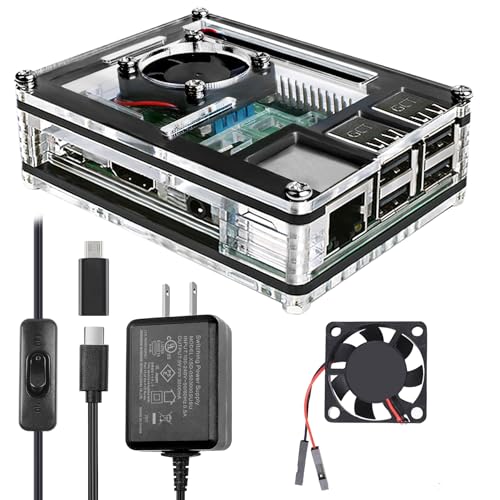
Product highlights: Clear acrylic shell designed for Raspberry Pi 3 B and 3 B+, including a 40mm cooling fan and three aluminum heatsinks. Also includes a 5V 3A power supply with an on/off switch for easy use. Best for Pi 3 projects requiring visible internals and straightforward cooling.
Best for: Pi 3 enthusiasts seeking visible hardware and integrated cooling in a single kit.
Why selected: The combination of a clear shell, multiple heatsinks, and a switchable power supply makes it convenient for learning setups and demonstrations where you want to observe activity while cooling is active.
Caution: Not compatible with Raspberry Pi 4 or Pi 5; plan accordingly if you upgrade hardware.
iUniker Case for Raspberry Pi 4 with Fan
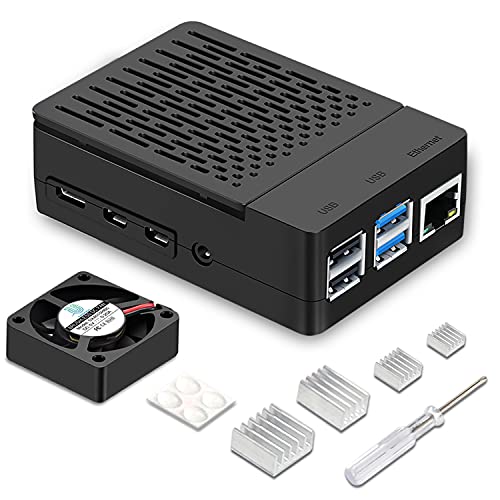
Product highlights: All-in-one kit for Raspberry Pi 4 Model B, including a 40mm fan, four aluminum heatsinks, screws, rubber feet, and a screwdriver. Designed for easy assembly and test-friendly GPIO access via a removable top cover. Best for beginners who want a ready-to-build cooling solution.
Best for: Beginners and classrooms needing a complete cooling kit with straightforward setup.
Why selected: The included toolkit reduces setup friction and provides practical GPIO access without disassembly, useful for educational projects and quick demonstrations.
Caution: The design is optimized for Pi 4; if you plan to reuse with other models, verify compatibility.
Raspberry Pi Official Pi 5 Case with Fan & Heatsink

Product highlights: Official Pi 5 case featuring a cooling fan with PWM speed control, a heatsink, and stackable compatibility. ABS/PC materials, removable lid for easy access, and silicone feet for stability. Best for Pi 5 users who want a trusted, officially supported shell with adjustable cooling.
Best for: Raspberry Pi 5 users seeking an official design with PWM-controlled cooling and future expandability.
Why selected: The official case provides predictable compatibility and straightforward integration with the Pi 5’s features, including fan control and a modular mounting approach for HATs and accessories.
Caution: As an official option, it may be priced at a premium compared with third-party cases offering similar features.
Argon NEO Aluminum Case for Raspberry Pi 4

Product highlights: Aluminum case with instant GPIO access via a magnetic sliding lid. Entire metal body provides effective passive cooling, and compatibility with an Argon Fan HAT allows for easy upgrade to active cooling when needed. Best for users who want a premium, expandable cooling solution for Pi 4.
Best for: Projects requiring quick GPIO access and a path to upgrade cooling without swapping cases.
Why selected: The ability to start passively and add active cooling later is a practical, scalable approach for evolving projects or fluctuating workloads.
Caution: Some users may find the aluminum construction heavier and the price higher than basic plastic shells.
Buying Guide: How to Choose the Right Raspberry Pi Case
- Cooling needs: Passive cases work well for steady workloads and silent operation; active cooling is recommended for gaming, media servers, or overclocked setups.
- Pi model compatibility: Confirm the case supports your model (Pi 3, Pi 4, Pi 5) since many cases are model-specific.
- Material and durability: Aluminum and ABS/PC blends offer different heat dissipation and weight profiles. Aluminum often provides superior heat spreading and durability.
- Expansion and accessibility: If you plan to use HATs, NVMe adapters, or frequent GPIO access, choose cases with accessible GPIO, removable tops, and space for add-ons.
- Ease of assembly: All-in-one kits with fans, heatsinks, and tools reduce setup time for beginners; consider whether you need a ready-to-build option.
- Noise and power: Fans add noise and power draw; consider PWM fan control if supported to balance cooling and quiet operation.
FAQ for Raspberry Pi Case Buyers
- What case is best for a silent Raspberry Pi 4?
– A passive aluminum or metal case like the Geekworm P173 is ideal for silent operation since it relies on heatsinks without a fan. - Do I need a fan if I’m not overclocking my Pi 4?
– Not always. For light use, a passive or well-ventilated case may suffice, but a fan helps maintain cooler temps under sustained loads. - Can I upgrade cooling later without changing the case?
– Some cases (like Argon NEO) support adding a separate cooling accessory like a fan HAT to upgrade cooling without replacing the case. - Is an official Raspberry Pi case better than third-party options?
– Official cases provide guaranteed compatibility and updates for the Pi model, but high-quality third-party options can offer broader features or lower prices. - Which case is best for Pi 3 vs Pi 4?
– Pi 3 cases are typically designed for Pi 3 models only, while Pi 4 cases must specify Pi 4 compatibility and may include enhanced cooling options for higher thermal loads. - Are clear cases useful for education or demonstrations?
– Yes; clear shells help users observe internal activity and cable routing, which is helpful for classrooms or DIY projects.