Looking for a budget-friendly gaming PC around £600 that can handle popular titles at 1080p with decent frame rates? This guide highlights five capable prebuilt desktops, optimized for casual to mid-range gaming, streaming, and everyday productivity. Each option is best for a different user type, from budget-conscious gamers to multitaskers who need smooth multitasking and solid storage. Below is a quick summary table of the selected models to help you compare key specs at a glance.
| Product | CPU / GPU | Memory | Storage | |
|---|---|---|---|---|
| Ryzen 5 2600 / RTX 2060 6G | 16GB DDR4 | 512GB SSD | Gamers who want solid 1080p performance with a capable RTX card | |
| Ryzen 5 5600 / RTX 3050 6GB | 32GB DDR4 | None specified | Multitaskers who need more RAM for streaming or heavy multitasking | |
| Core i7 / GTX 1660 Super 6G | 16GB RAM | 512GB SSD | Users who want strong 1080p gaming with a proven GPU | |
| Ryzen 5 5600GT / Vega graphics | 16GB RAM | Unknown | Budget buyers who don’t mind integrated graphics for lighter gaming | |
| Ryzen 5 5500 / RTX 3050 6GB | 16GB DDR4 | 1TB NVMe SSD | Creatives and gamers needing fast storage and solid 1080p performance |
STGAubron Gaming PC Desktop: Ryzen 5 2600, RTX 2060

This configuration targets gamers who want reliable 1080p performance on AAA titles with a capable RTX 2060 GPU. The Ryzen 5 2600 paired with 16GB DDR4 and a 512GB SSD provides balanced multitasking and fast load times. Best for: mid-range gamers who play titles like Fortnite, GTA V, and Call of Duty at high settings. Caution: If you expect sustained 1440p gaming, this GPU may begin to strain on newer titles at higher details.
SKYESEV Gaming Desktop: Ryzen 5 5600, RTX 3050

Designed for multitaskers and gamers who want strong 1080p performance with room to grow, this SKYESEV PC ships with a Ryzen 5 5600 and a GeForce RTX 3050 6GB, plus 32GB of DDR4 RAM. Best for: gamers who stream or run productivity apps simultaneously. Limitation: 32GB RAM offers headroom, but the build may overdeliver on power for casual titles if your monitor is limited to 60Hz.
STGAubron Gaming PC Desktop: Core i7, GTX 1660 Super
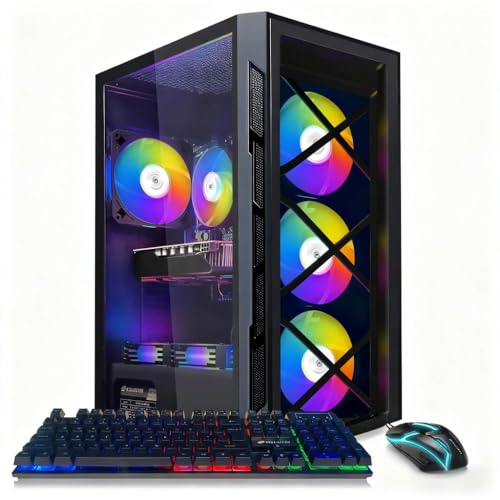
This STGAubron PC pairs a Core i7 processor with a GTX 1660 Super, providing solid frame rates for many modern titles at 1080p. Best for: users who want a dependable Intel-based system with a proven GPU for 1080p gaming and everyday tasks. Caution: Depending on cooling, the i7 model can run warmer under load, so ensure adequate ventilation.
YAWYORE Gaming PC Desktop: Ryzen 5 5600GT

This YAWYORE build emphasizes a strong CPU cornerstone with a 5600GT and Vega graphics, suitable for 1080p gaming and everyday tasks. Best for: budget-conscious buyers who want a capable processor and flexible upgrade path. Limitation: Vega-based graphics will lag behind RTX 30-series in newer titles at higher settings.
ZYNEEX Prebuilt Gaming Desktop: RTX 3050, Ryzen 5 5500

This ZYNEEX system combines a Ryzen 5 5500 with an RTX 3050 and a fast 1TB NVMe SSD, delivering smooth 1080p gaming with ample storage for a growing library. Best for: creators who also game and need quick boot times and fast game loads. Limitation: 16GB RAM may be suboptimal for heavy multitasking without upgrades.
Buying Guide
What should you consider first?
Key factors include CPU power, GPU capability, memory, storage, and upgrade potential. For 1080p gaming, a strong mid-range GPU like RTX 3050 or GTX 1660 Super paired with at least 16GB RAM is a solid baseline. If you stream or multitask heavily, prioritize 32GB RAM where possible and look for faster storage.
How to choose between CPUs
AMD Ryzen 5 options (e.g., 5600, 5500, 2600) typically deliver strong multi-threaded performance at a good price point. Intel Core i7- and i5-series builds offer solid single-threaded performance and can be a better choice for certain games or software. Consider future-proofing by choosing a platform with room to upgrade RAM or GPU.
Storage and speed
NVMe SSDs offer faster boot and load times than SATA SSDs. If a system includes a 1TB NVMe SSD, you get ample space and quick access to large game libraries. For most budget builds, 512GB SSD is a solid base, with room for external or additional internal storage later.
Upgrade paths and expandability
Look for a motherboard with extra RAM slots, PCIe slots for a future GPU upgrade, and multiple USB ports. Airflow and a modest cooling solution help maintain performance under load, especially with CPUs running near turbo frequencies.
Which build best fits your use case?
- Best for budget gaming with solid 1080p performance: STGAubron RTX 2060 or GTX 1660 Super options.
- Better for multitasking and streaming: SKYESEV with 32GB RAM is preferable.
- Best all-around storage and speed: ZYNEEX with 1TB NVMe SSD.
- Best value for lighter titles and general productivity: YAWYORE with Vega graphics.
FAQ
- What is the recommended RAM for 1080p gaming?
At least 16GB is recommended for smooth 1080p gaming and multitasking; 32GB is beneficial for streaming or heavy multitasking.
- Is a RTX 3050 enough for new titles at 1080p?
Yes, for most current titles at high or medium settings, 1080p with 60fps is achievable; for ultra settings or future titles, consider models with more GPU headroom.
- Should I buy a system with an Intel or AMD CPU?
Both can perform well; choose based on budget and upgrade plans. AMD Ryzen 5 series often offers strong multi-core performance at lower cost.
- Is NVMe storage worth it in a budget build?
Yes. NVMe SSDs provide faster load times and snappier system responsiveness, especially for boot drives and large game libraries.
- Can I upgrade these prebuilts later?
Many prebuilts support RAM and storage upgrades; check each model’s motherboard specs for PCIe slots and RAM capacity before purchasing.
- What is the best option for a strict £600 budget?
Among the listed options, look for the one offering 16GB RAM with a capable GPU like RTX 3050 or newer, and a fast SSD to balance performance with price.