Answering the question “which PS5 controller charger is best?” here are top options that fit common buying intents: fast charging, dual-controller support, and reliable protection. This guide targets gamers who want a tidy charging setup, station-style docks, and cabled alternatives for PS5 DualSense and Edge controllers. The featured picks are suited to players who value organized charging, steady power delivery, and easy status indicators. A quick buyer table follows to compare core details at a glance.
| Product | Best For | Key Benefit |
|---|---|---|
| PowerA Twin Charging Station | Families or shared consoles | Charges 2 controllers simultaneously with simple design |
| OIVO PS5 Controller Charger | 2-player setups with fast charging | 2-hour charge time using copper ports and dedicated AC adapter |
| Tokluck PS5 Charger Station | Edge and DualSense users seeking indicators | LED indicators and compact dock for two controllers |
| bibuks PS5 Charger Dock | Efficient charging with clear status | Dual fast charging with intelligent indicators |
| PowerA Solo Charging Station | Single-controller setups | Officially licensed, snap-down design for quick use |
PowerA Twin Charging Station for DualSense Controllers

Best for households needing to charge two controllers at once with a simple setup. The PowerA Twin Charging Station charges two DualSense wireless controllers and displays them neatly on a stand. It is officially licensed to work with Sony’s PlayStation systems, making it a reliable, plug-and-play option for families or roommates. The dock design minimizes cable clutter while keeping controllers within reach during longer gaming sessions. A potential limitation is that it may not include advanced smart protections beyond standard charging safeguards, so monitor charging if you frequently leave devices unattended.
OIVO PS5 Controller Charger
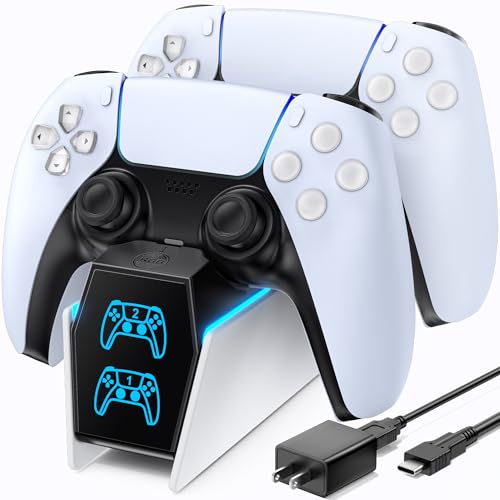
Better for players who want faster charging alongside a compact dock. The OIVO charger uses a copper connector approach and a dedicated AC adapter to deliver up to about 2 hours for two PS5 controllers, aiming for optimized charging. It is designed to fit both PS5 DualSense controllers and PS5 Edge variants. A note of caution: the speed may vary with cable quality and power source, so using the recommended AC adapter helps maintain performance.
Tokluck PS5 Controller Charger Station

Choose this if you want a two-controller dock with clear LED indicators and a compact footprint. Tokluck’s charger supports DualSense and Edge controllers and includes a built-in indicator system—red during charging and blue when full. The front-and-back power options and a straightforward on/off switch help manage power use. A potential limitation is that some users may prefer a more robust build or additional surge protection beyond standard protections listed in the features.
bibuks PS5 Controller Charger Dock
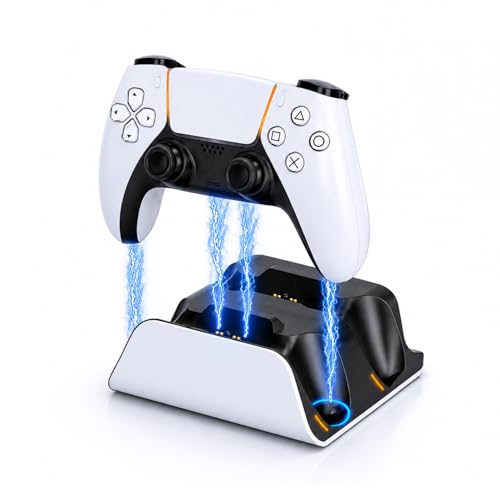
Best for users seeking dual fast charging with clear status indicators. The bibuks dock charges two controllers quickly and includes dual LED indicators to show charging status. It emphasizes overcharge protection and organized placement, which helps reduce desk clutter. A caution: ensure you use an appropriate power adaptor to achieve the stated two-controller charging times, as power quality can impact performance.
PowerA Solo Charging Station for DualSense

Best for a single-controller setup with a reliable, officially licensed design. The PowerA Solo Charging Station offers a snap-down charging experience, designed for convenient daily use. It is ideal for players who usually charge one controller at a time and value a clean, dedicated charging dock. A limitation: it handles one controller at a time, so it won’t suit multi-controller households without an additional dock.
Buying Guide
What should you consider when choosing a PS5 controller charger?
- Charging capacity: Decide between single-dock or dual-dock solutions based on your setup and how many controllers you regularly use.
- Power delivery and compatibility: Look for docks that support DualSense and Edge controllers and verify they come with appropriate AC adapters or cables for safe charging.
- Indicators and status: LED indicators help you know when a controller is charging, full, or standby. Consider solutions with on/off switches to manage power.
- Safety features: Overcurrent, overvoltage, and short-circuit protection are important for long-term controller health.
- Space and organization: Docking stations can reduce cable clutter and keep controllers accessible during gaming sessions.
- Reliability: Officially licensed or well-reviewed third-party options tend to offer consistent performance for daily use.
FAQ
- Are PS5 controller chargers dangerous to leave plugged in overnight? Most include safeguards, but it’s best to unplug if concerns arise. Look for overcharge protection and automatic shutdown.
- Can these docks charge DualSense and Edge controllers at the same time? Many listed options support both DualSense and Edge; confirm compatibility in product details.
- Do these chargers require the PS5 to be powered on? Some docks can draw power from the console, while others use dedicated AC adapters; check the product’s power options.
- Is a dual-dock necessary for most players? Dual-docks are ideal for households with two players or multiple controllers; single-dock options work for solo players.
- Do charging docks affect controller performance or wireless range? Proper charging hardware typically does not affect performance; avoid cheap cables that may cause power delivery inconsistencies.
- What maintenance helps extend dock life? Keep connectors clean, use the recommended power adapter, and store controllers securely on the dock when not in use.