Answering how to connect a classic PS2 to modern displays, this guide compares the top PS2 to HDMI adapters. It highlights who each product is best for and where to watch for potential limitations. Ideal buyers include retro gamers seeking easy plug‑and‑play setups, those upgrading to 1080p displays, and users needing 4:3 or 16:9 aspect options. The table below summarizes five well‑matched options to help you pick quickly.
| Product | Best For | Key Benefit |
|---|---|---|
| Mcbazel PS2 to HDMI Adapter | All PS2 Phat & Slim, PS1 | 4:3/16:9 switch, 480p→720p upscaling |
| Sartyee PS2 to HDMI Converter | All PS2 models, easy setup | Component input guidance to avoid black screens |
| Kaico PS2 to HDMI Adapter | PS2 games only, plug‑and‑play | True plug & play via AV port with HDMI output |
| Y.D.F PS2 to HDMI Adapter | PS1/PS2/PS3 signals to HDMI | No driver install, HDMI 4:3/16:9 switch |
| HOXIBSL PS2 to HDMI Converter | Broad PS1/PS2/PS3 range, USB power | 3.5mm audio, 78.7″ wired setup, 4:3/16:9 switch |
Mcbazel PS2 to HDMI Adapter

The Mcbazel adapter supports PS2 and PS1 on both Phat and Slim models. It connects directly to HDMI on modern displays with no driver installation. It upscales 480p to 720p, preserving classic image quality while avoiding a 4K mismatch. The built‑in 4:3 / 16:9 switch makes it suitable for both retro and modern gaming experiences. Best for players who want a straightforward, low‑latency solution and plan to game in standard definition upscaled to 720p.
Why selected: Works with PS2 and PS1, covers both form factors, and offers simple aspect ratio control for better viewing on modern TVs. Limitation: It cannot exceed the PS2’s native 480p output, so 4K upgrades are not possible.
Who should buy: Casual retro gamers and players who value plug‑and‑play setup and reliable compatibility across PS2 Phat and Slim consoles.
Tengchi RCA to HDMI Converter

The Tengchi device converts analog RCA composite input to HDMI output up to 1080p. It uses input ports for yellow (video) and white/red (audio) and forwards to HDMI 1.3 with 1080p support. It is a straightforward, plug‑and‑play option suited for classic AV setups that want a single HDMI output. Best for older consoles or players looking for a simple AV to HDMI bridge rather than a PS2‑only enhancement.
Why selected: Easy to install, widely compatible with legacy AV devices, and provides a clear HDMI signal. Limitation: Not designed for 4K; it does not convert HDMI back to AV or support 3D content.
Who should buy: Users upgrading legacy AV gear to HDMI displays, including PS2/PS3 users who need a basic AV to HDMI bridge.
Y.D.F PS2 to HDMI Adapter
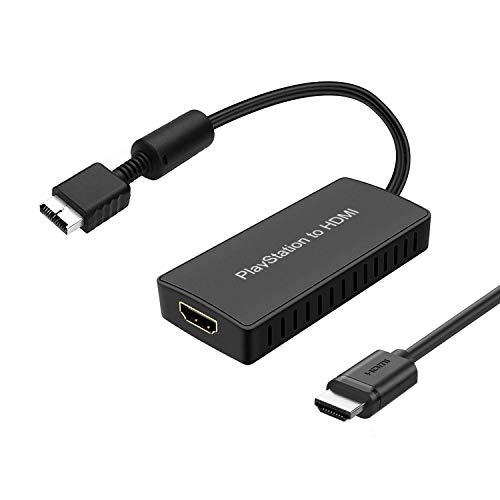
The Y.D.F adapter converts PS2/PS1/PS3 signals to HDMI with support for 16:9 and 4:3 aspect ratio switching. It emphasizes driver‑less operation and plug‑and‑play use. The product notes highlight universal compatibility with PS2/PS1/PS3 signals, making it a practical choice for multi‑generation setups. Best for gamers who want flexible aspect ratios and broad compatibility across Sony consoles.
Why selected: Simple setup, supports 4:3 and 16:9, and handles older console signals without requiring software. Limitation: The listing specifies PS1/PS2/PS3 signals, but actual performance can vary by TV input settings and PS2 component configuration.
Who should buy: Those with a mixed Sony console collection seeking one adapter to cover multiple generations.
HOXIBSL PS2 to HDMI Converter

The HOXIBSL converter handles PS1/PS2/PS3 signals to HDMI, with a built‑in 3.5mm audio jack for external speakers. It uses a one‑wire connection and a long 78.7‑inch cable for flexible setup. It supports 4:3 and 16:9 aspect ratio switching and remains a straightforward plug‑and‑play option. Best for players who want built‑in audio via a dedicated jack and a longer connection to the console.
Why selected: Includes a separate 3.5mm audio output for easier audio routing and a long run for flexible placement. Limitation: The note clarifies video conversion only; it does not improve video quality beyond the console’s output.
Who should buy: Players needing simple audio output options and a longer reach between console and display.
Buying Guide: PS2 To HDMI Adapter Essentials
- Output resolution and upscaling: Most adapters convert 480p to 720p or 1080p. Choose one that matches your TV’s native display capabilities without overpromising 4K results.
- Aspect ratio control: Look for 4:3 and 16:9 switches if you want authentic retro visuals or modern widescreen presentation.
- Compatibility: Confirm whether the adapter supports PS2 Phat, Slim, or PS1 in addition to PS2, and whether it requires component input settings (YPbPr/YCbCr) or simple AV to HDMI conversion.
- Setup and power: Some models are plug‑and‑play, others require external USB power. Consider your setup’s available power sources and cable routing.
- Audio options: Some adapters include a separate 3.5mm audio jack or require HDMI audio. Decide if you need an independent audio path or if HDMI audio suffices.
- Latency and gaming type: If you play action or rhythm games, prioritize low‑latency processing and stable frame timing.
- Reliability and support: Look for adapters with clear setup instructions and reasonable return policies if compatibility varies with your exact PS2 model.
FAQ
- Do PS2 to HDMI adapters require drivers?
Most listed adapters are plug‑and‑play and do not require drivers.
- Will these adapters upgrade PS2 visuals to 4K?
No. They typically upscale to 720p or 1080p within the PS2’s native output limits.
- Can I use 4:3 games in widescreen?
Yes, many adapters include a 4:3 to 16:9 switch, but some games may look stretched depending on the title.
- Is external power always required?
Some models are USB powered; others may not require external power for basic operation.
- Will these work with PS1 and PS3 as well?
Several adapters support multiple Sony consoles, though performance can vary by model and signal type.
- What should I do if I see a black screen?
Ensure the PS2 is set to the correct output (YPbPr/YCbCr or component) and refer to provided setup tips for preventing out‑of‑range errors.