Finding a dedicated art projector that fits creative workflows is essential for artists who trace, sketch, or plan murals. This guide highlights five top options ideal for drawing, tracing accuracy, and offline usability. Best for studio artists needing precise projection without internet reliance, better for mixed-media studios requiring flexible angles, and choose this for portable, quick setups. The selected models emphasize built‑in drawing tools, adjustable projection, and reliable image transfer. A concise buying guide and FAQs follow to support comparison and quick decisions.
| Product | Key Benefit | Best For |
|---|---|---|
| Caydo P3 Art Projector | High brightness (400 ANSI) and precise color | Daylight studios and high-detail tracing |
| Caydo P2 Art Projector | 250 ANSI lumens, offline drawing tools | Small spaces, offline workflows |
| Caydo P1 Art Projector | Built-in exclusive drawing app | General tracing and design transfer |
| Siftary Art Tracing Projector | 8 tracing tools, flexible modes | Professional drawing transfers |
| Caydo S1 Optical Tracing Projector | Pure optical tracing with enlargements | Hand-drawn line art, traditional tracing |
Caydo P3 Art Projector, Native 1080P Drawing Projector for Artists

The Caydo P3 offers bright projection and precise color, designed for artists who work with visible daylight or bright studios. It features 400 ANSI lumens and a 360° swivel base for easy mounting on walls, easels, chalkboards, or ceilings. The device supports high-contrast output to keep line work sharp and faithful to the original reference. Its built-in drawing assistant includes 0–200% zoom, 360° rotation, and 3×3 grids to help with scale, proportion, and composition. This model suits artists who need dependable image transfer without internet access and who value architectural or mural planning in varied environments.
Best for: Professionals needing daytime readability and flexible projection surfaces.
Why selected: Combines brightness with a robust drawing toolkit and versatile mounting options.
Caution: Higher brightness can require closer calibration in small rooms; ensure a stable surface for rotation-based alignment.
Caydo P2 Art Projector, Native 1080P Drawing Projector for Artists

The Caydo P2 focuses on offline drawing and adaptability. It delivers 250 ANSI lumens with accurate color and contrast, suitable for projecting onto walls, tabletops, ceilings, or tilted canvases via a rotating base. The exclusive drawing assistant includes 0–200% zoom, 360° rotation, and a 3×3 grid, along with four artistic modes (Gridify, Sketchify, Comicize, Monochromize) and three background colors. Image transfer is quick through a QR scan or USB drive, and the tools function offline, avoiding WiFi dependency—ideal for basements or spaces with poor connectivity.
Best for: Artists who need offline functionality and flexible working angles.
Why selected: Strong portability and drawing features at a mid-brightness level.
Caution: Performance may be limited in overly bright rooms without darkening surroundings.
Caydo P1 Art Projector for Artists, Built-in Exclusive Drawing App

The Caydo P1 emphasizes ease of use with an integrated drawing app that provides zooming, 360° rotation, and a 3×3 grid. It supports four artistic modes (Gridify, Sketchify, Comicize, Monochromize) and three background colors, making it suitable for beginners and seasoned artists transitioning between tracing and final design. The device is designed for projecting onto a variety of surfaces, from walls to whiteboards, helping artists trace or transfer photos and artworks with minimal setup. It also supports multiple screen-mirroring options for entertainment or concept previews.
Best for: New artists or educators who want straightforward, built‑in drawing tools.
Why selected: Integrated app reduces setup complexity.
Caution: Some users may prefer more advanced features found in higher‑brightness models.
Art Projector for Tracing and Drawing with App, Native 1280P HD
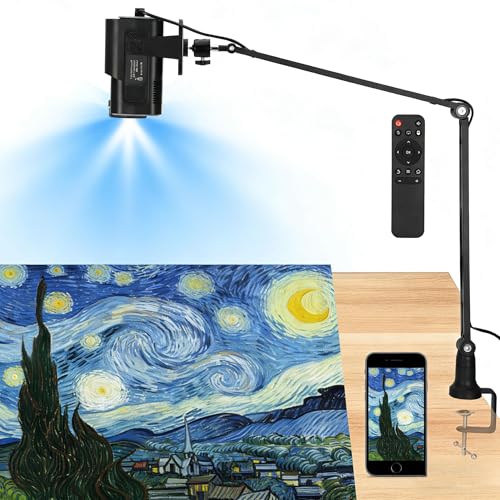
The Siftary model combines a native 1280×720 HD projection with a professional drawing app featuring eight tracing tools. It offers three background colors and four modes (Gridify, Sketchify, Comicize, Monochromize) to support different workflows. The GoHo Transfer feature allows quick image uploads, and the device supports several screens mirroring options for extended presentations. This projector aims at artists who need accurate tracing, overlaying grids, and quick transfer without complex steps.
Best for: Designers needing precise tracing tools and flexible workflow options.
Why selected: Strong tracing toolkit and transfer features.
Caution: Native resolution is 720p, which is lower than some 1080p options but adequate for line work and tracing at common canvas sizes.
Caydo S1 Art Projector for Tracing, Optical Projector

The Caydo S1 is a pure optical tracing projector designed for traditional, non-digital line art. It enlarges artwork up to 80 inches and offers a precise focus mechanism for crisp outlines. This model is best when the goal is manual tracing on paper or canvas with minimal electronic features. It works best in darkened rooms to maximize projected clarity and provides reliable enlargement from small sketches to larger murals.
Best for: Artists focusing on classical tracing with no digital dependency.
Why selected: Simple, distraction-free tracing with precise optical scaling.
Caution: No digital transfer or screen-based tools; relies on manual projection.
Buying Guide
What to consider when choosing an art projector for drawing and tracing:
- Brightness: Higher ANSI lumens improve visibility in rooms with ambient light; choose 400 ANSI for daytime use and at least 250 ANSI for darker studios.
- Projection surface flexibility: Look for a rotating base or adjustable tilt to accommodate walls, tables, ceilings, or easels.
- Drawing tools: Built-in apps with zoom, rotation, and grids help with scaling and composition; ensure offline operation if internet access is unreliable.
- Image transfer: QR transfer or USB drive options speed up workflows; confirm compatibility with your file formats and apps.
- Resolution and clarity: Native 1080p offers crisper lines; 720p can suffice for tracing but may blur on large canvases.
- Connectivity: If you need streaming or multimedia playback, consider models with built-in apps and wireless mirroring; otherwise, optical or offline projection reduces complexity.
- Portability and setup: For artists who travel or work in tight spaces, a compact model with a stable base is advantageous.
FAQ
- What projection surface works best for tracing?
A: Flat walls or easels provide stable, uniform projection; darkened rooms improve contrast for fine lines. - Is it necessary to have internet for these projectors?
A: No. Several models offer offline drawing tools and USB/QR image transfer, keeping workflows uninterrupted. - Can these projectors handle 4K content?
A: Some support 4K input via HDMI or USB, but native resolution is often 720p–1080p; use 4K content mainly for reference clarity at large scales, if supported. - Which model is best for beginners?
A: Models with built‑in drawing apps and simple transfer methods (like Caydo P1 or P2) typically suit beginners well. - Do these projectors distort images at large sizes?
A: High‑quality optics and proper focus reduce distortion; grid and measurement tools in the drawing apps also help maintain accuracy. - Can I use these for entertainment as well as drawing?
A: Many have streaming apps or screen-mirroring options, but some are optimized for drawing and may restrict outputs to drawing workflows.