Looking for a professional audio interface that delivers studio-grade sound for your recordings, podcasts, or live sessions? This guide highlights five top options and explains who they’re best for, plus a concise buying guide to help you compare features side by side. Each pick is selected for interoperability, durability, and clear value for money. Ideal buyers include home studios, podcasters, guitarists needing clean DI, and small project studios expanding to multi-input setups.
| Product | Best For | Key Benefit |
|---|---|---|
| Focusrite Scarlett 2i2 4th Gen | Compact home studios | Studio-grade mic pres with Auto Gain |
| Focusrite Scarlett Solo 4th Gen | Vocal/guitar basics | Air mode for vocal/guitar clarity |
| Focusrite Scarlett 4i4 4th Gen | Small project studios | Multiple inputs including MIDI I/O |
| Focusrite Scarlett 18i16 4th Gen | Multi-instrument setups | Extensive input/output options |
| Solid State Logic 2 MKII Plus | Podcasters and producers | Discrete preamps with bus power |
Focusrite Scarlett 2i2 4th Gen USB-C Interface

The Scarlett 2i2 4th Gen is designed for solo artists, small studios, or musicians who need straightforward USB-C connectivity with two combined mic/line inputs. It uses updated mic preamps and high headroom converters for clean, studio-like recordings. The Auto Gain feature helps beginners set the proper input level, while Clip Safe prevents distortion, allowing users to focus on performance rather than level management.
Best for: Solo singers, guitar-driven projects, and voiceover work in compact spaces. Choose this if you want reliable two-input simplicity with quality Focusrite conversion in a portable package. Limitation: Two inputs may be insufficient for complex multi-instrument sessions.
Focusrite Scarlett Solo 4th Gen USB-C Interface

The Solo 4th Gen targets songwriters and small-studio users who need high-quality two-input capability with enhanced vocal and instrument clarity. It features Air mode to lift vocals and guitars, delivering a more present sound in the final mix. It shares the 120dB dynamic range and high-spec converters with its higher-end siblings, ensuring professional results for solo projects.
Best for: Songwriters, guitarists, and podcasters seeking studio-grade sound in a compact unit. Choose this if you want “big studio” results without extra input burden. Limitation: Lacks MIDI I/O and the dual mic preamp flexibility of larger Focusrite models.
Focusrite Scarlett 4i4 4th Gen USB-C Interface

The Scarlett 4i4 4th Gen is a versatile studio hub suited for small project studios and producers who need more inputs and routing options. It provides two mic preamps, two instrument inputs, and four line inputs plus MIDI I/O, making it capable of handling mic’d vocals, guitars, keyboards, and external gear simultaneously. Its 120dB dynamic range ensures clean captures across sources.
Best for: Small bands, multi-instrument recording, and hybrid setups. Choose this if you require flexible routing and MIDI along with solid mic/line inputs. Limitation: May be more than needed for a solo voiceover or minimalist setup.
Focusrite Scarlett 18i16 4th Gen USB-C Interface

The 18i16 is built for producers and engineers who need extensive input and output routing in a single interface. It offers 18 inputs and 16 outputs, including four mic preamps, Hi-Z, ADAT, S/PDIF, and MIDI I/O. The 4th generation preamps deliver strong gain and clean conversion, making it a capable central hub for a multi-instrument setup, overdubs, and complex monitoring.
Best for: Busy home studios and producers working with keyboards, drums, and multiple mics. Choose this if you require large I/O and flexible expansion. Limitation: Size and complexity may be more than necessary for simple voiceover tasks.
Solid State Logic 2 MKII Plus USB-C Interface 2×4
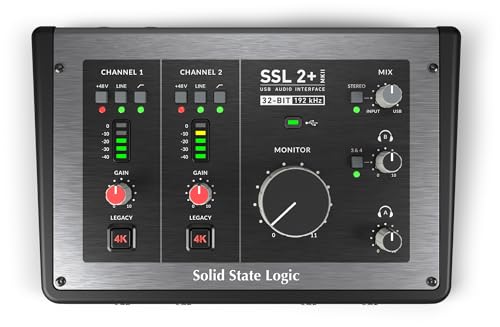
The Solid State Logic 2 MKII Plus targets podcasters, live-studio musicians, and producers who want robust, bus-powered performance with two XLR mic preamps and dedicated line/Hi-Z inputs. Its architecture emphasizes low-latency operation and solid analog character with SSL-inspired enhancements. The compact design suits desktop studios needing professional-grade inputs without external power bricks.
Best for: Podcasters, voice talents, and small studios seeking a flagship-like SSL workflow in a compact unit. Choose this if you prioritize a premium analog edge and easy bus-powered operation. Limitation: Two mic preamps may restrict multi-voice recording without additional preamps or interfaces.
PIYONE Audio Interface, 2X2 USB-C

The PIYONE 2×2 interface offers class-compliant USB-C connectivity, two inputs, and high-fidelity 24-bit/192kHz performance. It emphasizes portability and a simple plug-and-play experience, making it suitable for travelers, students, and mobile recordings. It supports a one-cable setup and is designed for Mac, PC, and iOS ecosystems, with a visual LED ring design for easy level checks.
Best for: Mobile musicians, students, and home studios needing reliable, driver-free operation. Choose this if you want a lightweight, budget-friendly option with solid conversion. Limitation: Only two inputs and limited expandability compared with multi-input models.
Universal Audio Volt 276 USB Audio Interface

The Universal Audio Volt 276 combines classic UA preamps and workflow with a Luna DAW option, adding an analog flavor through Vintage mode and a dedicated compressor inspired by the 1176. It targets users who want an analog-inspired path within a modern recording setup. The interface emphasizes high-quality vocal and instrument capture and seamless integration with UA’s ecosystem.
Best for: Musicians and engineers seeking an album-ready signal path with iconic preamps and UA workflow. Choose this if you value analog warmth and a unified software/hardware environment. Limitation: UA ecosystem features may require learning the workflow and may influence accessory choices.
Buying Guide: Key Considerations for a Professional Audio Interface
- Input/Output Needs: Assess how many mic pres, instrument inputs, and line or digital I/O you require. If you record bands or multiple instruments, prioritize larger I/O like the Scarlett 4i4 or 18i16, or even more capable options.
- Connectivity and Power: USB-C interfaces offer straightforward compatibility with modern laptops. Bus-powered devices reduce clutter but ensure your computer’s bus power is ample for your needs.
- Preamps and Converters: Look for high dynamic range and clean preamps when capturing vocals and instruments. 120dB dynamic range and 24-bit/192kHz sample rates are common targets for pro-grade results.
- Monitoring and Latency: Low-latency monitoring is essential for real-time performance. Check driver support and software routing options to avoid monitoring bleed or latency.
- Software and Workflow: Some interfaces include bundled software or integrate with specific DAWs. Consider whether a particular ecosystem (such as Air mode, Vintage modes, or SSL-inspired features) will fit your production style.
- Portability vs. Expandability: If you travel or work in multiple spaces, smaller 2×2 or 4×4 units maximize portability. For growing studios, higher-input hubs with MIDI and ADAT expandability offer better long-term value.
- Durability and Build: For mobile use, a rugged chassis and reliable connectors help prevent failures. Consider the weight, knock resistance, and cabling options for your setup.
FAQ
- What is an audio interface used for?
An audio interface converts analog recordings from mics and instruments into digital data that a computer can process and store, while also returning playback to monitors with low latency. - Do I need two mics preamps for a home studio?
Not always, but having at least two mic preamps is helpful for recording a vocal plus a second instrument or for stereo miking. More inputs improve versatility for larger sessions. - Is USB-C enough for a professional setup?
Yes, USB-C is common in modern interfaces and supports high data transfer rates. Ensure your computer has compatible ports or use appropriate adapters. - Should I choose a model with MIDI I/O?
If you plan to integrate keyboards, controllers, or other external gear, MIDI I/O adds convenient routing without extra devices. - What is “Air” or “Vintage” mode?
Air mode often adds brightness to vocals and guitars, while Vintage/analog modes emulate classic preamp characteristics for additional color in your recordings. - Are bundles essential?
Bundled software can help you start quickly, but core needs often depend on your DAW and monitoring setup. Bundles vary in usefulness from user to user.