Looking for solid, affordable desktops that balance performance and value? This guide highlights five cost-conscious options that fit typical home, student, or small office needs. Each pick is best for a specific buyer type, with clear reasons and a practical caveat. If you need a dependable refurbished or renewed machine, these choices help you compare form factors, processors, memory, and storage without overpaying.
Summary of selected products:
| Product | Form Factor | CPU | RAM | Storage | Best For |
|---|---|---|---|---|---|
| Dell Optiplex 7050 SFF | Small Form Factor | i7-7700 | 32GB | 1TB SSD | Power users needing multi-tasking |
| HP ProDesk 600 G3 SFF + Monitor Bundle | SFF | i5-6500 | 16GB | 256GB SSD | Students and home offices |
| Dell Optiplex 3060 | Mini/Compact | i5-8500 | 32GB | 1TB SSD | Upgrade-friendly setups |
| HP 24″ OmniStudio All-in-One | All-in-One | Core i5 | 8GB | 128GB UFS | Space-saving multimedia |
| Lenovo ThinkCentre M710q Tiny | Tiny | i3-6100T | 8GB | 256GB SSD | Ultra-compact desks |
Dell Optiplex 7050 SFF Desktop PC

The Dell Optiplex 7050 SFF is equipped with an Intel Core i7-7700 processor and 32GB of DDR4 RAM, paired with a 1TB solid-state drive. This configuration supports heavy multitasking, advanced office workloads, and media tasks with responsive performance. Best for power users or small offices that run multiple applications concurrently.
Best for: Professionals who need fast startup, ample memory, and room to run demanding software. Why selected: high RAM and strong CPU in a compact form factor aid productivity in crowded workspaces. Caution: Renewed units may vary in cosmetic condition and require consistent maintenance to maintain performance.
HP ProDesk 600 G3 SFF Desktop Computer with 21.5″ Monitor Bundle

This bundle uses a 6th-gen Intel Core i5-6500 with 16GB DDR4 RAM and a 256GB SSD, plus a 21.5″ Full HD monitor. It offers solid everyday performance for students and home offices, with a ready-made display solution. Best for: buyers who want a complete desk setup without hunting for a separate monitor. Caution: Monitor included means more upfront volume and potential shipping concerns.
Dell Optiplex 3060 Desktop Computer

The Dell Optiplex 3060 features an i5-8500 (3.2 GHz) with 32GB RAM and a 1TB SSD, plus built-in WiFi and Bluetooth. It includes a side panel RGB lighting kit for a customizable look and supports modern connectivity. Best for: users who want a mid-range, upgrade-friendly desktop with visual flair. Caution: RGB features require proper driver support and may affect power usage.
HP Windows 11 Desktop Computer

This HP ProDesk-style unit packs 16GB RAM with a 500GB SSD, running Windows 11 Pro for modern security and features. It is a compact option aimed at home or small office use, suitable for schoolwork, light multitasking, and streaming. Best for: buyers who want a reliable, compact Windows 11 PC without oversized footprint. Caution: The data mentions 16GB RAM in a dual-instance description; verify final RAM configuration before purchase.
Lenovo ThinkCentre M710q Tiny Desktop
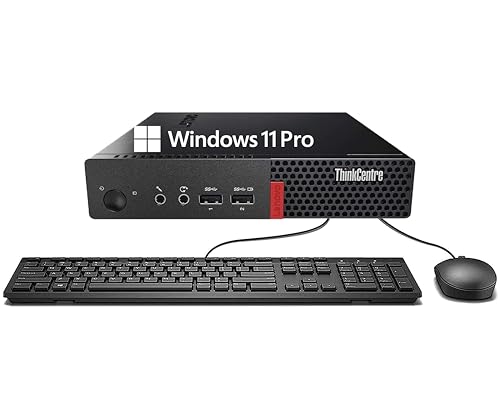
The Lenovo ThinkCentre M710q Tiny offers a compact form with 8GB DDR4 RAM and a 256GB SSD, powered by a 6th Gen Intel Core i3-6100T. Best for: spaces that demand a minimal footprint without sacrificing essential productivity. Caution: The lower-end CPU may be less capable with heavier multitasking or demanding software compared to higher-tier models.
Buying Guide
What should I consider when buying a budget desktop?
- Performance vs. need: Choose CPU and RAM based on intended tasks. Creative work and heavy multitasking benefit from 16–32GB RAM and a Core i5/i7.
- Form factor: SFF and Tiny desktops save space but may limit upgrade options. All-in-One saves space but trades upgradability.
- Storage: SSDs deliver fast boot and load times; 256GB is often enough for OS and apps, with additional HDD space if needed.
- Connectivity: Ensure WiFi, Bluetooth, and sufficient USB ports for peripherals.
- Renewed vs. new: Renewed/refurbished machines offer substantial savings but may have cosmetic or aging component considerations. Verify return policies and warranties.
- Upgrade path: If you anticipate future needs, prioritize systems with open RAM slots and available PCIe/drive expansion.
What is the best choice for students?
Look for a balance of multitasking capability and affordability. A 16GB RAM configuration with an SSD and a monitor bundle can simplify setup and improve performance for assignments, web research, and media tasks.
What is the best choice for home offices?
Prioritize compact form factors with reliable networking and Windows 11 Pro for security features. A 256GB+ SSD, 8–16GB RAM, and solid expandability support a productivity workflow with multiple apps and video conferencing.
What about space-saving all-in-one options?
All-in-One designs consolidate display and CPU, saving desk space and reducing cable clutter. They’re ideal for multimedia use and environments with tight desks, though they may limit internal upgrades compared to tower desktops.
How important is warranty and support?
For refurbished or renewed devices, a minimum warranty and accessible tech support help protect your investment and minimize downtime. Check the seller’s service terms and included accessories.
FAQ
- Are refurbished desktops reliable?
- Is 32GB RAM overkill for typical home use?
- Should I buy an all-in-one or a traditional tower?
- What operating system is best for compatibility?
- How important is storage speed?
- Can I upgrade these systems later?
Yes, when purchased from reputable refurbishers with testing, cleaning, and warranty processes, refurbished desktops can offer solid performance at a lower cost.
For standard tasks, 8–16GB is usually sufficient. 32GB is beneficial for heavy multitasking, large workloads, and future-proofing.
All-in-ones save space and simplify setup. Towers typically offer easier upgrades and higher performance per dollar for the same price.
Windows 11 Pro provides security features and business-friendly options; Windows 11 Home is adequate for general use.
An SSD significantly speeds boot times and app loading. A 256GB SSD with additional HDD storage is a common, cost-efficient setup.
Upgrade potential varies by model. Look for systems with accessible RAM slots and additional drive bays or PCIe expansion.