When your Wi-Fi struggles behind thick walls or in distant rooms, a powerline WiFi extender can bridge wired and wireless gaps using your existing electrical wiring. This guide highlights five solid TP-Link powerline extenders that help you extend network access to hard-to-reach areas. Each option suits different homes and use cases, from compact apartments to multi-story houses with basements and attics. Read on to compare capabilities, ideal buyers, and potential limitations.
| Product | Best For | Key Benefit |
|---|---|---|
| TP-Link AV1000 + AX1500 Wi‑Fi 6 KIT | Homes needing fast Wi‑Fi across two adapters | Wi‑Fi 6 plus wired AV1000 performance |
| TP-Link AV1000 Powerline Kit with Passthrough | Multi-story homes with electrical outlets in every room | Passthrough outlet keeps socket usable |
| TP-Link AV1300 Powerline Kit with Passthrough | Large homes needing stronger Wi‑Fi on multiple floors | Higher AV1300 speeds, better for HD streaming |
| TP-Link AV1000 Nano Size Kit | Compact setups and easy plug‑in deployments | Small form factor, flexible placement |
| TP-Link AV1000 Passthrough Kit (Gigabit) | Users who want a reliable wired/ wireless boost with passthrough | Direct wall outlet connection with Gigabit port |
The following sections provide detailed product-by-product guidance. Each entry notes who the product is best for, why it’s suitable, and a practical caveat to consider before purchase.
TP-Link AV1000 Powerline Ethernet Adapter+AX1500 Wi‑Fi 6 Kit

This kit uses HomePlug AV2 to deliver AV1000 powerline speeds with a Wi‑Fi 6 access point, suitable for households needing faster wireless performance in extra rooms. Best for buyers who want a single, cohesive system that provides both wired and wireless connectivity from two adapters. The set is designed to extend coverage through thick walls where routers struggle. Caution: actual speeds depend on your internet plan and wiring quality; expect smaller gains if the electrical system has interference or long distances.
TP-Link AV1000 Powerline Ethernet Adapter WiFi Extender Kit, Passthrough
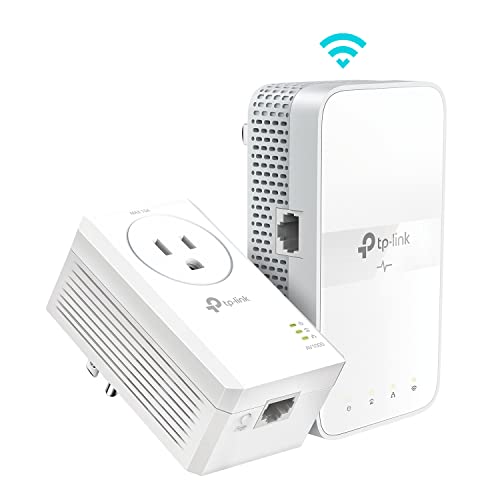
Best for multi-story homes where outlets on each floor are used heavily. This kit extends wired connectivity up to 750 feet via electrical wiring and includes a passthrough outlet to avoid losing a wall socket. Ideal for households with streaming devices, gaming consoles, and PCs that benefit from stable wired connections. Limitation: rare cases may see reduced speeds due to wiring conditions or long cable runs.
TP-Link AV1300 Powerline Ethernet Adapter WiFi Extender KIT- Passthrough
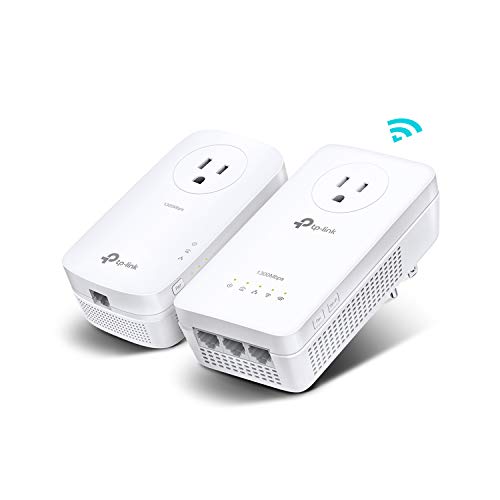
Choose this when you need more powerline bandwidth, especially in larger homes with multiple floors and thick walls. The AV1300 speeds improve performance for HD streaming and online gaming while maintaining wired connectivity through the electrical system. Best for homeowners who want extra headroom for several devices at once. Caution: Passthrough reduces the number of available outlets on that circuit; ensure placement won’t block essential plugs.
TP-Link AV1000 Powerline Ethernet Adapter KIT – Gigabit Port, Nano Size

Best for space‑constrained setups where a compact device is preferred. This kit extends Ethernet connectivity through existing electrical wiring with AV1000 speeds, compatible with other TP-Link powerline adapters. It’s well suited for small apartments or rooms where a smaller device improves discreet placement. Limitation: real-world performance can be influenced by wiring quality and distance between adapters.
TP-Link AV1000 Powerline Ethernet Adapter Kit – Passthrough, Gigabit Port

Ideal for homes where you want a reliable wired and wireless boost with a passthrough outlet. The kit uses AV1000 powerline speeds to extend network access through walls and barriers, helping with streaming, browsing, and gaming across several rooms. Caveat: only use on the same electrical circuit and avoid plugging into power strips or surge protectors for optimal performance.
Buying Guide: Key Considerations for Powerline Extenders
- Electrical wiring health: Powerline performance depends on your home’s wiring quality and age. In older homes, connected distance and interference can reduce speeds.
- Distance and circuit design: Adapters perform best on the same electrical circuit and within a reasonable distance. Separate circuits may slow performance substantially.
- Passthrough outlets: Choose passthrough models if you need to preserve wall outlets for lamps and devices without sacrificing network extension.
- Wi‑Fi vs. wired emphasis: If you need strong wireless coverage, prefer kits that combine powerline with a robust Wi‑Fi standard (e.g., Wi‑Fi 6). If you mainly need wired reliability, the AV1000 wired speeds may suffice.
- Number of devices: Consider the number of devices that will connect simultaneously. Higher AV classes (like AV1300) help in busy households with multiple streams and games.
- Future-proofing: If you expect higher internet plans or more devices, a Wi‑Fi 6 kit or higher‑speed powerline kit can provide longer usable life before an upgrade is needed.
Frequently Asked Questions
- What is a powerline extender?
A device that uses your home’s electrical wiring to extend network connectivity, delivering both wired and wireless access to hard-to-reach areas.
- Do powerline extenders require specific outlets?
They work best on outlets on the same electrical circuit and away from large appliances. Passthrough models keep outlets usable.
- Will powerline speeds match my internet plan?
No. Powerline speeds depend on the adapter class (AV1000, AV1300, etc.), the wiring, and distance. They cannot exceed your plan’s limit.
- Which is better for gaming: wired powerline or Wi‑Fi?
Wired powerline connections tend to be more stable and lower latency than wireless in challenging layouts, but a strong Wi‑Fi 6 extender can also perform well for gaming in many homes.
- How many adapters should I buy?
Generally, two adapters are needed to create a powerline network. Additional adapters can extend coverage to more rooms, but performance may vary with distance.
- Do I need a router with these devices?
No, these devices provide their own Wi‑Fi access point in addition to wired Ethernet ports, but you’ll connect them to your existing router’s network as part of a unified system.