If you’re selecting a point-of-sale (POS) system for a restaurant, you want reliability, ease of use, and strong integrations. This guide highlights five top options that suit different buyers—from small cafes needing compact all‑in‑one setups to larger venues requiring dual touchscreens and robust printing. Each pick is described with who it’s best for, why it’s selected, and a practical caution. The buyer intent is clear: find a restaurant POS that streamlines orders, payments, and cash handling without excessive setup time.
Summary table of chosen products
| Product | Best For | Key Benefit | Limitations |
|---|---|---|---|
| Touch Screen Computer POS System (17″) | Busy counters needing a built‑in system | Large display with integrated software | May require local setup for software |
| 19″ Touch Screen POS System | Restaurants with higher traffic | XL touch display and built‑in software | Size may take more counter space |
| Square Handheld | Tableside service and mobile orders | Portable and durable with offline mode | Fees may apply for transactions and peripherals |
| Volcora Dual‑Screen POS | Small business with space to spare | Dual touchscreens for staff and customer view | Professional hardware required for full setup |
| DatIO 10″ Fire Tablet System | Retail or quick‑serve on a compact tablet | All‑in‑one with receipt printer and drawer | Requires Datio subscription for full features |
Touch Screen Computer POS System For Restaurant

This all‑in‑one POS package pairs a 17 inch touch screen with built‑in software and a secure cash drawer. It’s best suited for restaurants with dedicated front‑of‑house counters that require reliable, ready‑to‑use hardware. The built‑in software streamlines daily operations from order entry to payment processing, making it suitable for mid‑volume venues. A potential drawback is that on‑site setup may be needed for initial configuration and software activation beyond plug‑and‑play basics.
19″ Touch Screen POS System With Kitchen Printer

This package features a 19 inch XL touch display with a complete POS system and an integrated kitchen order printer. It’s a strong pick for higher‑traffic venues that need quick navigation and immediate order routing to the kitchen. Best for larger booths or bar areas where a bigger screen reduces entry errors. The caution: footprint is larger, so counter space should be measured before purchase.
Square Handheld — Portable POS

Designed for tableside service, this compact device lets servers take orders, accept payments, and scan barcodes on the go. It’s best for restaurants that emphasize quick tableside service or a mobile checkout flow. It’s also durable and water‑splash resistant with a long‑lasting battery. A potential limitation is that some merchants prefer a larger screen for multitasking or need companion hardware to expand functionality.
Volcora Dual Touchscreen POS Terminal

This compact terminal blends a 15.6″ customer display with an 11.6″ staff touchscreen, providing a dual interface that boosts efficiency in dine‑in settings. It’s best for small to medium venues that want a modern look and clear separation of roles between the kitchen, bar, and front desk. The technology is feature‑rich, but the initial setup and ongoing management may require a capable POS administrator.
Datio 10‑Inch Fire Tablet POS System

This all‑in‑one solution uses a 10‑inch Fire tablet with a receipt printer and cash drawer. It’s well suited for compact quarters, quick‑service setups, and smaller retailers or salons that need a straightforward, affordable system. Choose this if you want a lightweight, scalable option with a simple software subscription model. A limitation is the need to rely on a subscription for continued full functionality and support.
Square Register POS System With White Glove Setup

This package targets new Square accounts with pre‑programmed configuration and white‑glove setup. It’s best for retailers and eateries that want to reduce initial configuration time and ensure a smooth onboarding. The advantage is start‑to‑finish setup support; the caveat is exclusive pricing tied to new Square accounts and ongoing service terms.
ZHONGJI A3POS System For Restaurants
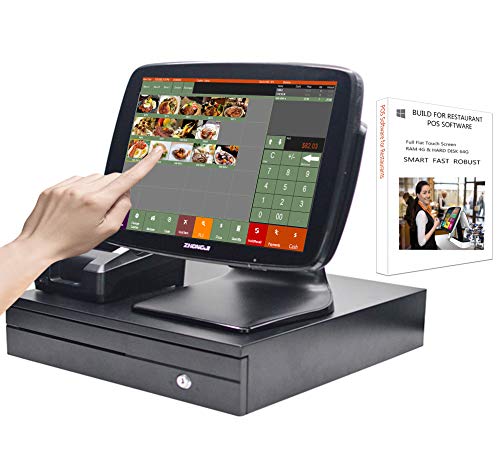
This package includes a 15 inch touchscreen PC, a thermal receipt printer, cash drawer, and MSJ POS software. It’s designed for mixed environments like restaurants and bars that require a robust hardware suite. Best for venues needing dependable hardware with a Windows base. A caution is that integration depth depends on software compatibility with existing systems.
Datio Cash Register With Printer For Retail or Restaurant

This all‑in‑one solution is compatible with iPad sizes from 9.7″ to 10.x” and pairs with the Datio POS App. It’s best for businesses seeking a familiar iPad‑based interface with a thermal printer and cash drawer. The main consideration is the need for a Datio POS subscription to enable full features, which affects long‑term cost planning.
Buying Guide: Key Considerations For Restaurant POS Selection
What should you consider before buying a restaurant POS system? Start with capacity and speed—how many orders per hour you expect and how fast the system processes them. Screen size matters: larger displays reduce entry errors but occupy more counter space. Hardware durability is essential in busy environments with spills and frequent cleaning. Look for integrated printers, cash drawers, and stable networking options to minimize maintenance.
What features matter most? Consider an all‑in‑one solution if you want minimal setup; or a modular approach if you need room to grow. Tableside ordering, offline payment capability, and robust customer display options improve service efficiency. Ensure software updates and support align with your business hours to avoid downtime during peak times.
How important is compatibility? If you already use certain payment processors or loyalty programs, verify compatibility before buying. Cloud‑based systems offer remote updates and data access, while on‑premises options can reduce dependency on the internet. Budget for ongoing subscription costs if the model relies on software licensing.
What about scalability and maintenance? Choose products with scalable plans and predictable costs. Dual‑screen or larger form factors may suit expanding menus or higher seat counts. Consider the availability of local support or reliable remote assistance for fast issue resolution.
FAQ
- What is the best POS system for a small cafe? A compact, all‑in‑one system with an easy setup and reliable cash handling is ideal for small cafes. Look for a model with a clear interface and tableside capabilities if you need quick service.
- Do I need a subscription for these POS systems? Some options include ongoing software subscriptions for updates and support. Others provide perpetual licenses with optional updates. Check each product’s terms to plan costs.
- Is a portable POS better for a restaurant? Portable POS devices are great for tableside orders and mobile payments. They enhance service speed but may require durable protections and reliable wireless connections.
- Should I prioritize display size or counter space? Prioritize display size based on your staff workflow. A larger screen can reduce entry errors, but it must fit on your counter without crowding work zones.
- Can these systems integrate with kitchen printers? Yes, most packages include or support kitchen printers to streamline order routing. Verify printer compatibility with your chosen software.
- What’s the risk of choosing a tablet‑based system? Tablet systems are affordable and flexible but may rely more on software subscriptions and require ongoing security updates and backups.