Need a reliable point-of-sale system tailored for restaurants? This guide highlights five top options that balance speed, reliability, and ease of use for food-service environments. Each pick is described for the type of buyer it suits best—whether you run a busy cafe, a full-service restaurant, or a quick-service bar. The included summary table helps compare core strengths at a glance.
Summary of Selected Products
| Product | Best For | Key Strength | Limitations |
|---|---|---|---|
| Touch Screen Computer POS System for Restaurant Bar Full Package | High-volume bars and restaurants | All-in-one board with 17″ touch display and integrated software | Includes hardware and software, may require ongoing updates |
| Volcora Dual Touch Screen POS Terminal | Dine-in or fast-casual venues | Two touchscreens for staff and customer display | Hardware-only option; software choice may vary |
| Volcora 15.6″ White POS Terminal (Hardware Only) | Compact counters with modern look | Space-saving design with dual-display potential | Requires separate software setup |
| Square Register POS System | Small to medium cafes and boutiques | Pre-programmed, all-in-one solution with quick setup | Less flexibility for heavy customization |
| Square Handheld | Tableside service and mobile orders | Portable, offline mode, built-in barcode scanner | Limited by Square ecosystem on some plans |
Touch Screen Computer POS System for Restaurant

The system features a large 17-inch touch screen for fast navigation and order entry, a complete POS setup with built-in software, and a secure cash drawer for organized transactions. Best for high-traffic bars or casual dining where speed and reliability are critical. Choose this if you want an all-in-one solution that minimizes setup steps and supports quick service operations. Caution: In busy environments, ensure staff training covers the cash-handling workflow to avoid transaction delays.
Volcora Dual Touch Screen POS Terminal

This Volcora terminal pairs a 15.6″ main screen with an 11.6″ customer display, powered by an Intel Core i5 and Windows 11 Pro in the hardware specification. It is a strong fit for places needing clear separate views for staff and customers. Best for quick-service or dining venues that want crisp on-counter presentation and robust connectivity. Limitation: As hardware-only, it requires selecting compatible software and ongoing maintenance separately.
Volcora 15.6” White POS Terminal (Hardware Only)

Designed for space-conscious counters, this Volcora unit emphasizes a wide 15.6″ touchscreen with durable build for busy front desks. Best for small to mid-size restaurants and cafes that want a clean, modern look with reliable input responsiveness. Use this if you will supply your own software; avoid if you require an all-in-one package with built-in POS software.
Square Register POS System

Square Register offers a pre-programmed, ready-to-use solution with white-glove setup and ongoing U.S.-based support. This makes it ideal for new businesses or those seeking fast deployment with strong support. Best for startups, small retail-like eateries, and venues prioritizing simple onboarding. Caution: While convenient, it may be less customizable for complex workflows compared with open platforms.
Square Handheld POS

The Square Handheld enables payments, tableside orders, and barcode scanning in one portable device. Best for delivering tableside service, takeout, or curbside pick-ups where mobility matters. It offers offline payment options, which is helpful in locations with spotty Wi-Fi. Limitation: It works best within the Square ecosystem, which may influence feature access based on plan choices.
19″ Touch Screen POS System for Restaurant

This 19-inch touch display offers a larger navigation surface and an integrated POS system with a built-in cash drawer. Best for restaurants needing a larger display to manage high-volume orders at the counter. Caution: Ensure mounting depth and desk space align with the 19″ footprint to avoid crowding the service area.
ZHONGJI A3POS System for Restaurants
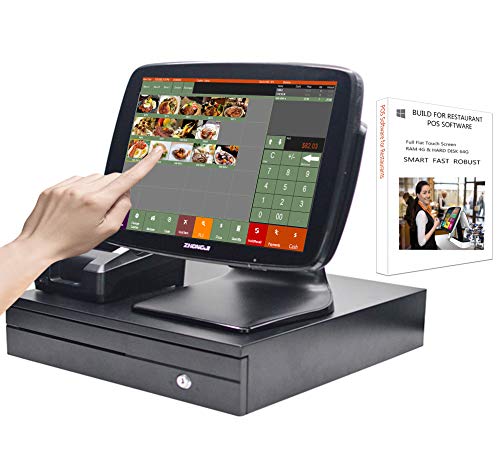
ZHONGJI’s Set02 includes a 15-inch touch screen with an integrated receipt printer and a stainless steel cash drawer, plus a robust PC and Windows software stack. Best for venues that want an all-in-one workstation with strong hardware compatibility. Caution: Windows 10 compatibility means some newer software may require updates or alternatives for future-proofing.
Volcora Dual Touchscreen Portability

A compact Volcora dual-display POS with built-in WiFi and modern inputs supports a versatile restaurant setting. Best for small to mid-size venues needing a dual-view experience for staff and customers. Choose this if counter space is limited and you want integrated customer display functionality.
Buying Guide: Key Purchase Considerations
What type of restaurant do you operate, and how busy is it? Select a system with speed and reliability for high-volume environments. Consider hardware-to-software flexibility, future-proofing, and ease of deployment.
- All-in-One vs. Hardware-Only: All-in-one options reduce setup effort, while hardware-only units offer flexible software choices.
- Display Size and Ergonomics: Larger screens speed order entry; dual screens help with staff and customer interactions.
- Connectivity and Expansion: Look for USB, HDMI, Ethernet, and serial ports to connect printers, scales, and other peripherals.
- Portability: Tableside or handheld devices enhance service at the table or kiosk ordering.
- Support and Updates: Consider providers offering onboarding, remote setup, and ongoing support.
FAQ
- What is the best POS for a high-volume restaurant?
Systems with large displays, integrated software, and fast processing are best for high-volume venues. All-in-one packages minimize setup time for busy staff.
- Should I choose a hardware-only POS or an all-in-one system?
Hardware-only options offer flexibility to use preferred software, while all-in-one systems simplify deployment and maintenance.
- Is a dual-touchscreen POS better for dine-in?
Yes, dual screens help with order capture and customer display, improving front-of-house efficiency in busy dining rooms.
- Do portable handheld POS devices work offline?
Many handheld devices support offline payments, which helps during service interruptions or Wi-Fi outages.
- What should I consider for ongoing POS costs?
Factor in software subscriptions, payments processing fees, and potential add-ons like printers and cash drawers.
- Can these POS systems integrate with existing software?
Most offer integrations or extensibility options, but verify compatibility with your current POS ecosystem and accounting tools.