If you’re filming YouTube videos with a smartphone, the right kit can dramatically improve audio, lighting, and stability. This guide highlights five practical, value-focused phone vlogging kits designed for iPhone and Android users. They’re ideal for aspiring creators, hobbyists, and professionals who want plug-and-play setups without complex gear. Each option emphasizes clear audio, flexible lighting, and stable mounting to boost video quality in varied shooting environments.
Summary table of selected products:
| Product | Best For | Key Benefit |
|---|---|---|
| Content Creator Essentials Vlogging Kit for iPhone | iPhone vloggers needing all-in-one trolling setup | Wireless mics and 4-in-1 stand/light |
| Vlogging Kit for iPhone/Android with Auto Tracking | creators wanting hands-free framing | Face-tracking tripod with dual mics |
| UBeesize 12″ LED Ring Light with 62″ Tripod | Content creators needing reliable lighting | Bright LED ring light, tall tripod |
| Yeaki 71″ Selfie Stick Vlogging Kit | Mobile creators seeking long reach | Long selfie stick with lights and mic |
| Overhead Camera Mount with Ring Light | Top-down or overhead shoots | Flexible arm with clamped feet |
Content Creator Essentials Vlogging Kit for iPhone

The kit centers on crystal-clear wireless audio without apps, using a 1-transmitter, 2-mic system with a 3-in-1 receiver (USB-C/Lightning/3.5mm). It promises auto pairing, up to 79 feet range, and 12 hours of recording from a 2-hour charge. This is best for iPhone vloggers who want studio-like sound without Bluetooth or extra software. A key caveat is you’ll want to monitor battery life in long shooting sessions, since the receiver can be unplugged to save power.
Best for: iPhone creators who need plug-and-play audio with flexible placement and long recording windows. Why selected: it integrates a compact wireless mic system with a versatile 4-section stand that expands for multiple angles, reducing setup time between takes.
What to watch: avoid this if you require Bluetooth connectivity or third-party mic apps for advanced processing.
What’s included: a 13″ to 71″ adjustable setup, phone tripod, selfie stick, wireless remote, dual lights, and a USB-C rechargeable light system. The design emphasizes hands-free control and smooth movement for on-the-go filming.
Vlogging Kit for iPhone/Android with Auto Tracking
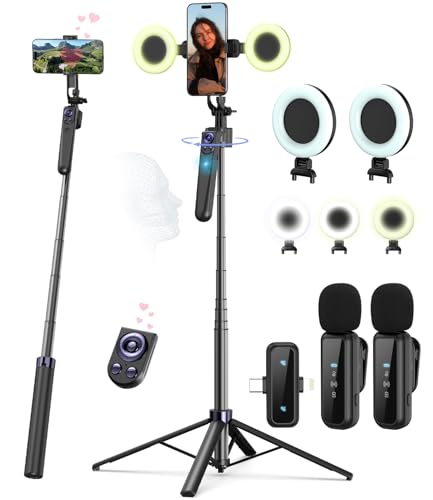
This kit features an auto face-tracking tripod for iPhone with a professional microphone and dual LED lights. It’s designed for smooth, hands-free recording and consistent lighting for high-quality videos. The AI-powered 360° face tracking centers the user automatically, making it ideal for vlogs, live streams, and mobile interviews.
Best for: creators who want consistent framing without manual panning. Why selected: the face-tracking and gesture control provide a standout convenience for dynamic shoots and multi-angle content, reducing the need for a dedicated camera operator.
What to watch: choose this if you regularly move while recording; if you don’t need tracking, a simpler kit may save cost.
What’s included: a wireless clip-on mic system with Type-C/Lightning compatibility and up to 79 feet range, enabling long-range freedom for indoor and outdoor shoots. Battery life runs up to 12 hours with a 2-hour charge.
UBeesize 12″ LED Ring Light with 62″ Tripod Stand

This option centers on lighting quality. The 12-inch ring light hosts 240 LEDs and 10 brightness levels across five color modes (ranging 3000K to 6000K). It’s best for evenly diffused light in makeup, tutorials, streaming, and product photos. The stand extends to 62 inches and converts into a handheld selfie stick, offering flexible mounting for desk or floor setups.
Best for: creators needing dependable, studio-like lighting on a budget. Why selected: strong color range and adjustable brightness help maintain consistent skin tones and reduce shadows across shots.
What to watch: avoid if you need extremely high-powered lighting for large spaces; LED brightness has practical limits in sunlit outdoor environments.
Yeaki 71″ Selfie Stick Vlogging Kit

This all-in-one kit is designed for TikTok and YouTube creators. It combines a 71″ selfiestick tripod, detachable dual fill lights, a wireless microphone, and a smart remote. The dual-mic system provides a 12-hour runtime on quick charges and supports Type-C/Lightning connectors for iPhone and Android. The extended reach makes it ideal for distant subjects and room-scale shoots.
Best for: creators who need reach and mobility for on-site shoots. Why selected: long selfie stick, strong lighting, and reliable wireless audio support dynamic, mobile content creation.
What to watch: consider the weight and portability for travel-heavy filming; the longer rig may be bulkier to carry.
Overhead Camera Mount with Ring Light

This setup focuses on overhead recording with a dimmable six-inch ring light and a flexible arm. The clamp-based base fits desks up to 5.2 cm thick, and the arm offers full range for top-down tutorials, cooking videos, crafts, and nail art. USB power enables compatibility with power banks and laptops for on-the-go shoots.
Best for: creators doing top-down content, tutorials, or live-stream demonstrations. Why selected: versatile mounting, adjustable lighting, and a compact footprint suit overhead workflows well.
What to watch: avoid if you need heavy-duty cameras; this is optimized for lightweight phones or action cams.
Buying Guide: Key Considerations for a Smartphone Video Kit
- Audio quality: Look for wireless mic systems with multiple mics and a reliable range. No-app setups can simplify workflow but confirm battery life aligns with your shooting schedule.
- Lighting versatility: A ring light or LED panels with adjustable color temperatures improve image quality in variable environments. Check brightness levels and color accuracy.
- Stability and mounting: Tripods, selfie sticks, and overhead mounts should match your filming style, whether on-the-go vlogs, tabletop tutorials, or top-down recipes.
- Device compatibility: Ensure mics and receivers support your phone’s port (Lightning, USB-C) or offer universal adapters. Some kits also support multiple devices for future-proofing.
- Portability: Consider overall weight and size. Lighter kits are easier for travel but may compromise on extra features like larger lights or longer reach.
- Battery life and charging: Check if batteries are user-replaceable or USB-rechargeable, and plan for breaks during longer shoots.
What to prioritize depending on your use case
- Beginner vlogs: prioritize an all-in-one kit with dual mics, a stable tripod, and easy setup.
- Cooking or top-down tutorials: choose overhead mounts with flexible arms and a reliable ring light for even illumination.
- Outdoor or on-location shoots: prefer long-range wireless audio and portable lighting solutions for variable lighting conditions.
FAQ
- Q: Do I need an app for these mics? A: Most listed kits advertise no app required, focusing on plug-and-play operation for straightforward setups.
- Q: What’s the typical wireless range? A: Many kits advertise up to 79 feet, suitable for room-to-room or courtyard filming.
- Q: Are these compatible with iPhone and Android? A: Several kits offer Type-C and Lightning compatibility or dual-interface receivers for both platforms.
- Q: Is a ring light necessary if I have LED panels? A: Ring lights provide flattering, even facial illumination and are a popular choice for close-up videos and makeup tutorials.
- Q: Can I shoot hands-free with these kits? A: Yes, face-tracking tripods, wireless mics, and smart remotes enable hands-free recording for many scenarios.
- Q: Which kit is best for beginners? A: An all-in-one kit with a lightweight tripod, built-in lights, and a dual-mic system typically offers the best balance of simplicity and quality.