Looking for the best PDF merge software to combine, edit, and secure documents on Windows? This guide focuses on five reliable options that excel at merging PDFs, plus other essential features like editing, OCR, and e-signing. It helps buyers choose based on core needs such as volume of merges, OCR accuracy, and whether lifetime licenses or multi-device access matter most. Each product is evaluated for who benefits most, with clear pros, limitations, and practical comparisons.
| Product | Best For | Key Benefit |
|---|---|---|
| PDF Pro 3 | Power users needing all-in-one tools | Comprehensive editing, merging, OCR, and form features |
| PDF Director 2 Plus | Simple merge and page management | Drag & drop merging and easy page operations |
| Systweak PDF Editor Pro | Office workflows with conversion | Convert to/from Word, Excel, PowerPoint; sign and protect |
| Scrivar PDF Pro | One-time purchase with many tools | 30+ tools; lifetime license with unlimited eSign |
| Corel PDF Fusion | Viewing and quick merges | Supports 100+ formats and quick drag-and-drop merging |
PDF Pro 3 – All-in-One PDF Editor

Brand: Markt + Technik
Features include: ALL-IN-ONE SOLUTION for reading, editing, converting, merging, and protecting PDFs; create interactive forms; compare PDFs; bates numbering; find and replace text or colors; OCR engine; commenting, highlighting, and form filling; document protection and more; easy to install with a well-structured interface and free tech support.
Best for: users who want a single suite for workflow-heavy tasks, including batch conversions and advanced editing. Why selected: Offers a robust feature set in one package for professionals who frequently merge and modify PDFs. Limitation: May have a steeper learning curve due to many features.
PDF Director 2 Plus – Easy Merges and Edits

Brand: Markt + Technik
Features include: Merge several PDF files into one via Drag & Drop; split a PDF into two or more; add or remove pages with ease.
Best for: users who primarily need straightforward merging and page management. Why selected: Simple, intuitive controls reduce time spent organizing documents. Limitation: Fewer advanced editing and OCR options than full-suite editors.
Systweak PDF Editor Pro – Convert, Edit, Sign and Protect
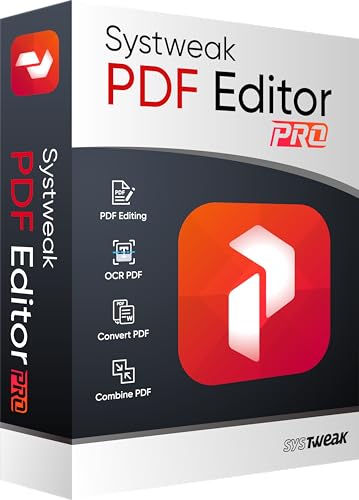
Brand: Systweak
Features include: Edit, convert, sign, protect, compress, and enhance PDFs; makes scanned PDFs searchable; convert PDFs to Excel, Word, PowerPoint, images, and vice versa.
Best for: office environments needing document preparation and format conversion. Why selected: Strong conversion capabilities support reuse of existing content. Limitation: Licensing is per device per year, which may affect multi-user teams.
Scrivar PDF Pro – 30+ Tools, Lifetime Access
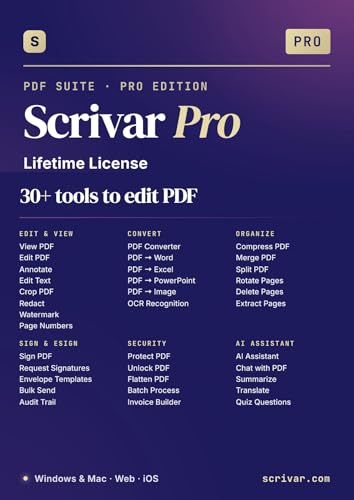
Brand: Scrivar
Features include: 30+ tools in one app for editing, converting, merging, splitting, compressing, signing, OCR, redaction, watermarking, batch processing, and more. Lifetime license with updates; unlimited eSign with in-browser signing.
Best for: buyers who want a comprehensive, all-in-one tool with a single one-time price. Why selected: No feature gates or upsells; lifetime ownership is attractive for long-term use. Limitation: Some users may prefer cloud-based signing workflows over in-app signing.
Corel PDF Fusion – Quick Merges and Viewing

Brand: Corel
Features include: View over 100 file formats without extra software; drag-and-drop merging; editing tools to reuse content from existing documents without starting from scratch.
Best for: users who need fast viewing and light editing with broad format support. Why selected: Efficient for quick merges and basic edits in diverse workflows. Limitation: Not as feature-rich for heavy editing or OCR as dedicated editors.
Buying Guide
What workflow do you need?
For teams that merge many PDFs daily and require advanced editing, OCR, and forms, a comprehensive tool like PDF Pro 3 or Scrivar PDF Pro may offer the best value. If simple merging and page management are the primary tasks, PDF Director 2 Plus provides a streamlined experience with minimal setup.
Is OCR or text recognition important?
OCR accuracy matters when you need searchable text from scanned documents. Products with built-in OCR (for example, PDF Pro 3 and Scrivar) are preferable for archiving and data extraction. If OCR is not essential, lighter options may suffice.
How should licensing be handled?
Consider whether you want a lifetime license or a subscription. Scrivar’s lifetime license is attractive for long-term use. If you work across multiple devices, confirm whether licenses cover multiple machines or require per-device purchases.
Do you need e-signing and protection?
For contracts and forms, look for built-in e-signing and document protection features. Systweak and Scrivar offer signing and security options, but verify if these meet your compliance needs or require additional tools.
File format compatibility and conversion needs
Some tools excel at converting PDFs to Word, Excel, PowerPoint, or image formats, which is essential for content reuse. Systweak focuses on wide-format conversion, while Corel PDF Fusion emphasizes format viewing and quick merges, which suits users prioritizing compatibility.
What about cost and updates?
Evaluate total cost of ownership, including one-time payments versus subscriptions, and whether updates are included. Lifetime options reduce long-term expense, but confirm update policies and support terms.
Summary recommendations
- Best overall all-in-one with strong editing and OCR: PDF Pro 3
- Best for simple merge tasks: PDF Director 2 Plus
- Best for office conversions and e-signing: Systweak PDF Editor Pro
- Best value lifetime license with many tools: Scrivar PDF Pro
- Best for fast viewing and quick merges: Corel PDF Fusion
FAQ
- What is the best PDF merge software for beginners?
PDF Director 2 Plus offers straightforward merge and page operations suitable for new users.
- Can these tools convert PDFs to Word or Excel?
Yes, several options include conversion features; Systweak PDF Editor Pro emphasizes broad format conversion.
- Do these programs support OCR?
OCR is available in products like PDF Pro 3 and Scrivar PDF Pro, aiding searchable PDFs.
- Is a lifetime license worth it?
Lifetime licenses such as Scrivar’s can be cost-effective for long-term use if you need many updates without annual fees.
- Are cloud-based signing features necessary?
If you need browser-based signing without apps, confirm whether the product provides in-browser signing or requires another service.
- Do these tools support batch processing?
Some products offer batch processing within a single workflow, which helps when handling many PDFs at once.