Answering the question gamers ask most: which PC WiFi adapter delivers the lowest latency and strongest signal for gaming? This guide compares five top USB and PCIe adapters optimized for gaming performance, high-speed streams, and reliable connections. The recommended picks cater to desktop setups, laptops, and gaming rigs that prioritize speed, stability, and ease of use. Best for budget upgrades, best for portability, and best for high-end gaming rooms are included.
| Product | Best For |
|---|---|
| TP-Link Archer TX20U Plus | High-speed USB 6-enabled gaming on desktops |
| NETGEAR Nighthawk A8000 | Tri-band AX/6 GHz ready gaming on any PC |
| WAVLINK AX1800 USB Adapter | Strong dual-band performance with MU-MIMO/OFDMA |
| TP-Link Archer TX30U Plus | Wi‑Fi 6 with beamforming and wide coverage |
| TP-Link Archer TX3000E | PCIe upgrade for indoor gaming rigs |
TP-Link Archer TX20U Plus — AX1800 USB 3.0 Adapter

Key features: AX1800 speeds, dual-band 2.4 GHz and 5 GHz, high-gain 5dBi antennas, WPA3 security. Uses USB 3.0 for optimal performance, with a focus on gaming, downloading, and streaming. Suitable for desktops and gaming consoles connected to a PC via USB.
Best for: Gamers who want an easy, plug‑and‑play upgrade to Wi‑Fi 6 on a desktop without opening the case. Choose this if you prefer a simple USB solution with solid gaming performance and WPA3 security. Caution: performance can vary with USB ports and host hardware; ensure you’re using a USB 3.0 port for peak speed.
TP-Link Archer T2U Plus — AC600 USB Adapter

Key features: Long-range dual-band adapter, 802.11ac upgrade, speeds up to 433 Mbps on 5 GHz and 200 Mbps on 2.4 GHz, dual-band 2.4 GHz and 5 GHz, 5dBi antenna system, WPA/WPA2 security. This is a balanced option for those who need reliable wireless on a budget and want decent gaming performance without PCIe upgrades.
Best for: Players seeking a budget-friendly upgrade, easy setup, and reliable wireless with dual-band coverage. Better for casual to mid-core gamers than for top-tier competitive play. Limitation: not the latest Wi‑Fi 6/6E standard, so peak throughput will be lower than AX devices.
WAVLINK AX1800 USB 3.0 Adapter
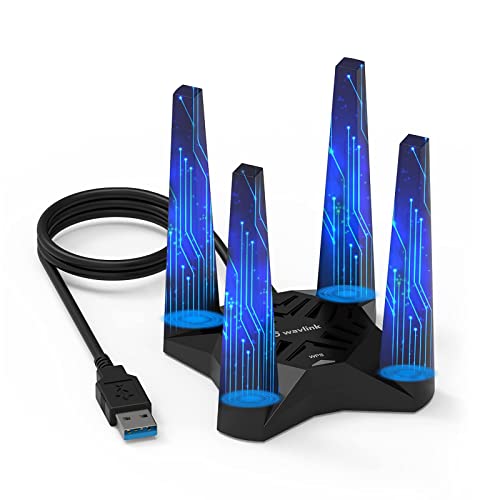
Key features: Dual-band 2.4 GHz and 5.8 GHz (AX1800), MU-MIMO, OFDMA, four 3dBi high-gain antennas, WPA3 security, USB 3.0 cable included. Designed to minimize latency and maximize stability for gaming, streaming, and online work.
Best for: Gamers who want strong signal penetration and reliable multi-device performance in busy home networks. Choose this if you need better range and simultaneous device support. Caution: actual speeds depend on router capabilities and environment; the reported AX1800 is a combined maximum speed that varies by band usage.
NETGEAR Nighthawk WiFi 6E USB 3.0 Adapter (A8000)

Key features: AXE3000 tri-band wireless speed, 6 GHz band support for compatible routers, USB 3.0 interface, flippable antenna for best signal direction. This adapter targets high-end gaming, HD conferencing, and streaming on newer networks.
Best for: Enthusiast gamers with a WiFi 6E router or mesh system seeking maximum headroom and future-proofing. Better for setups where the 6 GHz band is available. Limitation: requires a WiFi 6E capable router to realize the 6 GHz benefits; otherwise performance aligns with standard WiFi 6 capabilities.
TP-Link Archer TX30U Plus — AX1800 USB 6 Router-Ready

Key features: Wi‑Fi 6 with dual-band flexibility, beamforming, two high-gain antennas, WPA3 security, plug-and-play on Windows 11/10. The TX30U Plus focuses on faster speeds for streaming and gaming, with stable connectivity in busy homes.
Best for: Users wanting robust Wi‑Fi 6 performance and strong coverage in larger rooms or multi-device households. Choose this if you need reliable streaming and gaming on a USB solution. Caution: Driver installation may require manual steps on some systems.
TP-Link Archer TX3000E — PCIe WiFi 6 Card

Key features: PCIe upgrade for desktop gaming rigs, Wi‑Fi 6 technology with MU-MIMO and OFDMA, dual-band, 2× high-gain antennas, Bluetooth 5.3, WPA3 security. This internal card delivers strong, stable connections with low latency for gaming. Driver installation is required via website or included CD.
Best for: Serious PC gamers who want the strongest, lowest-latency wireless connection and are comfortable opening a PCIe slot. Better for fixed setups where USB adapters may suffer from interference. Limitation: PCIe installation requires a desktop and basic hardware familiarity.
Buying Guide
- USB vs PCIe: USB adapters are quick, portable upgrades ideal for laptops and some desktops; PCIe cards typically offer the strongest, most stable connections and lower latency for desktops with dedicated PCIe slots.
- Wi‑Fi standard: Wi‑Fi 6/6E (AX/ AXE) delivers higher throughput and better multi-device performance. Wi‑Fi 5 (AC) is still solid but slower and less future-proof.
- Frequency bands and speed: Dual-band adapters (2.4 GHz and 5 GHz) balance range and speed. For gaming, prioritize devices with 5 GHz or higher speeds and low latency features like MU‑MIMO and OFDMA where available.
- Antenna design: High-gain external antennas improve range and stability, particularly in larger homes or where signals must pass through walls.
- Security: Look for WPA3 support for stronger encryption and better protection on gaming sessions and streaming.
- Driver support and compatibility: Ensure the adapter has driver support for your operating system version (Windows 10/11 are common). Some devices require manual driver installation.
- Router compatibility: To maximize benefits, pair with a router that supports your adapter’s standard, such as Wi‑Fi 6/6E, MU‑MIMO, or OFDMA.
FAQ
- What should I choose for a desktop PC: USB or PCIe?
– If you want the simplest upgrade with minimal hardware changes, choose USB (TX20U Plus or TX30U Plus). For the lowest latency and best stability in a fixed setup, a PCIe card like TX3000E is optimal. - Will WiFi 6E provide a noticeable gaming advantage?
– Yes, if your router supports 6E and you’re in a network with high congestion. The 6 GHz band adds headroom and reduces interference, improving gaming and streaming performance. - Is WPA3 essential for gaming?
– WPA3 improves security for all online activities, including gaming. It’s recommended if available on the adapter and router. - Do dual-band adapters require special placement?
– Place the adapter where the signal is strongest, ideally with a direct path to the router. USB extenders can help reduce interference if needed. - Can these adapters work with older routers?
– Yes, most support backward compatibility with older routers, but you won’t reach their maximum speeds if the router itself is older than WiFi 5/6 standards. - Do I need to install drivers?
– Some adapters are plug-and-play, while others require driver installation via the manufacturer’s site or included CD. Follow the provided setup instructions for best results.
In summary, for gaming-focused upgrades, consider the Archer TX20U Plus for a fast USB option, the NETGEAR Nighthawk A8000 for future-proof 6E-ready performance, the WAVLINK AX1800 for solid MU‑MIMO support, the TX30U Plus for robust Wi‑Fi 6 USB performance, and the TX3000E for the strongest desktop upgrade with a PCIe card. Each choice balances ease of use, speed, and range to suit different gaming setups.