If you’re searching for reliable online password management, this guide highlights practical options that balance security, convenience, and offline or hardware-backed protection. This selection targets different buyer needs: portable hardware managers for travel, offline devices for privacy, simple cards for quick password access, and multi-factor compatible keys for robust authentication. Use the quick comparison table below to identify which product best fits your scenario, then read detailed breakdowns to understand how each option works in real-world use.
| Product | Best For | Key Benefit | Limitations |
|---|---|---|---|
| OnlyKey FIDO2 / U2F Security Key | Power users needing combined 2FA and password management | Open-source, versatile authentication methods | Requires compatible sites and setup |
| Atlancube PasswordPocket | Offline, Bluetooth-filled convenience for iPhone and Android | Internet-free data transfer with AES-256 encryption | Bluetooth dependency for auto-fill |
| Qwertycards | Simple, portable strong-password card for wallets | Dedicated backup letter with codes | Manual handling; limited digital features |
| Password Keeper Stick (VYRUCLYZ) | Offline password storage on a dedicated device | Local-only storage with optional device password | No cloud sync |
OnlyKey FIDO2 / U2F Security Key

Product overview: OnlyKey combines a password manager, a two-factor security key, and a secure communication token in a single device. It supports FIDO2 / U2F, Yubico OTP, TOTP, and challenge-response methods. Open-source and verified, OnlyKey emphasizes portability with a durable, tamper-resistant design.
Best for: Security-conscious users who want a multi-functional hardware solution. This option is especially suitable for professionals who need to protect multiple online accounts across Windows, Linux, Mac OS, and Android while maintaining portable authentication capabilities.
Why chosen: It provides broad compatibility, offline protection, and cryptographic features in one device, reducing the need for separate tools. Its open-source nature adds a layer of transparency for users who value verifiability.
Caution: Some websites or services may require additional configuration to work with hardware keys, so users should verify site support and compatibility before relying on it for all accounts.
Atlancube PasswordPocket
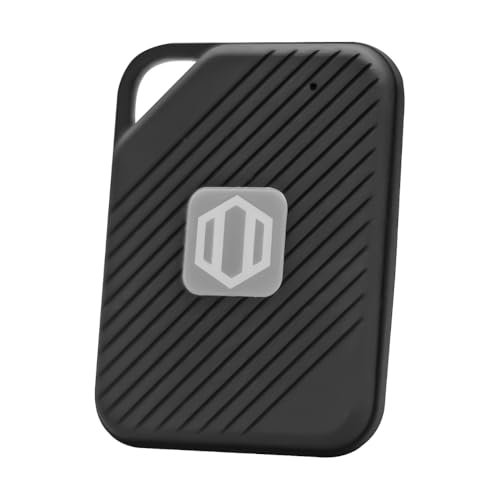
Product overview: PasswordPocket is an offline hardware password keeper with Bluetooth auto-fill for iPhone and Android. It stores up to 1,000 logins and employs military-grade AES-256 encryption to protect credentials.
Best for: Users who want an internet-free solution for credential storage and straightforward Bluetooth-based autofill on mobile devices without cloud dependence.
Why chosen: The offline operation and large login capacity make it a strong option for privacy-focused individuals who frequently switch devices or operate in environments with restricted connectivity.
Caution: Bluetooth auto-fill can introduce pairing complexities on some devices; ensure your phone’s compatibility and pairing stability before relying on it full-time.
Qwertycards – Password Wallet Card

Product overview: The Qwertycards solution is a simple plastic card that helps you create strong, memorable passwords for multiple sites. Each card ships with a cover letter containing the codes necessary to recover your credentials in backups.
Best for: Budget-conscious users who want a portable, low-tech method to generate and recall strong passwords without relying on cloud services.
Why chosen: The card’s physical format makes it easy to carry and use, providing a quick-start option for those who prefer tangible password generation and a physical backup letter.
Caution: This approach lacks dynamic password management features and may require manual updates as sites evolve their security requirements.
Password Keeper Stick by VYRUCLYZ

Product overview: The Password Keeper Stick is a portable offline password manager with a Type-C port for direct data access. It emphasizes local storage and user control for sensitive data such as banking and login information. It supports device-level password protection for added security against loss or theft.
Best for: Individuals who prioritize offline storage and full control over their credentials, without any dependence on cloud syncing or external servers.
Why chosen: The emphasis on local-only storage and optional device protection makes it a solid choice for those who want privacy-first management and quick access via a USB-C interface.
Caution: As a purely offline device, it lacks automatic syncing across devices; plan for manual updates if you use multiple devices regularly.
Buying Guide: Key Considerations for Choosing an Online Password Manager
What level of security do you need? If you handle sensitive information or access critical accounts, hardware-backed options like OnlyKey can provide stronger, offline protection. For everyday web usage, a mix of offline devices and simple offline cards may suffice.
Do you want offline or cloud-based storage? Offline devices reduce exposure to cloud breaches but may require manual sync if you use multiple devices. Cloud-enabled managers offer convenience but add a trusted dependency on service providers.
How important is portability? If you travel often or work across devices, portable hardware keys and compact cards can simplify access while keeping credentials physically secure.
What sites do you use most often? Some platforms support specific authentication methods (FIDO2/U2F, TOTP, OTP). Ensure the chosen product supports your most-used services.
Is backup and recovery important? Look for products that provide a secure backup mechanism, especially if you rely on physical cards or offline devices for access to important accounts.
What is your technical comfort level? Open-source options may appeal to technically inclined users who want transparency, while user-friendly hardware keys offer plug-and-play convenience for broader audiences.
FAQ: Quick Answers for Online Password Manager Buyers
- What is an online password manager? A system that stores and auto-fills your login credentials across sites and devices, often with encryption and optional two-factor authentication. Some options are hardware-based for offline use.
- Are hardware password managers safe? Yes, when properly used. They store credentials offline and support strong authentication methods, reducing exposure from online breaches.
- Do these devices work with all websites? Most work with common sites, but compatibility varies by service and authentication method. Verify site support for FIDO2/U2F, OTP, or TOTP.
- Can I use offline password storage on multiple devices? Offline devices typically require manual synchronization or a shared backup strategy if you use multiple devices.
- What is the best option for travelers? A portable hardware key (like OnlyKey) or offline password keeper that supports on-the-go authentication and offline storage.
- Do I still need a traditional password manager? Hardware-based solutions can complement software managers by providing strong second factors and offline storage for sensitive credentials.