When you need compact, efficient input for gaming or creative work, a one handed keyboard can boost your speed and comfort. This guide highlights five top options, each suited to different use cases—from MMO and MOBA dominance to precise PC work and console-style control. The best choices target players who want fast macros, ergonomic wrists, and compact desks. The table below compares the five selections at a glance to help you choose quickly.
| Product | Best For | Key Benefit |
|---|---|---|
| Redragon K585 | MMO/MOBA players | Multiple macro profiles and hotkey customization |
| Razer Tartarus V2 | PC gamers seeking many programmable keys | High key count with a thumbpad for movement |
| RedThunder 35 Keys | Compact, travel-friendly setups | All keys with macro capability in a small form |
| MageGee 34 Keys | Wireless flexibility | Tri-mode wireless with RGB backlighting |
| Guiheng 39 Keys | Integrated keyboard/mouse combo users | Wired reliability with colorful LED effects |
Redragon K585 Wired One-Handed Keypad

Best for MMO and MOBA players who want quick access to ability rotations. The K585 offers seven onboard macro keys with multiple profiles, allowing complex combos with a single press. Its hot-swappable switches let you tailor the feel to match your main keyboard, and a USB pass-through plus detachable wrist rest keeps your desk clean and comfortable.
- 7 onboard macro keys per profile, with 4 profiles (28 total bindings).
- Switch compatibility: swap in most 3-pin or 5-pin switches without soldering.
- USB pass-through and magnetic, detachable wrist rest for convenience.
Best for: Players who rely on rapid, repeatable combos and want tunable tactile feedback. Caution: Macro setup can be complex; ensure your game supports custom macros in your preferred manner.
Razer Tartarus V2 Left-Handed Gaming Keypad

Best for gamers who want high button density with a comfortable thumbstick-style movement option. The Tartarus V2 provides 32 programmable keys and a mecha-membrane mix for tactile feedback without the harsh click. A built-in 8-way thumbpad adds improved movement control for precision and quicker navigation.
- 32 programmable keys for extensive hotkey layouts.
- Mecha-membrane switches offer mechanical feel with softer actuation.
- Thumbpad enables more natural, console-like movement control.
Best for: Players who need many actions mapped with a familiar tactile response. Caution: Some users may prefer a fully mechanical feel for long sessions.
RedThunder One Handed Gaming Keyboard 35 Keys

Best for compact setups that still need robust macro capabilities. This 35-key keypad emphasizes portability with full anti-ghosting across all keys. It features macro recording and ergonomic design for long sessions, along with easy access to macro profiles for rapid in-game actions.
- Macro recording via FN+F1/F2, easy setup for quick outputs.
- Anti-ghosting across all 35 keys for reliable input during fast games.
- Portable design with ergonomic considerations for comfort.
Best for: Gamers who travel or prefer a small desk footprint. Caution: Some users may want more extensive macro storage than this model provides.
MageGee Wireless One Handed Keyboard
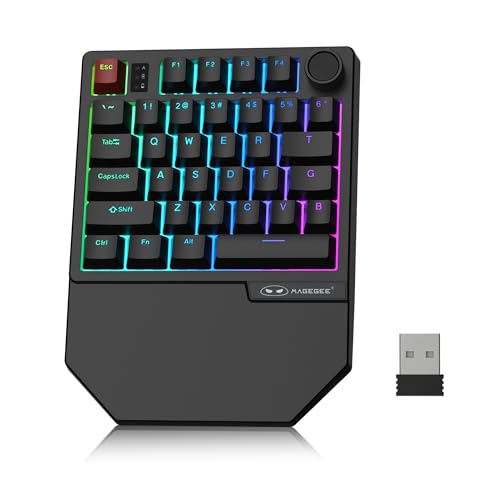
Best for gamers seeking wireless flexibility with strong RGB visuals. The MageGee keyboard offers tri-mode connectivity (Bluetooth, 2.4GHz), 34 keys with non-conflict design, and linear red switches. It supports RGB backlighting and multiple brightness controls for dynamic in-game ambiance.
- Tri-mode connectivity frees you from cables.
- 34 non-conflict keys with linear red switches for quick, quiet actions.
- RGB backlighting with customizable brightness and effects.
Best for: Players who value wireless freedom and a compact profile. Caution: Battery life and wireless latency can vary with use; check device compatibility for multi-OS environments.
Guiheng Wired One Handed Keyboard And Mouse Combo

Best for gamers who want an all-in-one wired solution. The Guiheng combo includes a 39-key keypad and a rainbow LED backlit mouse, designed for fast response with a high-DPI capable sensor. It emphasizes wired reliability and straightforward plug-and-play use.
- Wired keypad and RGB mouse combo with 39-key keyboard.
- Rainbow LED backlighting adds visual appeal and quick key location.
- Plug & Play with broad compatibility across Windows and Mac ecosystems.
Best for: Users who prefer a ready-to-use wired setup with bundled peripherals. Caution: The integrated keyboard may feel less modular than standalone keys when expanding setups.
Buying Guide
What should you consider when choosing a one handed keyboard?
- Macro needs: How many programmable keys do you require, and do you need multiple profiles?
- Connectivity: Do you want wired reliability or wireless flexibility (Bluetooth or 2.4GHz)?
- Switch feel: Do you prefer a mechanical, mecha-membrane, or linear switch for speed and comfort?
- Ergonomics: Is a wrist rest important, and should the device be compact enough to fit your desk?
- Compatibility: Will you use Windows, macOS, or consoles, and does it support plug-and-play with your setup?
How to choose between the top features?
- If you emphasize complex in-game rotations, prioritize keyboards with the most macro keys and reliable profiles, like the Redragon K585 or Guiheng models.
- For movement-rich games and console-style control, a keypad with an accurate thumbpad or a dedicated joystick can improve fluidity, as seen in the Razer Tartarus V2.
- Wireless options are best for clutter-free desks but consider battery life and latency for competitive play, as with MageGee.
- All-in-one bundles are convenient for new setups, though you may trade customization for simplicity, as with Guiheng bundles.
Frequently Asked Questions
- What is a one handed keyboard used for?
It provides compact input with macro capabilities to streamline gaming actions or workflows that require rapid hotkeys.
- Are one handed keyboards good for productivity?
Yes, they can improve efficiency for software with dense hotkeys or for users who want a focused button panel while main keyboard remains free for typing.
- Can one handed keypads replace a full keyboard?
They can complement or replace specific workflows, but traditional typing on a full keyboard remains faster for long-form text.
- Do these devices require software to use all features?
Many support basic plug-and-play, but macro recording and advanced customization often require accompanying software or on-device profile setup.
- Is wireless better than wired for gaming?
Wireless offers freedom of movement but may introduce latency or battery considerations; wired connections generally provide steady, low-latency input.
- How many keys should I start with?
Begin with 32–39 keys if you need extensive macros; choose around 34 keys if you want a balance between portability and functionality.