The best office phones for small businesses balance clarity, expandability, and easy administration. This guide targets buyers seeking reliable landline or hybrid systems that scale as teams grow. Each top pick suits different needs—from compact setups for solo owners to multi-line systems for small teams with shared lines. Below are five strong options, with who they’re best for, why they’re selected, and a quick buying snapshot.
| Product | Brand | Best For | Key Benefit |
|---|---|---|---|
| Panasonic KX-TGF852B | Panasonic | Small offices needing robust call blocking and multi-handset flexibility | Corded base with expandable cordless handsets |
| AT&T DLP73590 | AT&T | Teams needing large displays and quick shortcuts | 5″ color base display and smart call blocker |
| VTech IS8251-3 | VTech | Home offices or small teams with cell-link options | Business-grade cordless with Bluetooth to cell |
| VTech AM18447 | VTech | Small offices growing toward 10 stations | 4-line system with auto attendant and intercom |
| VTech IS8128-51 | VTech | Homes or small offices needing long range and call blocking | Long-range DECT with smart blocking |
Panasonic KX-TGF852B Corded + 2 Handsets

Best for offices needing a stable base with expandability. The system combines a corded base with two cordless handsets and supports up to six cordless phones. A large 3.4-inch LCD on the base helps users see who is calling, and one-touch dial keys speed frequent contacts. A prominent red call block button makes blocking unwanted calls straightforward. Hands-free and bilingual caller ID add convenience for busy front desks. Caution: additional cordless handsets are sold separately, so plan for future growth.
AT&T DLP73590 5-Handset DECT 6.0 System

Choose this when you need a larger color display for easy menu navigation and quick shortcuts. The 5″ base display supports personalized shortcuts to contacts, messages, call history, and more. It supports conference calls among lines and handsets, plus intercom functionality, ideal for small teams coordinating on projects. Best for: offices that value quick access and collaborative calling. Limitation: the description emphasizes features rather than extensive interoperability with non-AT&T devices.
VTech IS8251-3 Business Cordless System
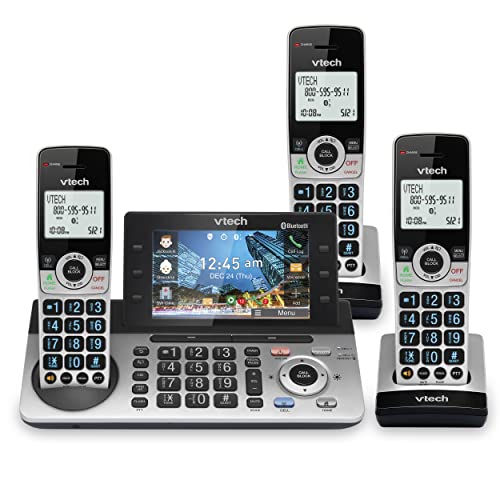
Best for home offices or small teams needing dual-line capability and cell-link options. This 3-handset cordless system features a 5″ color display, programmable shortcuts, and a virtual two-line setup that can manage landline and cell calls. It supports pairing with up to two cell phones or a headset, enhancing work flexibility. Caution: not all features are guaranteed to work with every cell provider, so verify Bluetooth compatibility for your devices.
VTech AM18447 Main Console System

Best for growing small offices needing multi-line auto attendant features. The AM18447 system supports up to 10 stations, with a main console that connects to analog lines and cordless handsets via DECT 6.0. It offers per-line auto attendants, directory access, extension routing, and voicemail recording. Choose this for scalable, polished call management. Limitation: setup may require attention to line provisioning during expansion.
VTech IS8128-51 5-Handset Cordless System

Best for households or small offices needing long-range reliability. The IS8128-51 delivers DECT 6.0 range up to 2,300 feet, plus smart call blocking to reduce unknown and robocall disruptions. It supports Bluetooth pairing to cell phones and an intercom feature for internal communication. Caution: high-range performance can depend on building layout and interference from nearby devices.
Buying Guide
What to consider when choosing an office phone system for a small business:
- Expansion potential: Look for systems that can add handsets or desksets as your team grows.
- Multi-line handling: If you regularly manage calls on several lines, select a system with auto attendant and per-line routing.
- Display and usability: Large color displays and intuitive menus reduce training time and error.
- Blocking and security: Features like smart call blockers help reduce nuisance calls and protect employees.
- Bluetooth and cell-link: For workers who use mobile phones, cell-link features can keep calls seamless across devices.
- Cost of ownership: Consider initial setup, extra handsets, and ongoing maintenance when planning a budget.
Frequently Asked Questions
- What is the best system for a small office with multiple departments? Answer: A multi-line system with auto attendant and per-line routing, like the 4-line VTech AM18447, supports department-based call distribution without complexity.
- Do cordless extensions affect call quality? Answer: Quality is generally good with DECT 6.0, but distance and interference can impact clarity; place basestations centrally.
- Can I connect cell phones to a home office system? Answer: Yes, many models offer Bluetooth or cellular link options to integrate cell calls with landlines.
- How important is a large base display? Answer: For busy desks, a large display enhances speed and reduces misdialing, especially for quick shortcuts.
- Are auto attendants a must for small teams? Answer: They improve professionalism and route calls efficiently, particularly if multiple lines are in use.
- Is expansion always necessary? Answer: Not immediately, but choosing a scalable system saves replacement costs as needs grow.