Looking for a reliable multi-room wireless speaker system? This guide highlights five top options that support whole-home audio, easy setup, and solid synchronization across rooms. Each pick targets different needs—from ultra-low latency for TV and meetings to wireless AirPlay 2 compatibility for Apple users. Best fits include homes with streaming from multiple devices, small business spaces, or event venues where synchronized playback matters.
Summary of chosen products:
| Product | Best For | Key Benefit | Notable Limitation |
|---|---|---|---|
| Avantree Harmony 2 | Background music in homes, classrooms, small meeting rooms | Ultra-low latency under 30 ms for synchronized playback | Requires transmitter connection; no app needed but setup relies on hardware |
| Dio Node 5-Pack | Whole-home Apple-friendly environments | Apple AirPlay 2 compatibility; easy, privacy-focused design | 5-pack may be more than needed for small spaces |
| Venucast Harmony A3 | Parties and shared spaces with multiple powered speakers | Expandable receivers; wide coverage up to 328 ft | Requires compatible receivers to achieve full multi-room setup |
| Sonos Era 100 SL | Streaming-capable, microphone-free home audio | WiFi and Bluetooth streaming with turntable line-in | Limited by ecosystem if expanding beyond Sonos |
| Dio Node 3-Pack | Balanced AirPlay 2 multi-room in smaller homes | Apple AirPlay 2 support; easy setup and seamless coverage | Three-pack may require extra compatibility checks for existing gear |
Avantree Harmony 2 – Multi-Room System

Designed for multi-room indoor audio in homes, classrooms, and meeting spaces. Ultra-low latency under 30 ms ensures synchronized playback across all speakers, ideal for TV sound and spoken content. Setup is straightforward: connect the transmitter to a TV, phone, or laptop via optical, AUX, or Bluetooth, then power on for auto-connection. Best for environments needing reliable, synchronized sound without complex apps.
Who it’s best for: small offices, classrooms, or living spaces needing consistent room-to-room audio with minimal setup. Caution: if you need a large, established ecosystem with extensive app control, this solution may feel simpler but less scalable than some ecosystems.
Dio Node Multiroom Wi-Fi (5-Pack)

Reimagines home audio with seamless multiroom coverage via Wi-Fi and AirPlay 2. This 5-pack offers Apple ecosystem integration for broad compatibility across iPhone, iPad, and Mac devices. Privacy-conscious design with no built-in microphones adds security while keeping setup quick and simple. Best for Apple households seeking straightforward, lossless streaming across multiple rooms.
Who it’s best for: Apple users who value AirPlay 2 and a privacy-first approach. Caution: while AirPlay 2 broadens compatibility, this system emphasizes Apple devices, which may limit some non-Apple control options in certain setups.
Venucast Harmony A3 – Auracast System

Syncs multiple powered speakers through a transmitter and receivers for unified sound in homes and events. The 328-foot range supports larger spaces like patios or event areas. It’s ideal for users who want to link AV receivers, Bluetooth speakers, or soundbars into one synchronized system with minimal repeated pairing.
Who it’s best for: home parties or small-to-medium venues needing a scalable, wired-ready approach. Caution: expandability relies on adding compatible receivers to complete the full multi-room setup.
Sonos Era 100 SL – Compact Speaker
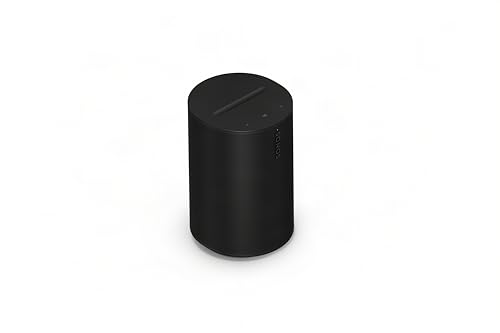
Compact, microphone-free speaker with WiFi and Bluetooth options. It delivers balanced stereo sound from dual tweeters and a midwoofer. The Era 100 SL is a good starter or expansion piece for a Sonos ecosystem, with support for streaming over WiFi and Bluetooth, plus line-in for turntables. Best for users already invested in Sonos or seeking a microphone-free, privacy-conscious system.
Who it’s best for: listeners who prioritize a clean, compact design and easy expansion within the Sonos ecosystem. Caution: cross-compatibility with non-Sonos devices may be less seamless than pure WiFi-only options.
Dio Node 3-Pack – Wi‑Fi Multiroom

Provides balanced multi-room coverage with Apple AirPlay 2 compatibility and easy setup. This three-pack suits smaller homes that want AirPlay 2 streaming across several rooms without a heavy hub. It supports streaming from iPhones, iPads, and Macs, plus playback from other AirPlay 2-compatible devices.
Who it’s best for: households seeking straightforward AirPlay 2 multi-room audio in a compact footprint. Caution: for large homes or complex setups, add-ons may be necessary to reach all desired rooms.
Buying Guide
What should you consider when choosing a multi-room wireless speaker system?
- Room coverage and expansion: Do you need a system that scales from a few rooms to many spaces? Consider products that offer easy expansion with compatible speakers or receivers.
- Latency and synchronization: If you plan to watch TV or present in meetings, prioritize models with ultra-low latency and reliable room-to-room sync.
- Connectivity: Do you prefer Wi‑Fi, Bluetooth, or a wired transmitter? Look for ecosystems that work with your existing devices (Apple AirPlay 2, Alexa, or Sonos, for example).
- Privacy and microphones: Some systems include or require microphones and voice assistants. If privacy is a concern, choose microphone-free options or devices with local control.
- Voice assistants and ecosystem: If you already own devices from a particular brand, choosing that ecosystem can simplify setup and compatibility.
- Ease of setup: Apps vs. app-free setups. Decide whether you want a quick, app-free connection or a feature-rich app for advanced control.
- Audiophile vs. casual listening: For high-fidelity stereo or multi-room ambience, look for speakers with balanced drivers and clear separation across rooms.
Frequently Asked Questions
- What is multi-room audio, in simple terms?
Multi-room audio plays synchronized sound across multiple speakers in different rooms from a single source or group of sources.
- Do I need a hub to run these systems?
Some systems use a hub or transmitter for synchronization, while others rely on Wi‑Fi or Bluetooth without a dedicated hub.
- Is AirPlay 2 required for Apple devices?
No, but AirPlay 2 compatibility makes it easier to cast from Apple devices to multiple speakers.
- Can I mix brands in a multi-room setup?
Compatibility varies by system. Some ecosystems support cross-brand streaming, while others work best within a single brand.
- What should I consider if I have a large home?
Choose a system that supports several speakers and reliable wireless range, ideally with a method to add receivers or expand coverage.
- Are microphone-equipped devices more convenient?
They offer voice control but may raise privacy concerns. If privacy matters, pick microphone-free options.